<?xml version="1.0" encoding="utf-8"?>
<feed xmlns="http://www.w3.org/2005/Atom">
    <id>https://joschua.io</id>
    <title>joschua.io</title>
    <updated>2026-08-06T23:05:06.553Z</updated>
    <generator>https://github.com/jpmonette/feed</generator>
    <author>
        <name>Joschua Glau</name>
    </author>
    <link rel="alternate" href="https://joschua.io"/>
    <subtitle>The personal website of Joschua, a web developer, note-taking nerd and Jesus-follower based in Australia.</subtitle>
    <icon>https://joschua.io/favicon.ico</icon>
    <rights>All rights reserved 2026, Joschua Glau</rights>
    <entry>
        <title type="html"><![CDATA[VoiceInk is great!]]></title>
        <id>/posts/2026/08/07/voiceink</id>
        <link href="https://joschua.io/posts/2026/08/07/voiceink"/>
        <updated>2026-08-06T21:24:14.000Z</updated>
        <summary type="html"><![CDATA[A report of using VoiceInk and how it has affected my workflows. ]]></summary>
        <content type="html"><![CDATA[<p>Due to a recent very cute addition to our family, I find myself operating the world one-handed more frequently. Part of the things I do while having a baby slung over the shoulder is occasionally wanting to type into text boxes. <a href="https://birchtree.me/" rel="nofollow">Matt Birchler</a> mentioned what a game changer transcription is but I only looked into it recently.</p><p><a href="https://tryvoiceink.com/" rel="nofollow">VoiceInk</a> is a transcription app for Mac. It is <a href="https://github.com/beingpax/VoiceInk" rel="nofollow">open source</a>. There's a free version that prepends a sentence prompting you to upgrade. Upgrading is a one-off payment. No subscription! You can use the Pro version of the app by <a href="https://github.com/Beingpax/VoiceInk/blob/main/BUILDING.md" rel="nofollow">building it from source</a> yourself. Being a cheapskate, this is what I did for the first couple of days. The building was super easy, but because the app worked so well, I was happy to pay and upgrade.</p><h2 id="setup">Setup</h2><p><img alt="Screenshot of the VoiceInk app listing available models." src="/images/posts/2026/08/voiceink/screenshot-2.png"></p><p>I've got the app set up to use Parakeet v3, a local transcription model, which has been very fast and accurate. It also works in German, which is great! On top of the local transcription, you can send the transcribed text off to different models to add in punctuation and correct mistakes. I've set it up to use the Claude Code CLI, which I already use. So no need for another service there.</p><p><img alt="VoiceInk settings" src="/images/posts/2026/08/voiceink/screenshot-3.png"></p><p><code class="">Right option</code> works well for me, slinging a baby over the left shoulder while having the right hand free and I don't use the key enough to trigger accidental transcription starts.</p><h2 id="workflow-ramble-more">Workflow: Ramble more!</h2><p>A side effect of enabling transcription is that I do much more rambling into a microphone–even when I have two hands free! For some processing it just helps to articulate the thoughts verbally.</p><p>For example, for design feedback, I found it helpful to have the agent generate multiple iterations. As I look through the design iterations I speak my thoughts and have them transcribed. Then I let the agent synthesize those thoughts into actionable feedback.</p><p>It also worked well for me to transcribe raw feature or product ideas into Claude Code and refine them with the <a href="https://github.com/EveryInc/compound-engineering-plugin/blob/main/docs/skills/ce-brainstorm.md" rel="nofollow">ce-brainstorm</a> skill.</p><h2 id="summary">Summary</h2><p>In a twist, this whole blog post was written-transcribed using VoiceInk!</p><p>If you haven't looked into transcription apps yet, do check it out. It doesn't need to be VoiceInk, but transcription can just be another method to interact with your computer.<sup><a href="#user-content-fn-1" aria-describedby="footnote-label" data-footnote-ref="" id="user-content-fnref-1">1</a></sup></p><section class="footnotes" data-footnotes=""><h2 class="sr-only" id="footnote-label">Footnotes</h2><ol><li id="user-content-fn-1">Dan Shipper from Every took this even a step further by <a href="https://www.youtube.com/watch?v=DXknnapb_GU" rel="nofollow">interactively writing with ChatGPT voice</a>. This stream is mesmerizing to watch–but there are some hard questions we need to ask ourselves about what it does to us when we use the human-to-human medium of dialogue in human-to-machine interactions. <a href="#user-content-fnref-1" aria-label="Back to reference 1" class="data-footnote-backref" data-footnote-backref="">↩</a></li></ol></section>]]></content>
        <author>
            <name>Joschua Glau</name>
        </author>
    </entry>
    <entry>
        <title type="html"><![CDATA[How to fix guardRailViolationError with Foundation Models on XCode 26]]></title>
        <id>/posts/2025/08/23/guardrail-error-xcode-26</id>
        <link href="https://joschua.io/posts/2025/08/23/guardrail-error-xcode-26"/>
        <updated>2025-08-23T06:12:28.000Z</updated>
        <summary type="html"><![CDATA[I ran into a guardRailViolationError when developing with Foundation Models on Xcode 26.0 beta 6. It can be fixed by changing your Siri language to “English (US)”. But is this a bug?]]></summary>
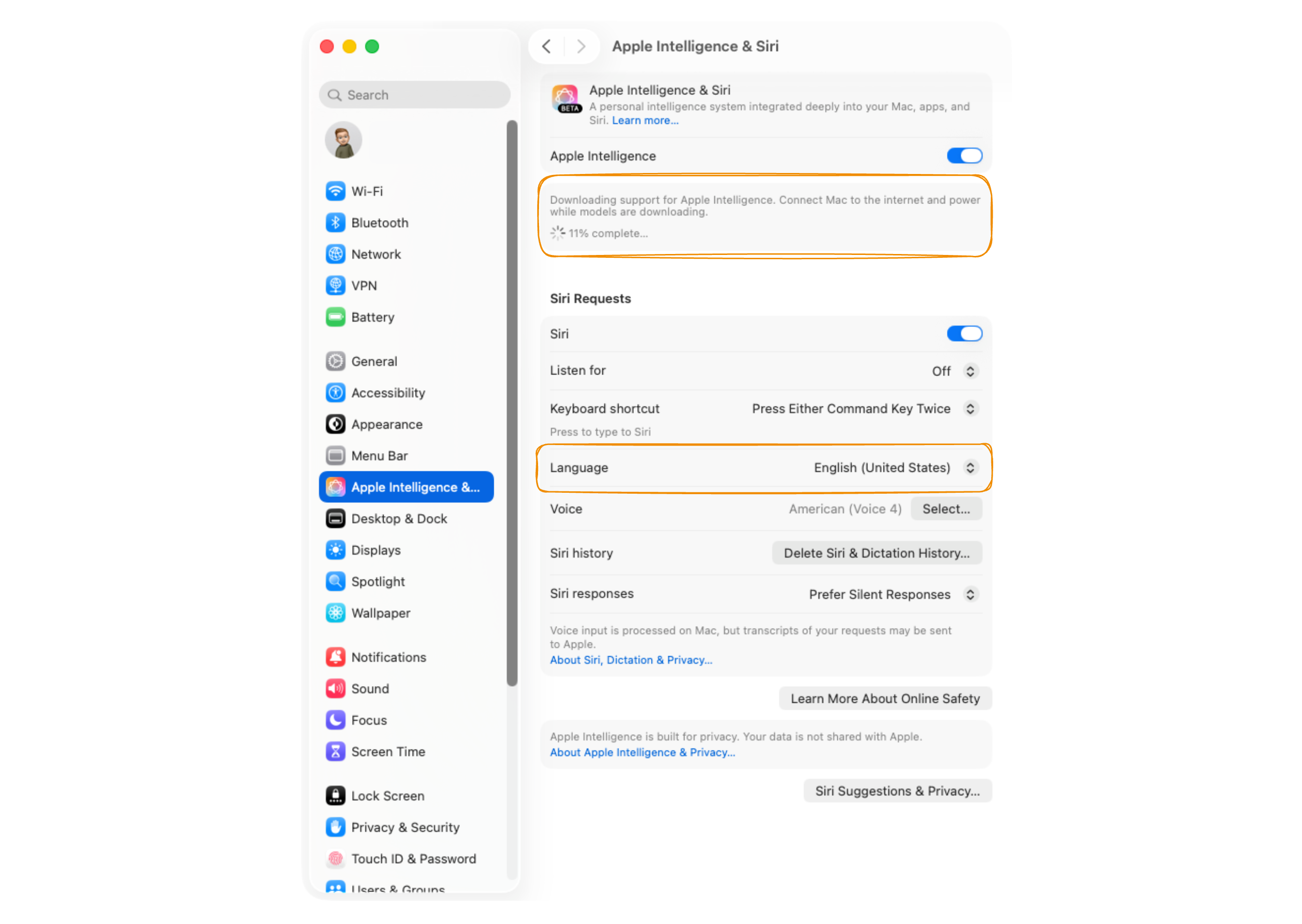
        <content type="html"><![CDATA[<p>When developing with <a href="https://developer.apple.com/documentation/foundationmodels" rel="nofollow">Foundation Models</a> on the Xcode 26 beta<sup><a href="#user-content-fn-1" aria-describedby="footnote-label" data-footnote-ref="" id="user-content-fnref-1">1</a></sup> I got a <code class="">guardrailViolation</code> error: <code class="">"There are no underlying assets (neither atomic instance nor asset roots) for consistency token for asset set com.apple.modelcatalog"</code>.</p><p>I wasn’t passing sensitive prompts to the model. <code class="">SystemLanguageModel.default</code> returned <code class="">.available</code>.</p><p>In the end, I found the solution in this <a href="https://stackoverflow.com/a/79724238" rel="nofollow">StackOverflow</a> response:</p><blockquote><p>The error persisted until I noticed that my MacOS language was set to English (US) but the Siri language defaulted to English (Australia). Once I switched the Siri language to English (United States) the Apple Intelligence checkbox appeared and it started downloading the models. After that my code (similar to the code in question) started working!</p></blockquote><p>Once I set my Siri settings to <em>English (US)</em>, models started downloading:</p><p><img alt="Screenshot of the system settings, Apple Intelligence tab. Language is set to English (United States) and there is a progress bar that models are downloading" src="/images/posts/2025/08/guardrail-error-xcode-26/settings.png"></p><p><a href="https://support.apple.com/en-au/121115#:~:text=English%20%28Australia%2C%20Canada%2C%20India%2C%20Ireland%2C%20New%20Zealand%2C%20Singapore%2C%20South%20Africa%2C%20UK%20and%20US%29" rel="nofollow">How to get Apple Intelligence – Apple Support (AU)</a></p><h2 id="is-this-a-bug">Is this a bug?</h2><p>I don’t think this is expected behaviour.</p><p>The <a href="https://developer.apple.com/documentation/foundationmodels#:~:text=To%20use%20the%20on%2Ddevice%20language%20model%2C%20people%20need%20to%20turn%20on%20Apple%20Intelligence%20on%20their%20device.%20For%20a%20list%20of%20supported%20devices%2C%20see%20Apple%20Intelligence." rel="nofollow">Foundation Models Documentation</a> states:</p><blockquote><p>To use the on-device language model, people need to turn on Apple Intelligence on their device. For a list of supported devices, see <a href="https://www.apple.com/apple-intelligence/" rel="nofollow">Apple Intelligence</a>.</p></blockquote><p>The linked page, “Apple Intelligence” <a href="https://www.apple.com/apple-intelligence/#footnote-2:~:text=Supported%20languages%20include%20English" rel="nofollow">explains</a>:</p><blockquote><p>Supported languages include English, <span>…</span></p></blockquote><p>More clearly, in <a href="https://support.apple.com/en-au/121115#:~:text=English%20%28Australia%2C%20Canada%2C%20India%2C%20Ireland%2C%20New%20Zealand%2C%20Singapore%2C%20South%20Africa%2C%20UK%20and%20US%29" rel="nofollow">another support article</a>:</p><blockquote><p>Apple Intelligence is available on supported iPhone, iPad and Mac models in these languages: <span>…</span>, English (Australia, Canada, India, Ireland, New Zealand, Singapore, South Africa, UK and US) <span>…</span></p></blockquote><p>At least if the language is not supported, <code class="">SystemLanguageModel.default.availability</code> should not return <code class="">.available</code>.</p><p>I might be missing something, but for now I filed a ticket in the Feedback Assistant (<code class="">FB19844387</code>).</p><p>If you have insights, please get in touch!</p><h2 id="full-error-message">Full error message</h2><pre code="guardrailViolation(FoundationModels.LanguageModelSession.GenerationError.Context(debugDescription: &#x22;May contain sensitive or unsafe content&#x22;, underlyingErrors: [Error Domain=com.apple.SensitiveContentAnalysisML Code=15 &#x22;Failed model manager query for model com.apple.fm.language.instruct_300m.safety: Model Catalog error: Error Domain=com.apple.UnifiedAssetFramework Code=5000 &#x22;There are no underlying assets (neither atomic instance nor asset roots) for consistency token for asset set com.apple.modelcatalog&#x22; UserInfo={NSLocalizedFailureReason=There are no underlying assets (neither atomic instance nor asset roots) for consistency token for asset set com.apple.modelcatalog}&#x22; UserInfo={NSLocalizedDescription=Failed model manager query for model com.apple.fm.language.instruct_300m.safety: Model Catalog error: Error Domain=com.apple.UnifiedAssetFramework Code=5000 &#x22;There are no underlying assets (neither atomic instance nor asset roots) for consistency token for asset set com.apple.modelcatalog&#x22; UserInfo={NSLocalizedFailureReason=There are no underlying assets (neither atomic instance nor asset roots) for consistency token for asset set com.apple.modelcatalog}, NSUnderlyingError=0x600003305fe0 {Error Domain=ModelManagerServices.ModelManagerError Code=1026 &#x22;Model Catalog error: Error Domain=com.apple.UnifiedAssetFramework Code=5000 &#x22;There are no underlying assets (neither atomic instance nor asset roots) for consistency token for asset set com.apple.modelcatalog&#x22; UserInfo={NSLocalizedFailureReason=There are no underlying assets (neither atomic instance nor asset roots) for consistency token for asset set com.apple.modelcatalog}&#x22;}}]))
"><code __ignoreMap="">guardrailViolation(FoundationModels.LanguageModelSession.GenerationError.Context(debugDescription: "May contain sensitive or unsafe content", underlyingErrors: [Error Domain=com.apple.SensitiveContentAnalysisML Code=15 "Failed model manager query for model com.apple.fm.language.instruct_300m.safety: Model Catalog error: Error Domain=com.apple.UnifiedAssetFramework Code=5000 "There are no underlying assets (neither atomic instance nor asset roots) for consistency token for asset set com.apple.modelcatalog" UserInfo={NSLocalizedFailureReason=There are no underlying assets (neither atomic instance nor asset roots) for consistency token for asset set com.apple.modelcatalog}" UserInfo={NSLocalizedDescription=Failed model manager query for model com.apple.fm.language.instruct_300m.safety: Model Catalog error: Error Domain=com.apple.UnifiedAssetFramework Code=5000 "There are no underlying assets (neither atomic instance nor asset roots) for consistency token for asset set com.apple.modelcatalog" UserInfo={NSLocalizedFailureReason=There are no underlying assets (neither atomic instance nor asset roots) for consistency token for asset set com.apple.modelcatalog}, NSUnderlyingError=0x600003305fe0 {Error Domain=ModelManagerServices.ModelManagerError Code=1026 "Model Catalog error: Error Domain=com.apple.UnifiedAssetFramework Code=5000 "There are no underlying assets (neither atomic instance nor asset roots) for consistency token for asset set com.apple.modelcatalog" UserInfo={NSLocalizedFailureReason=There are no underlying assets (neither atomic instance nor asset roots) for consistency token for asset set com.apple.modelcatalog}"}}]))
</code></pre><section class="footnotes" data-footnotes=""><h2 class="sr-only" id="footnote-label">Footnotes</h2><ol><li id="user-content-fn-1">I was using XCode 26.0 beta 6 when this error occurred. <a href="#user-content-fnref-1" aria-label="Back to reference 1" class="data-footnote-backref" data-footnote-backref="">↩</a></li></ol></section>]]></content>
        <author>
            <name>Joschua Glau</name>
        </author>
    </entry>
    <entry>
        <title type="html"><![CDATA[A year of iOS Indie Hacking]]></title>
        <id>/posts/2025/07/17/a-year-of-ios-indie-hacking</id>
        <link href="https://joschua.io/posts/2025/07/17/a-year-of-ios-indie-hacking"/>
        <updated>2025-07-17T07:13:58.000Z</updated>
        <content type="html"><![CDATA[<blockquote><p>I have been building iOS apps for a year now, and learned a ton.</p></blockquote><p>A few days ago marks my first anniversary of iOS Indie Hacking. I was always intrigued by iOS development: The animations are slick, performance is great and there are lots of creative opportunities.</p><p>Coming from a web dev background, a lot of skills were transferable in picking up SwiftUI, but I also hit a lot of road blocks along the way. I did ship a bug into a live app, and I just couldn’t figure out what the issue was while negative reviews kept coming in. 😬 But although there’s been ups and downs in the learning journey, I’m glad that I stuck with it!</p><p>After a year of Indie Hacking I’ve got four apps on the App Store, a community of awesome users and even some recurring revenue coming in! Most importantly, I learned a ton. It’s a joy to be able to refactor old code now, or fix a bug much faster than before. Learning Swift also impacted my web dev chops positively. Different languages expose you to different mental models.</p><p>So if there’s a language you were thinking about trying–go for it! If you’re learning and building–stick with it 😄</p>]]></content>
        <author>
            <name>Joschua Glau</name>
        </author>
    </entry>
    <entry>
        <title type="html"><![CDATA[Rediscovering journaling with “capture in the moment” and LLM summaries]]></title>
        <id>/posts/2024/12/13/interstitial-journaling-llm-summaries</id>
        <link href="https://joschua.io/posts/2024/12/13/interstitial-journaling-llm-summaries"/>
        <updated>2024-12-12T22:16:50.000Z</updated>
        <summary type="html"><![CDATA[Combining interstitial journaling with LLM-generated summaries has ended my journaling drought. Read about my workflow, and learn how you can set it up in this blog post!]]></summary>
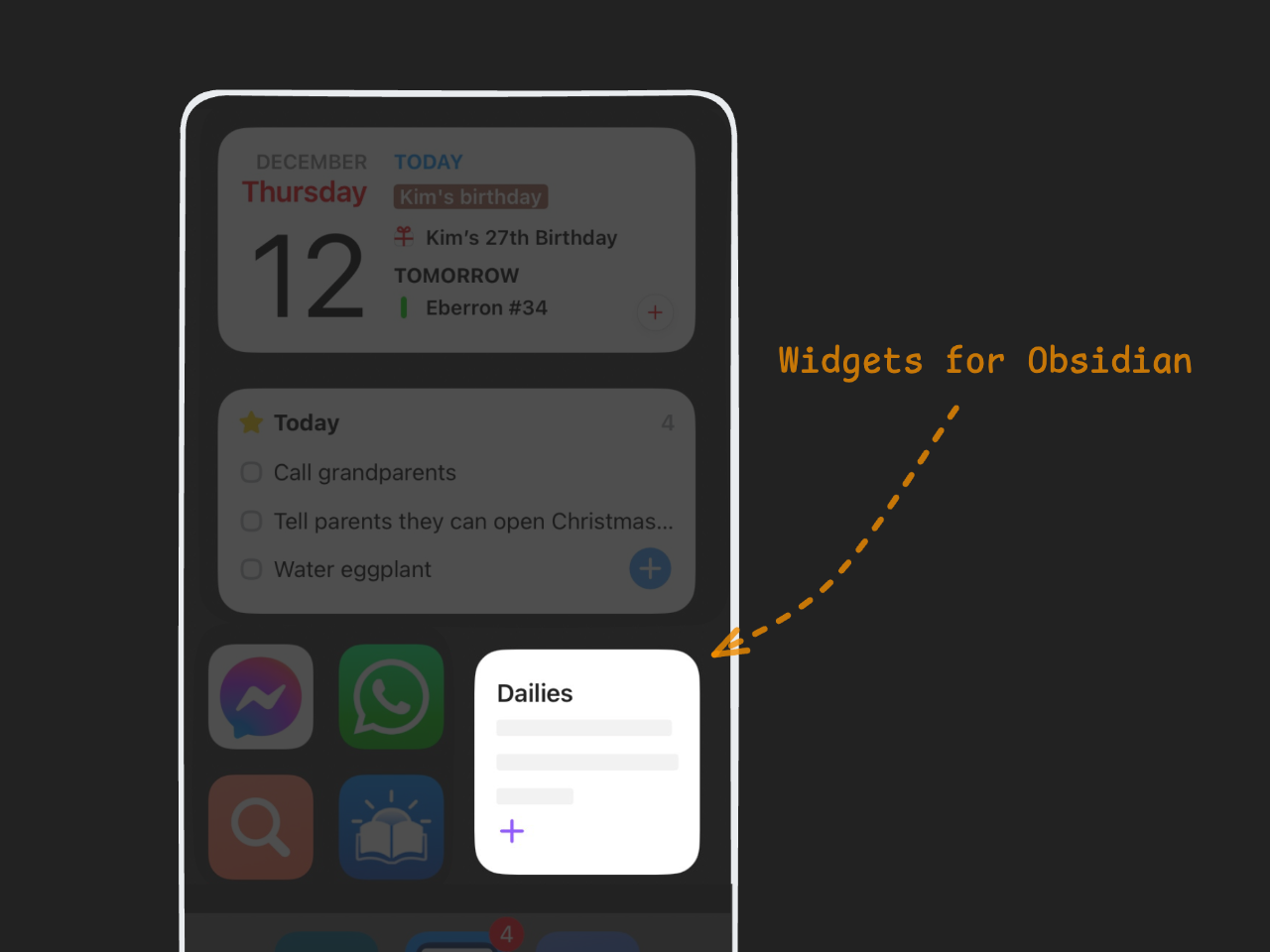
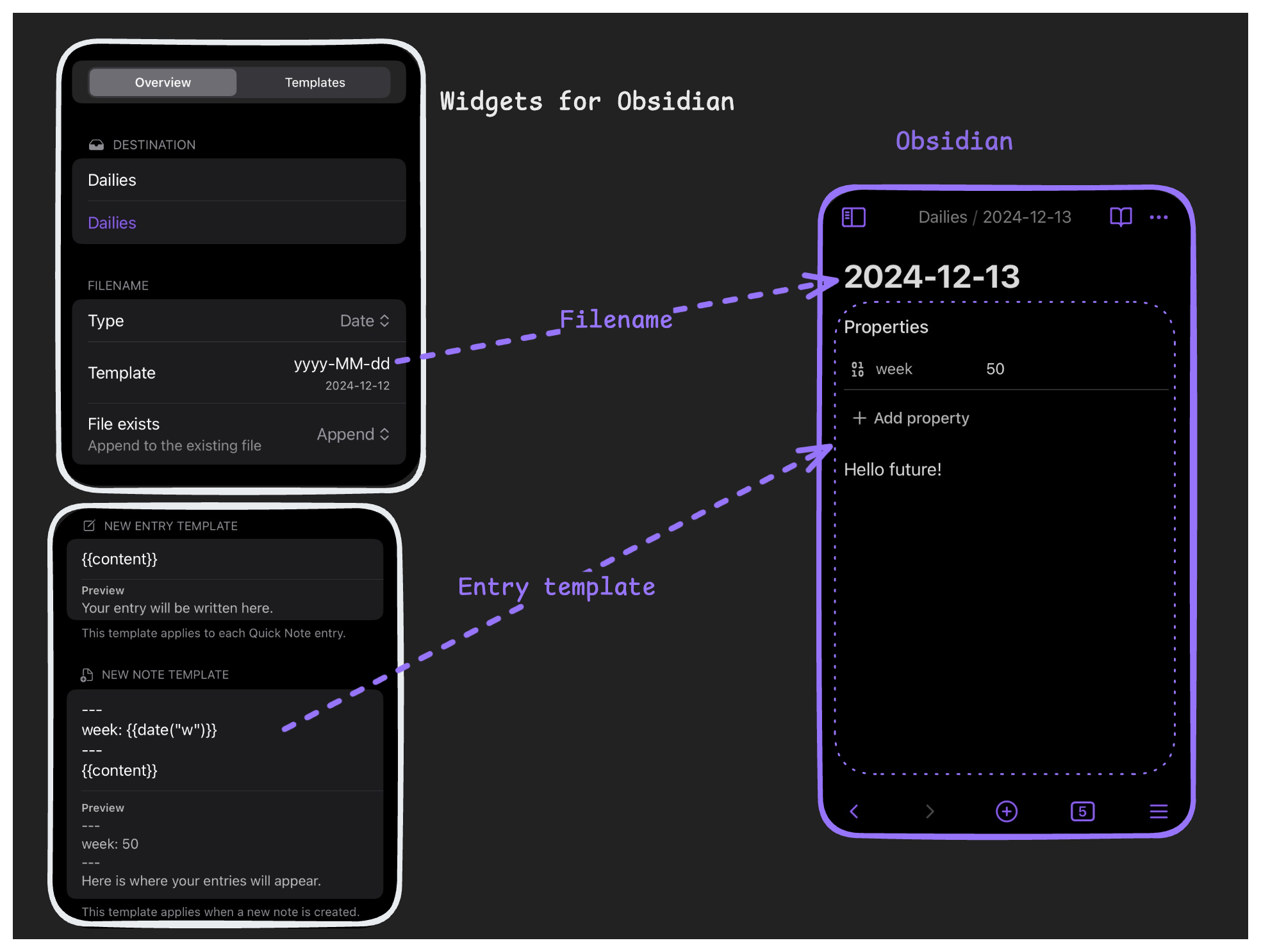
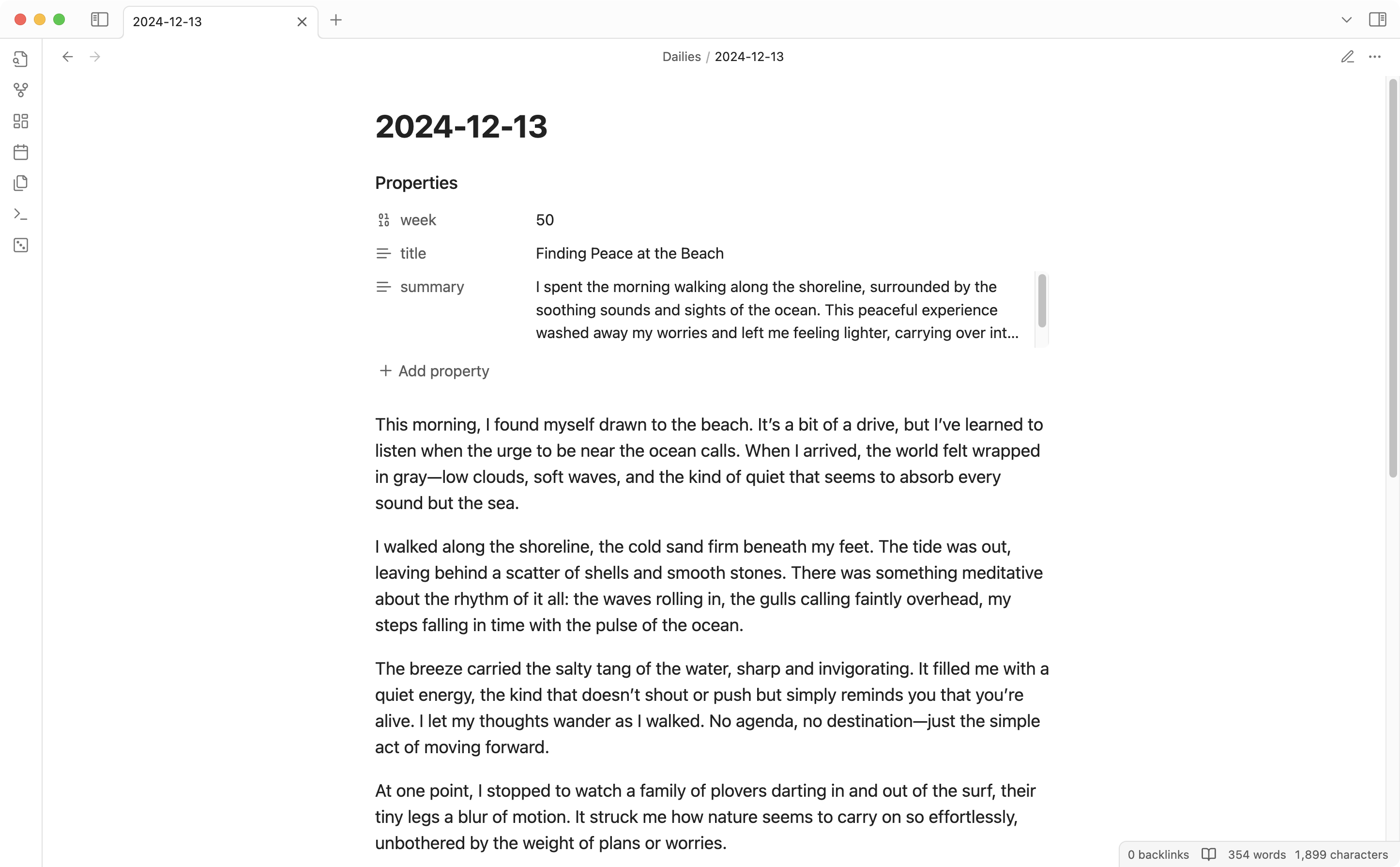
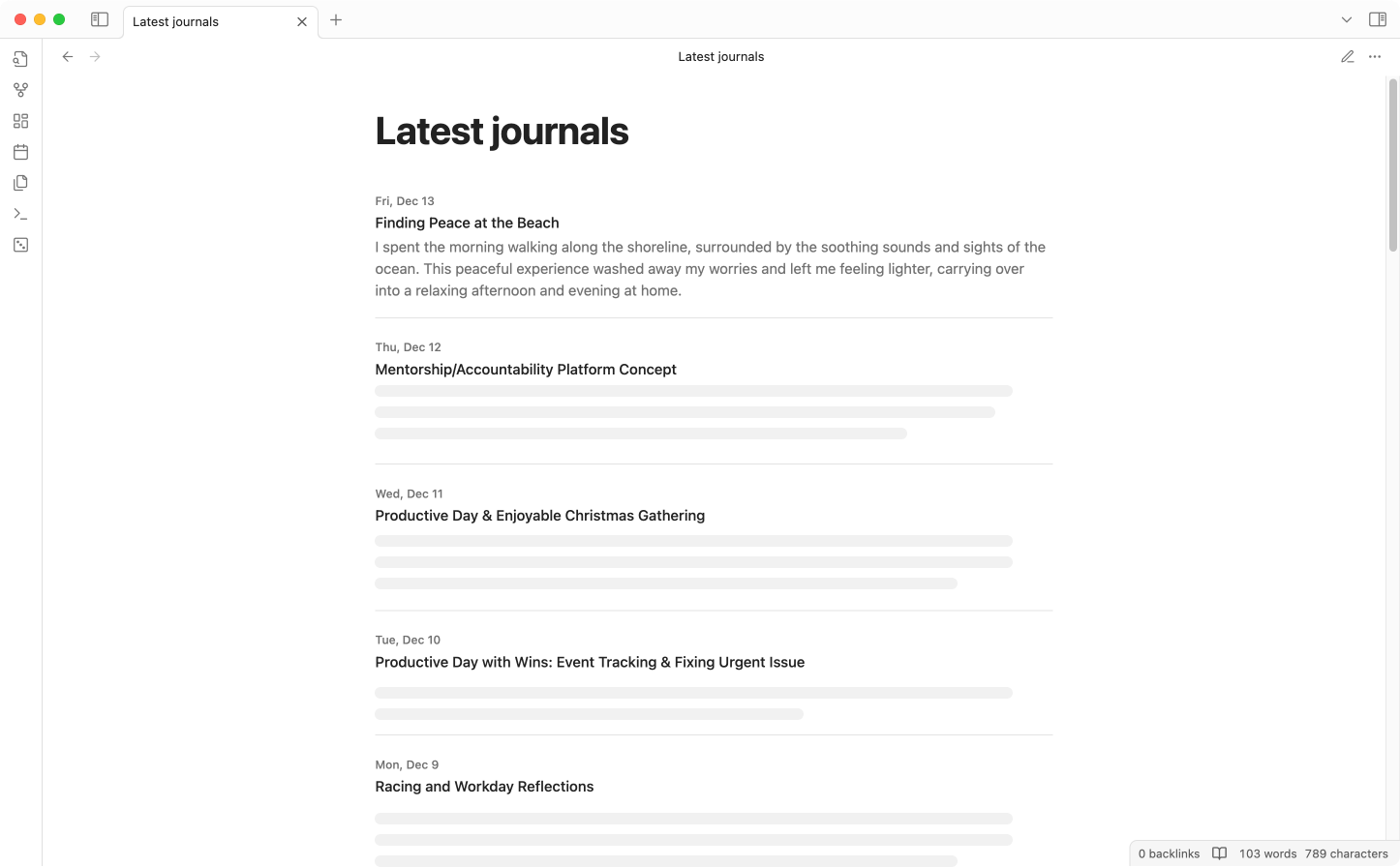
        <content type="html"><![CDATA[<p>We all know the many benefits of journaling. Truth be told though, I’ve been in a journaling drought. But now, I’ve finally broken the spell, with a workflow that combines quick capturing in the moment, large language model (LLM) summaries and a neat looking overview note. This approach has made journaling enjoyable and effective for me—and I hope it inspires you too!</p><h2 id="interstitial-journaling-or-capturing-in-the-moment">Interstitial journaling (or, capturing in the moment)</h2><p>In seasons of my life, I’ve really enjoyed sitting down in the morning and spending an hour to write out all my thoughts. Right now, I don’t have the time for that.</p><p>So what I do instead is to capture experiences as they arise throughout the day. Finished the work day? Write a quick note about what stood out. Had a great chat with a friend? Jot down a couple of notes. Feeling lethargic for no reason? Capture briefly how I’m feeling.</p><p>The benefit of this is that I end up journaling a lot more by just doing these “quick hits”. My journals are also more authentic, since I write down what’s fresh in memory, rather than reflecting on a moment the next morning.</p><p>What I use for capturing these quick entries, is an app that I built, called <a href="https://apple.co/4dULbIT" rel="nofollow">Widgets for Obsidian</a>. Interstitial journaling works best on mobile for me, but Obsidian’s mobile startup times can be slow. This app lets you capture entries really quickly.</p><p><img alt="Mockup of an iPhone with a widget to capture to daily notes highlighted" src="/images/posts/2024/12/interstitial-journaling-llm-summaries/wfo-homescreen.png">Widgets for Obsidian on my homescreen</p><p>I really like the visual reminder of a journaling widget on my home screen. When I open my phone, I’m immediately reminded to not jump into Twitter, but to take a short moment to write about what’s going on and how I feel.</p><p>These entries throughout the day get added to my daily note. You can customise the entry destination extensively, but I kept it pretty simple. The filename is today’s date formatted as <code class="">YYYY-MM-DD</code>. I add the week number in the frontmatter, and entries underneath.</p><p><img alt="Widgets for Obsidian allows the formatting of a dynamic filename, which corresponds to today&#x27;s date." src="/images/posts/2024/12/interstitial-journaling-llm-summaries/image.png"></p><h2 id="summarising-with-llms">Summarising with LLMs</h2><p>The downside of interstitial journaling is that all these entries, because they arise in the moment, are a bit scattered. In general, a major challenge for me has been that I rarely revisit my journals. Often my journal notes are too long, and I just want to get the highlights to remember what happened on the day.</p><p>So I’ve been experimenting with adding summaries to my journal notes via a local LLM. The benefit of running a model locally is that my top-secret journal entries remain private because the processing never leaves my machine. It is also free!</p><p>How this works practically is that I set up a script, which you can <a href="https://github.com/selfire1/llm-markdown-journal-summary" rel="nofollow">find on GitHub</a> with some instructions. Periodically, usually when I do my weekly review, I run the script and it adds a property to the note with a summary of the content. I also have it add a punchy short title for each journal entry.</p><p><img alt="Obsidian note with a long body, and a short title, and medium-length summary" src="/images/posts/2024/12/interstitial-journaling-llm-summaries/screenshot-journal.png">The 'title' and 'summary' properties are generated by a LLM. Also, this example journal entry is LLM-generated.</p><h2 id="creating-an-overview-note">Creating an Overview Note</h2><p>Using <a href="https://blacksmithgu.github.io/obsidian-dataview/" rel="nofollow">Dataview</a>, I then collate all these entries into a nice looking overview<sup><a href="#user-content-fn-1" aria-describedby="footnote-label" data-footnote-ref="" id="user-content-fnref-1">1</a></sup>:</p><p><img alt="A note with a list of entries consisting of the date, a title, and a summary." src="/images/posts/2024/12/interstitial-journaling-llm-summaries/screenshot-overview.png">I removed some summaries for privacy. No point running a local model and then publishing my deepest secrets on the internet!</p><p>Now it’s actually quite fun to go back and review my journals from the week. I open the overview note, scan through the titles and look at the summaries. If I want to read more details about a day, I can just open the corresponding note. But this setup helps me to see at a glance what’s been going on and what I’ve been thinking about. I like revisiting this overview during my weekly review, and actually pausing and remembering what has been happening.</p><h2 id="conclusion">Conclusion</h2><p>So these are the ingredients to my rejuvenated journaling system:</p><ol><li>Interstitial capture in the moment with <a href="https://apple.co/4dULbIT" rel="nofollow">Widgets for Obsidian</a>,</li><li>using a local LLM to <a href="https://github.com/selfire1/llm-markdown-journal-summary" rel="nofollow">summarise my journals</a>,</li><li>and then having an overview note to check what’s been going on and to reflect.</li></ol><p>I hope this can inspire you to either try capturing a little bit more often, or explore how local LLMs, for example in summarising, can support your notetaking workflow. If you’d like any help setting any of these up in your Vault, feel free to <a href="https://joschua.io/about" rel="nofollow">get in touch</a>.</p><p>Happy journaling!</p><section class="footnotes" data-footnotes=""><h2 class="sr-only" id="footnote-label">Footnotes</h2><ol><li id="user-content-fn-1">You can find the Dataview Query in <a href="https://gist.github.com/selfire1/b2114683b9398c19a60703324d80758e" rel="nofollow">this GitHub gist</a>. The CSS snippet I use for the styling is <a href="https://gist.github.com/selfire1/9de88d85431f153af29f464ddaec4327" rel="nofollow">in this gist</a>. <a href="#user-content-fnref-1" aria-label="Back to reference 1" class="data-footnote-backref" data-footnote-backref="">↩</a></li></ol></section>]]></content>
        <author>
            <name>Joschua Glau</name>
        </author>
    </entry>
    <entry>
        <title type="html"><![CDATA[Hi, RSS Club!]]></title>
        <id>/posts/2024/12/04/hi-rss-club</id>
        <link href="https://joschua.io/posts/2024/12/04/hi-rss-club"/>
        <updated>2024-12-03T21:57:14.000Z</updated>
        <summary type="html"><![CDATA[The first edition of RSS club. 🤫]]></summary>
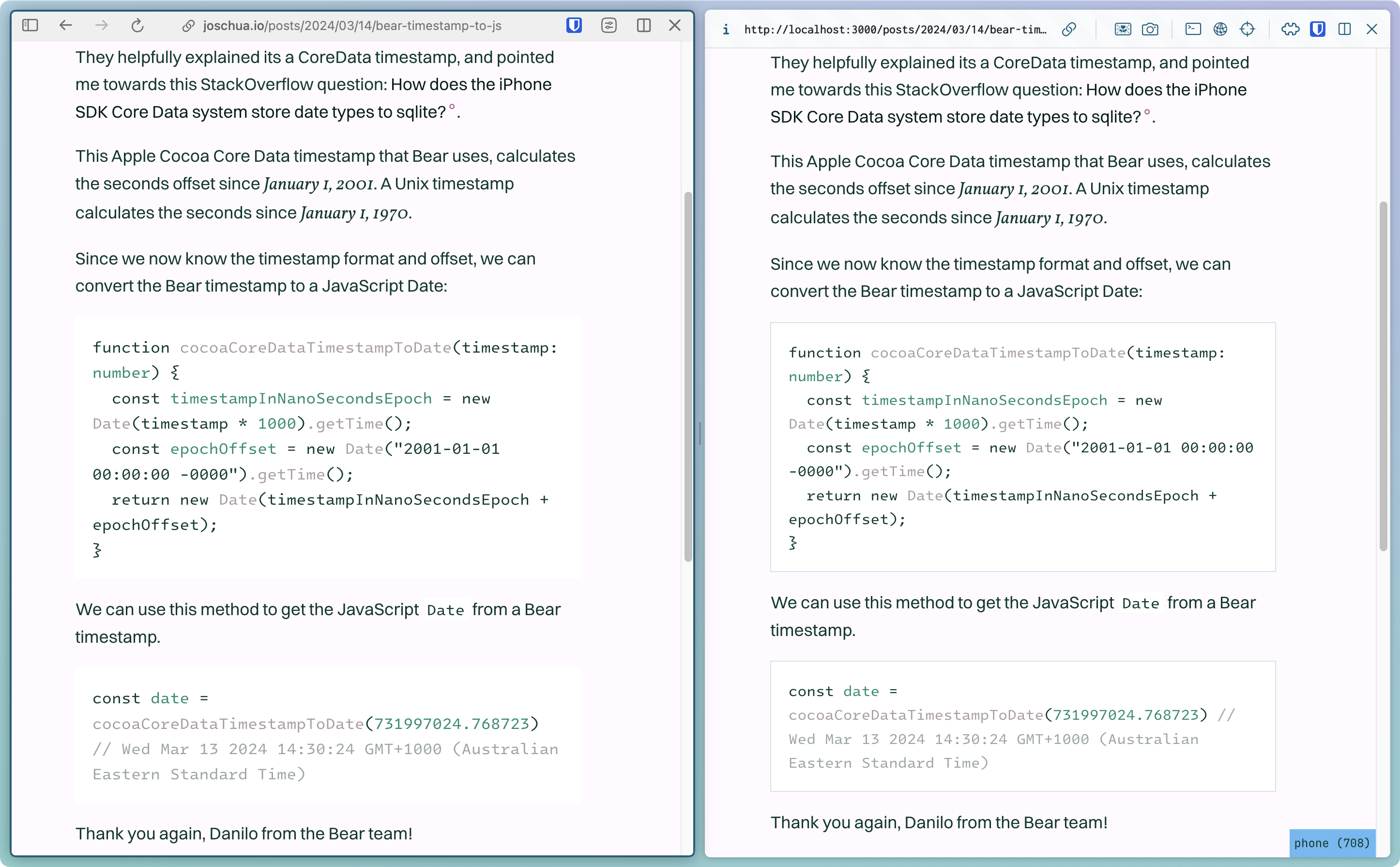
        <content type="html"><![CDATA[<aside class="rss-club"><p class="italic"><img src="/images/icons/rss.svg" alt="">This is an RSS-only post. It's a secret! Read more about <a href="/rss-club">RSS Club</a>.</p></aside><p>Hi there! Thank you for subscribing to my blog via RSS. For this very first edition of RSS club, I’ll talk a bit about some blog updates.</p><h2 id="blog-migration">Blog migration</h2><p>I recently moved my blog over from <a href="https://astro.build/" rel="nofollow">Astro</a> to <a href="https://nuxt.com/" rel="nofollow">Nuxt</a>.</p><h3 id="why-move-away-from-astro">Why move away from Astro?</h3><p>After my website builds started failing, it felt easier to switch frameworks rather than debug the issue. There is a lot to love about Astro, but I had a few problems with it:</p><ol><li>Astro releases new versions so often. It’s great to see their release velocity, but for a blog I just want to “set it and forget it”. It’s stressful that I often have to update the package and change relevant code. I’m two major versions behind at this point! And I’m not alone: Fellow blogger <a href="https://www.seanmcp.com/articles/astro-and-release-velocity/" rel="nofollow">Sean also talks about this issue</a> with his Astro-based blog.</li><li>Assets paths are weird. In order to use Astro’s image optimisation, you have to place your images in the <code class="">assets/</code> folder, and reference them with a relative path. This lead to paths like <code class="">../../../../../assets/2023/04/breakpoint-indicator-screenshot.png</code> in my blog posts. That’s ugly and error-prone.</li><li>Because Astro is young, there isn’t good tooling support yet in Neovim. I wrote about a <a href="/posts/2023/06/22/set-up-nvim-for-astro/">few steps to set it up</a>. But neither formatting nor highlighting work reliably.</li></ol><p>In summary, for my blog I want something that…</p><ol><li><em>Just works</em> and requires little maintenance,</li><li>and makes it easy to change existing code.</li></ol><p>So, although it pains me to replace a simple static site generator with a JavaScript framework, I landed on Nuxt. Nuxt is what I work with every day in my day job, so I’m really familiar with it. It’s fast to troubleshoot issues. And it enables me to add some new features – like support for RSS club!</p><h2 id="styling-tweaks">Styling tweaks</h2><p>While migrating, I just slightly tweaked the code styles on the page. I added a subtle border, so that the white code background stands out more from the light pink site background. I also decreased the code font size:</p><p><img alt="Two version of the same website. The right version has a light grey border around the code box." src="/images/posts/2024/12/hi-rss-club/screenshot-code.png">Left: Before. Right: After.</p><p>I think these changes make the code stand out a bit more, instead of it just blending into the background.</p><p>The code is set in the <a href="https://github.com/intel/intel-one-mono" rel="nofollow">Intel One Mono</a> font. It’s supposed to be designed for maximum legibility, but in the context of the blog I find the font a bit too eccentric. I might change it to something more paired back in the future.</p><h2 id="in-summary">In summary</h2><p>I love this idea of <a href="https://ethanmarcotte.com/wrote/let-a-website-be-a-worry-stone/" rel="nofollow">your website as a worry stone</a>: Something that you can continously tweak without an expectation of it being “shipped” or “finished”. I hope that this migration makes it easier to write more, and to tweak the design of the site.</p><p>Thank you for reading, and for using RSS! You’re awesome.</p>]]></content>
        <author>
            <name>Joschua Glau</name>
        </author>
    </entry>
    <entry>
        <title type="html"><![CDATA[Kick-start app icon design with ChatGPT and Dall-E]]></title>
        <id>/posts/2024/06/20/kickstart-icon-design-with-ai</id>
        <link href="https://joschua.io/posts/2024/06/20/kickstart-icon-design-with-ai"/>
        <updated>2024-06-20T10:27:58.000Z</updated>
        <summary type="html"><![CDATA[AI tools like this can kick-start a creative process when you know what you want but don't quite have the knowledge to implement it. This posts explains how to create a good iOS app icon for free with ChatGPT and Dall-E.]]></summary>
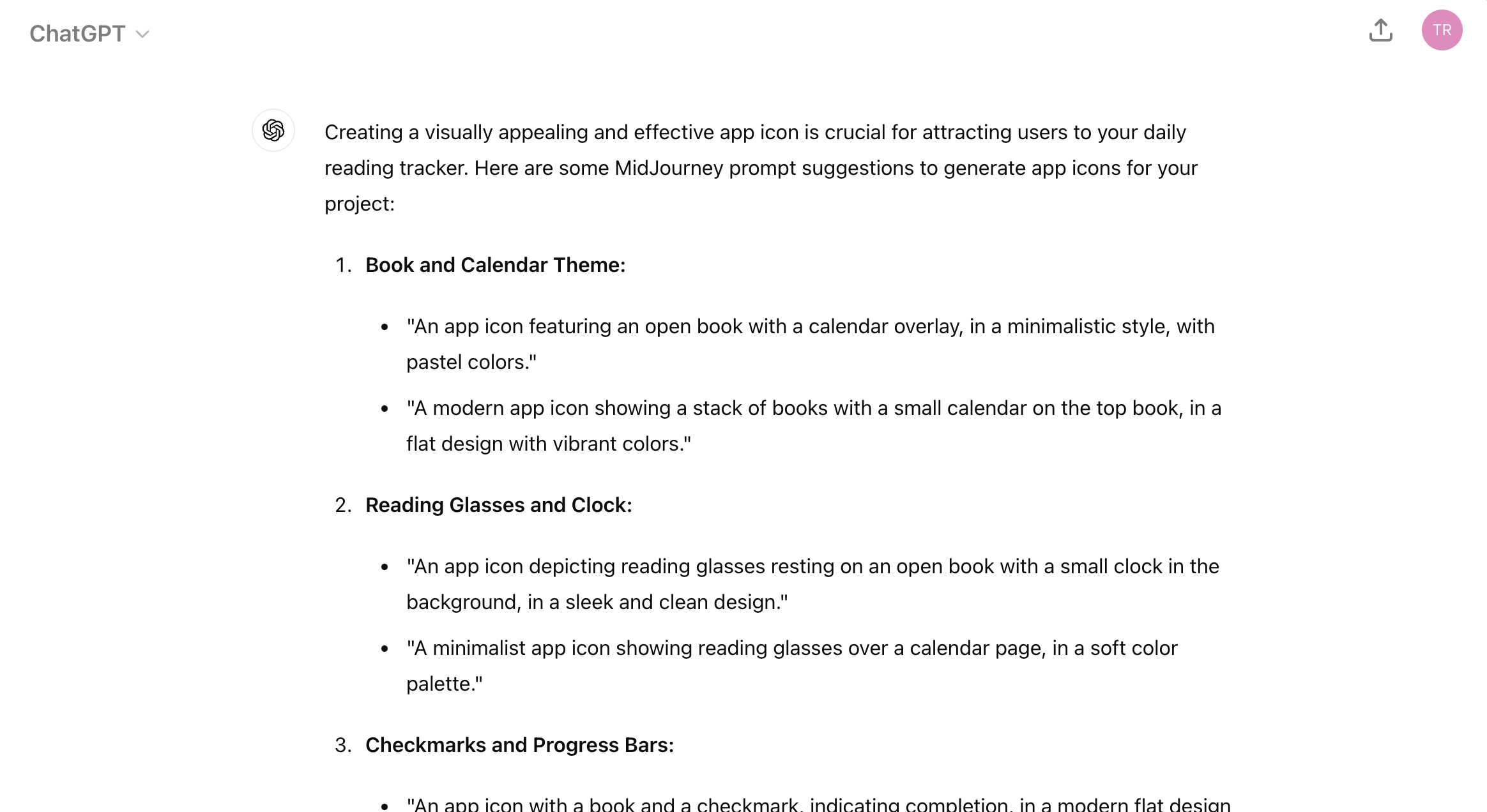
        <content type="html"><![CDATA[<h2 id="tldr">tldr;</h2><ol><li>Describe your app concept to ChatGPT. Ask it for prompts for Dall-E.</li><li>Input the best prompts into Dall-E (eg. via <a href="https://www.bing.com/images/create" rel="nofollow">Bing Image Creator</a>).</li><li>Give ChatGPT feedback on the generated images. Generate refined Dall-E prompts.</li><li>Repeat #2 and #3 until you have something to work with.</li><li>Create a design based on the best output in #4.</li></ol><p>With this method, I created a decent app icon as a developer with no app icon design expertise. Read on for an example process and the final result!</p><h2 id="step-1-initial-prompt-to-chatgpt">Step 1 – Initial prompt to ChatGPT</h2><p>Give ChatGPT (or, "Chat") some background info about your application. Then ask it to suggest prompts for AI image generators.</p><p>My original prompt:</p><blockquote><p>I'm building a simple daily reading tracker for iOS. Make some suggestions for midjourney prompt to generate app icons.</p><p><em>– Me</em></p></blockquote><p>I also pasted in a part of <a href="https://developer.apple.com/design/human-interface-guidelines/app-icons" rel="nofollow">Apple's icon design guidelines</a> for extra context.</p><p>I got this response back:</p><p><img alt="Screenshot of a conversation in the ChatGPT web interface as described below" src="/images/posts/2024/06/kickstart-icon-design-with-ai/screenshot-1.png"></p><p>Here's an excerpt:</p><blockquote><ol><li>Book and Calendar Theme:
<ul><li>"An app icon featuring an open book with a calendar overlay, in a minimalistic style, with pastel colors."</li><li>"A modern app icon showing a stack of books with a small calendar on the top book, in a flat design with vibrant colors."</li></ul></li><li>Reading Glasses and Clock:
<ul><li>"An app icon depicting reading glasses resting on an open book with a small clock in the background, in a sleek and clean design."</li><li>"A minimalist app icon showing reading glasses over a calendar page, in a soft color palette."</li></ul></li><li>Checkmarks and Progress Bars:
<ul><li>"An app icon with a book and a checkmark, indicating completion, in a modern flat design with bold colors."</li><li>"A stylish app icon with a book and a progress bar, symbolizing daily reading goals, in a bright and engaging design."
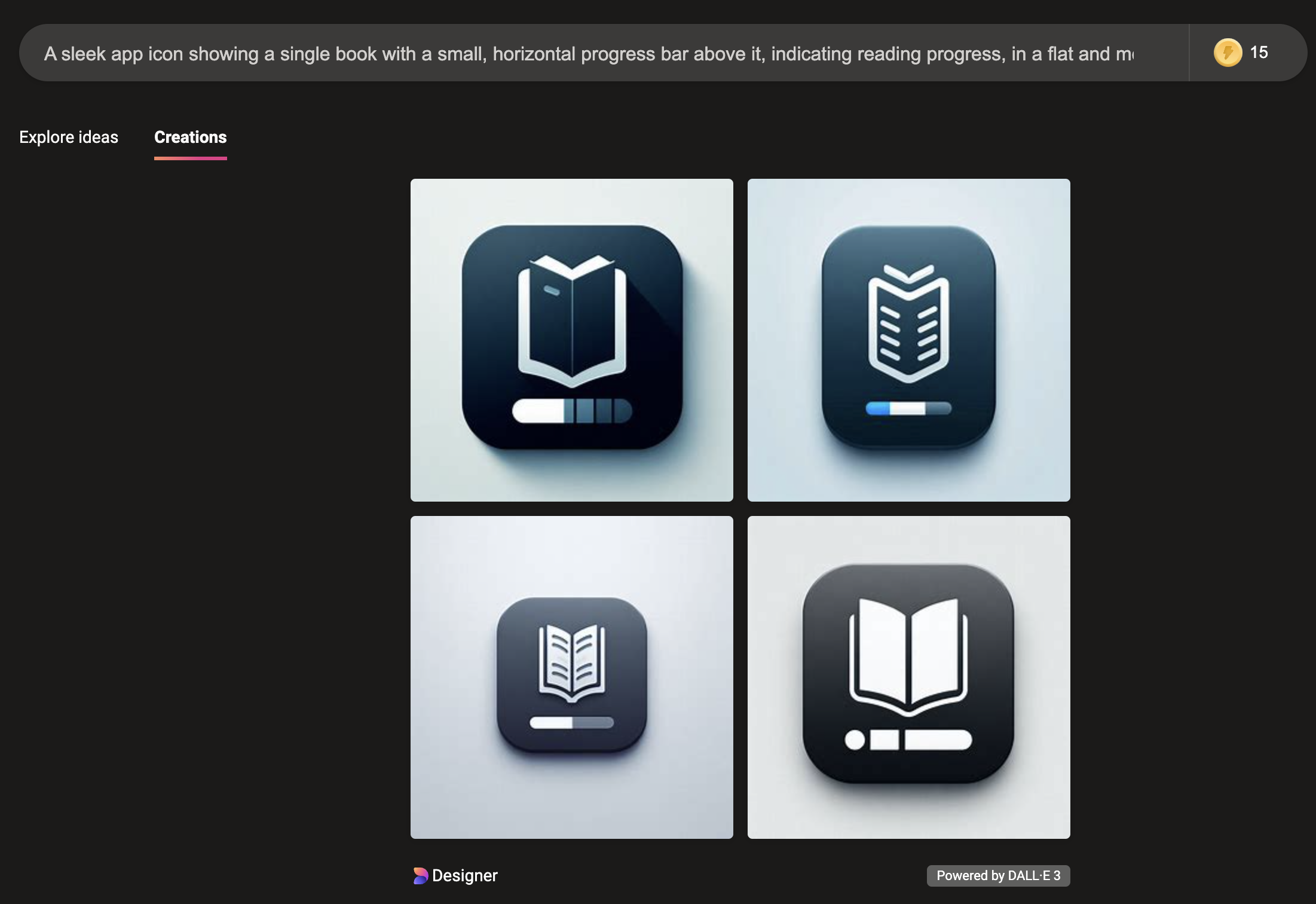
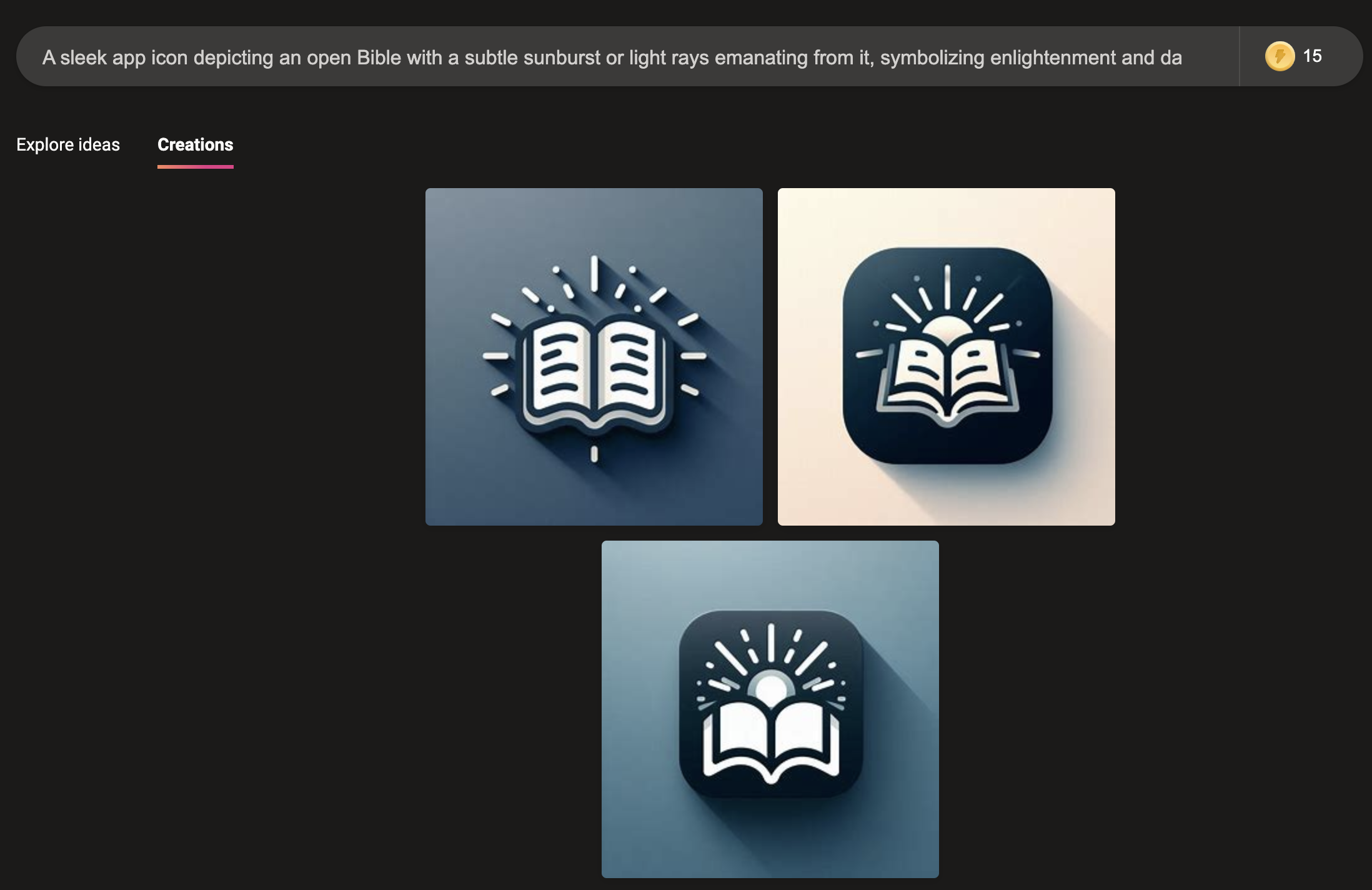
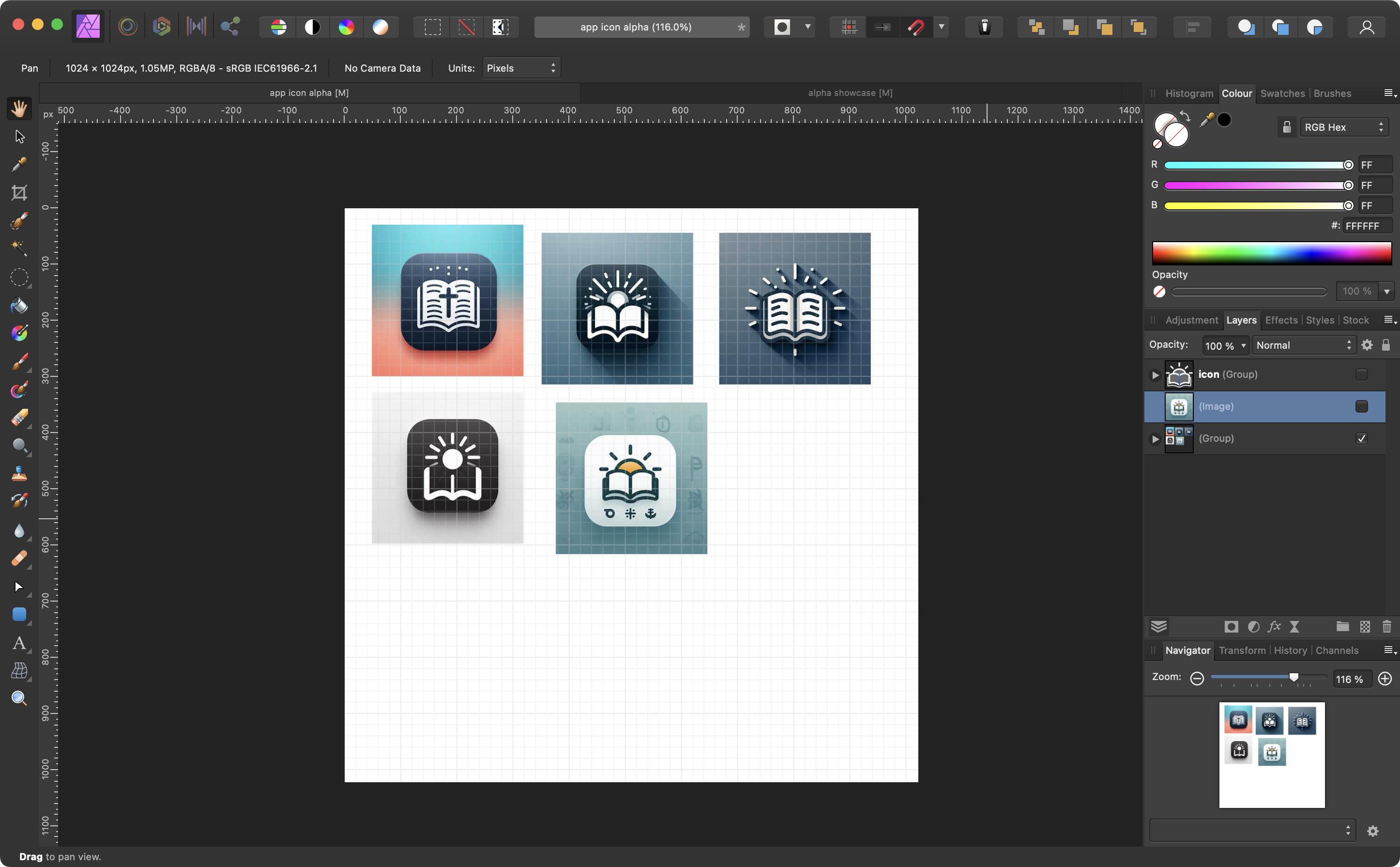
…</li></ul></li></ol><p><em>– ChatGPT</em></p></blockquote><h2 id="_2-dall-e-use-prompt">#2 – Dall-E: Use prompt</h2><p>I skimmed the suggestions and pasted my favourite prompt into <a href="https://www.bing.com/images/create" rel="nofollow">Bing Image Generator</a><sup><a href="#user-content-fn-1" aria-describedby="footnote-label" data-footnote-ref="" id="user-content-fnref-1">1</a></sup>. It's a free image generation tool that uses Dall-E under the hood. Any similar tool will do.</p><p>This is what it created:</p><p><img alt="App icons generated by Bing Image Creator with a pastel, colourful, outlined style" src="/images/posts/2024/06/kickstart-icon-design-with-ai/screenshot-2.png">Prompt: <em>'A simple app icon featuring an open book with a small calendar overlay, using a minimalistic design and soft pastel colors'</em></p><h2 id="_3-chatgpt-refine">#3 – ChatGPT: Refine</h2><p>The generated icons look cool by themselves, but they don't fit the iOS design.</p><p><img alt="App icons with a simple white music symbol on a red gradient background." src="/images/posts/2024/06/kickstart-icon-design-with-ai/app-icons.png">From the <a href="https://developer.apple.com/design/human-interface-guidelines/app-icons#Best-practices" rel="nofollow">Human Interface Guidelines on icons</a>.</p><p>I gave this feedback to Chat:</p><blockquote><p>I tried #1, it was too cluttered and not in line with how ios icons look. Revise the remaining if necessary.</p><p><em>– Me</em></p></blockquote><p>It returned some refined prompts.</p><blockquote><p>Certainly! Here are revised prompts to better align with the simplicity and clarity expected for iOS app icons:</p><ol><li>Reading Glasses and Clock:
<ul><li>"A simple app icon depicting reading glasses with a small, minimalistic clock integrated into the design, using a sleek and modern style with a flat color scheme."</li></ul></li><li>Checkmarks and Progress Bars:
<ul><li>"A clean app icon with a single book and a checkmark, using a flat design with a bold, solid color palette."</li></ul></li><li>Character Reading:
<ul><li>"A minimalistic app icon featuring a silhouette of a person reading a book, using a simple background and an elegant, streamlined style."</li></ul></li><li>…</li></ol><p><em>– ChatGPT</em></p></blockquote><h2 id="_4-iterate">#4: Iterate</h2><p>Repeat  #3 and #4 until you have something to work with.</p><p>I used Chat's prompt on checkboxes to try a different direction:</p><p><img alt="Four generated app icons with a book and a checkmark." src="/images/posts/2024/06/kickstart-icon-design-with-ai/screenshot-3.png"></p><p>Notice how much simpler the design is. It still doesn't look like iOS, but we're getting closer.</p><p>I gave Chat the feedback to move away from checkmarks. I also made it explicit that this is a tracker for Bible reading (something that I forgot to mention earlier):</p><blockquote><p>I like #3 much more, but it's not really clear that it's for the Bible. Also, I don't use the progress indicator in the app. I also don't want to use a checkmark - it feels too much like a habit tracker. Are there other metaphors?</p><p><em>– Me</em></p></blockquote><p>I moved back and forth between Chat and Dall-E and explored progress bars,</p><p><img alt="Four generated app icons with a book and a progress bar. The progress bar looks glitchy." src="/images/posts/2024/06/kickstart-icon-design-with-ai/screenshot-4.png"></p><p>rays of light,</p><p><img alt="Three generated app icons with a book and a sun or ray of sunlight in a white and gray style." src="/images/posts/2024/06/kickstart-icon-design-with-ai/screenshot-5.png"></p><p>and a more prominent sun:</p><p><img alt="Four generated app icons with a book and a sun above it." src="/images/posts/2024/06/kickstart-icon-design-with-ai/screenshot-6.png"></p><p>This style is already much more aligned with the iOS-native look I want to go for. This iteration progress takes seconds: I skim Chat's response, paste it into Bing Image Creator, give my immediate feedback to Chat and generate another image.</p><p>Eventually, Bing generated these icons:</p><p><img alt="Four quite different app icons with the top right being a simple book with a yellow sun above it." src="/images/posts/2024/06/kickstart-icon-design-with-ai/screenshot-7.png"></p><p>The image in the top right looks very similar to what I wanted my icon to look like. It's good enough, and I can move to the final step.</p><h2 id="_5-implement-the-design">#5: Implement the design</h2><p>Yes, this process involves getting hands-on with some design tools.</p><p>I wish we could copy and paste the result straight away, but</p><ol><li>the output is a <code class="">jpeg</code> file, and you'll likely need something rasterised like an <code class="">svg</code>,</li><li>it <a href="https://answers.microsoft.com/en-us/bing/forum/all/use-of-images-generated-via-bing-create-for/8f3ad8e2-6680-4b74-84af-38e440c5527c" rel="nofollow">seems like</a> you can't use images created with Bing Image Creator for commercial purposes<sup><a href="#user-content-fn-2" aria-describedby="footnote-label" data-footnote-ref="" id="user-content-fnref-2">2</a></sup> – so this might rule out some projects,</li><li>and most importantly: the result isn't that great. You'll need to make some improvements.</li></ol><p>I pasted the favourites into my graphic design software of choice<sup><a href="#user-content-fn-3" aria-describedby="footnote-label" data-footnote-ref="" id="user-content-fnref-3">3</a></sup>:</p><p><img alt="Screenshot of a graphic design software with previous generator icons pasted into it" src="/images/posts/2024/06/kickstart-icon-design-with-ai/screenshot-8.png"></p><p>I traced the outlines of some of the icons, tweaked the design, and changed the background colour. This is what I landed on:</p><p><img alt="A simple app icon with an open book and a gradient sun behind it." src="/images/posts/2024/06/kickstart-icon-design-with-ai/result.png"></p><p>I think that's a great-looking icon for the beta version of this app! If I can produce something neat like this in minimal time, I'm sure you can create something even more beautiful.</p><p>If you have feedback on the design, please let me know <a href="https://x.com/selfire1/status/1803750002130563381" rel="nofollow">on this tweet</a> or <a href="mailto:hi@joschua.io">over email</a>.</p><p>AI tools like this can kick-start a creative process when you know what you want but don't quite have the knowledge to implement it.</p><section class="footnotes" data-footnotes=""><h2 class="sr-only" id="footnote-label">Footnotes</h2><ol><li id="user-content-fn-1">Or, "Copilot Designer"? I can't keep up with those AI rebrands. <a href="#user-content-fnref-1" aria-label="Back to reference 1" class="data-footnote-backref" data-footnote-backref="">↩</a></li><li id="user-content-fn-2">But Dall-E  <a href="https://help.openai.com/en/articles/6425277-can-i-sell-images-i-create-with-dall-e" rel="nofollow">is fine</a>? Gen-AI copyright seems murky and none of this is legal advice. <a href="#user-content-fnref-2" aria-label="Back to reference 2" class="data-footnote-backref" data-footnote-backref="">↩</a></li><li id="user-content-fn-3"><a href="https://affinity.serif.com/en-us/photo/" rel="nofollow">Affinity Photo</a> that is – I'm sure it's terrible for this job! As said, I'm a developer, not a designer 🫣 <a href="#user-content-fnref-3" aria-label="Back to reference 3" class="data-footnote-backref" data-footnote-backref="">↩</a></li></ol></section>]]></content>
        <author>
            <name>Joschua Glau</name>
        </author>
    </entry>
    <entry>
        <title type="html"><![CDATA[How to convert a Bear timestamp to JavaScript Date]]></title>
        <id>/posts/2024/03/14/bear-timestamp-to-js</id>
        <link href="https://joschua.io/posts/2024/03/14/bear-timestamp-to-js"/>
        <updated>2024-03-13T22:08:50.000Z</updated>
        <summary type="html"><![CDATA[Bear App's timestamps uses the CoreData date format. This is how to convert it to a JavaScript date.]]></summary>
        <content type="html"><![CDATA[<p>The dates in <a href="https://bear.app/faq/where-are-bears-notes-located/" rel="nofollow">Bear's database</a> are written in a format like this: <code class="">731997024.768723</code>.</p><p>It looks similar to a unix epoch timestamp, but the dates are off. I asked the Bear support team which format their database uses. They helpfully explained its a CoreData timestamp, and pointed me towards this StackOverflow question: <a href="https://stackoverflow.com/questions/2494542/how-does-the-iphone-sdk-core-data-system-store-date-types-to-sqlite" rel="nofollow">How does the iPhone SDK Core Data system store date types to sqlite?</a>.</p><p>This Apple Cocoa Core Data timestamp that Bear uses, calculates the seconds offset since <em>January 1, 2001</em>. A Unix timestamp calculates the seconds since <em>January 1, 1970</em>.</p><p>Since we now know the timestamp format and offset, we can convert the Bear timestamp to a JavaScript Date:</p><pre class="language-typescript" code="function cocoaCoreDataTimestampToDate(timestamp: number) {
  const timestampInNanoSecondsEpoch = new Date(timestamp * 1000).getTime();
  const epochOffset = new Date(&#x22;2001-01-01 00:00:00 -0000&#x22;).getTime();
  return new Date(timestampInNanoSecondsEpoch + epochOffset);
}
" language="typescript" meta=""><code __ignoreMap="">function cocoaCoreDataTimestampToDate(timestamp: number) {
  const timestampInNanoSecondsEpoch = new Date(timestamp * 1000).getTime();
  const epochOffset = new Date("2001-01-01 00:00:00 -0000").getTime();
  return new Date(timestampInNanoSecondsEpoch + epochOffset);
}
</code></pre><p>We can use this method to get the JavaScript <code class="">Date</code> from a Bear timestamp.</p><pre class="language-javascript" code="const date = cocoaCoreDataTimestampToDate(731997024.768723) // Wed Mar 13 2024 14:30:24 GMT+1000 (Australian Eastern Standard Time)
" language="javascript" meta=""><code __ignoreMap="">const date = cocoaCoreDataTimestampToDate(731997024.768723) // Wed Mar 13 2024 14:30:24 GMT+1000 (Australian Eastern Standard Time)
</code></pre><p>Thank you again, Danilo from the Bear team!</p><h2 id="more-resources">More Resources</h2><ul><li><a href="https://github.com/selfire1/Bear-Markdown-Export" rel="nofollow">selfire1/Bear-Markdown-Export</a></li><li><a href="https://www.epochconverter.com/coredata" rel="nofollow">Cocoa Core Data Timestamp Converter</a></li><li><a href="https://developer.mozilla.org/en-US/docs/Web/JavaScript/Reference/Global_Objects/Date" rel="nofollow">Date - JavaScript | MDN</a></li></ul>]]></content>
        <author>
            <name>Joschua Glau</name>
        </author>
    </entry>
    <entry>
        <title type="html"><![CDATA[Dotfiles]]></title>
        <id>/posts/2024/02/13/dotfiles</id>
        <link href="https://joschua.io/posts/2024/02/13/dotfiles"/>
        <updated>2024-02-12T20:54:56.000Z</updated>
        <summary type="html"><![CDATA[Dotfiles are a great way to keep your dev environments synced and to keep all your configuration in one place. I enjoy poking through others' dotfiles to find some inspiration for my setup. So, I also went public with my dotfiles in the hopes that you might find a bit of inspiration.]]></summary>
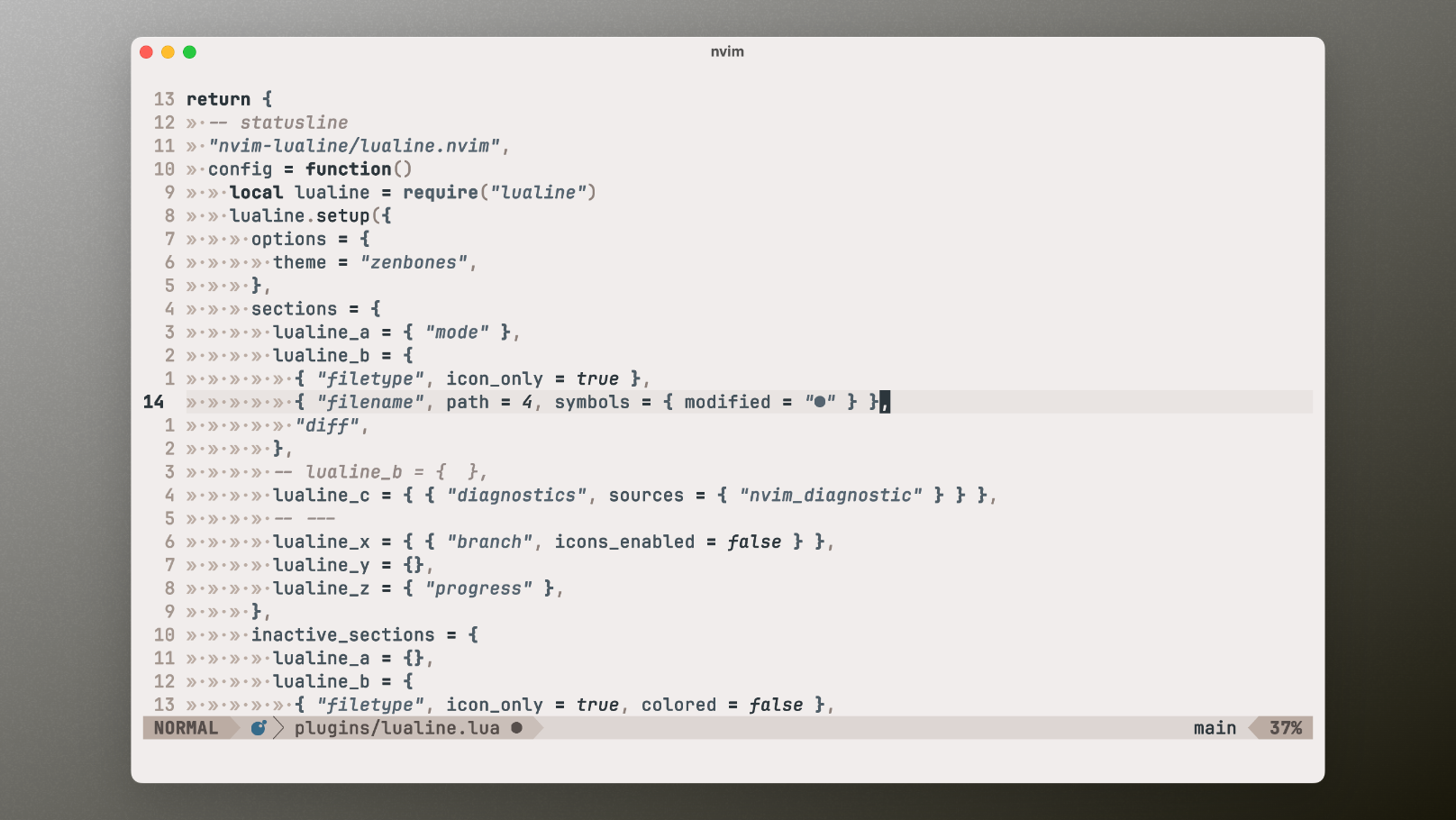
        <content type="html"><![CDATA[<p>After tinkering with them for some time in a private repository, I made my dotfiles <a href="https://github.com/selfire1/dotfiles" rel="nofollow">public on GitHub</a>.<sup><a href="#user-content-fn-1" aria-describedby="footnote-label" data-footnote-ref="" id="user-content-fnref-1">1</a></sup></p><p>I really enjoy poking through other programmers' dotfiles. It allows you to look behind the curtain and learn from their setup.</p><p>So, my setup is also inspired by a few other resources:</p><ul><li><a href="https://github.com/evantravers/dotfiles" rel="nofollow">evantravers/dotfiles</a>: Evan's setup was my starting point for dotfiles, and the directory structure and my early nvim config are inspired by him.<sup><a href="#user-content-fn-2" aria-describedby="footnote-label" data-footnote-ref="" id="user-content-fnref-2">2</a></sup></li><li><a href="https://github.com/josean-dev/dev-environment-files" rel="nofollow">josean-dev/dev-environment-files</a>: Josean's dotfiles and <a href="https://www.youtube.com/watch?v=vdn_pKJUda8&#x26;list=PLnu5gT9QrFg36OehOdECFvxFFeMHhb_07&#x26;index=3" rel="nofollow">amazing</a> <a href="https://www.youtube.com/watch?v=6mxWayq-s9I&#x26;list=PLnu5gT9QrFg36OehOdECFvxFFeMHhb_07&#x26;index=7" rel="nofollow">video</a> <a href="https://www.youtube.com/watch?v=NL8D8EkphUw&#x26;list=PLnu5gT9QrFg36OehOdECFvxFFeMHhb_07&#x26;index=8" rel="nofollow">walkthroughs</a> have helped me structure my nvim config better and set up language servers and linting.</li><li><a href="https://nanotipsforvim.prose.sh/" rel="nofollow">nanotipsforvim</a>: Chris shares a variety of small vim tips, some of which, like the <a href="https://nanotipsforvim.prose.sh/motion-setup--hjkl-as-amplified-hjkl" rel="nofollow">HJKL motions setup</a> or the <a href="https://nanotipsforvim.prose.sh/remapping-all-your-textobjs-for-speed" rel="nofollow">textobjs remap</a> have become essential to my setup.</li></ul><h2 id="highlights">Highlights</h2><p>I find these parts of my dotfiles especially useful in my day-to-day coding.</p><h3 id="nvim">nvim</h3><h4 id="git-commit-management">Git commit management</h4><pre class="language-lua" code="return {
    &#x22;tpope/vim-fugitive&#x22;,
    config = function()
        local keymap = vim.keymap -- for conciseness
        -- Git keybinds / fugitive keybinds
        keymap.set(&#x22;n&#x22;, &#x22;<leader>g&#x22;, &#x22;:G<CR>&#x22;) -- open Git view
        keymap.set(&#x22;n&#x22;, &#x22;<leader>gsc&#x22;, &#x22;:Gwrite | :G commit<CR>&#x22;) -- git stage and commit
        keymap.set(&#x22;n&#x22;, &#x22;<leader>gg&#x22;, &#x22;:Gwrite | :G commit<CR>&#x22;) -- git stage and commit
        keymap.set(&#x22;n&#x22;, &#x22;<leader>gs&#x22;, &#x22;:Gwrite <CR>&#x22;) -- git stage
        keymap.set(&#x22;n&#x22;, &#x22;<leader>ga&#x22;, &#x22;:G add --all -- &#x27;:!src/content/*&#x27; &#x27;:!.gitignore&#x27; | :G commit<CR>&#x22;) -- git stage all (except commonly ignored)
        keymap.set(&#x22;n&#x22;, &#x22;<leader>gc&#x22;, &#x22;:G commit<CR>&#x22;) -- git commit
        keymap.set(&#x22;n&#x22;, &#x22;<leader>gp&#x22;, &#x22;:G push<CR>&#x22;) -- git push
    end,
}
" language="lua" meta=""><code __ignoreMap="">return {
    "tpope/vim-fugitive",
    config = function()
        local keymap = vim.keymap -- for conciseness
        -- Git keybinds / fugitive keybinds
        keymap.set("n", "&#x3C;leader>g", ":G&#x3C;CR>") -- open Git view
        keymap.set("n", "&#x3C;leader>gsc", ":Gwrite | :G commit&#x3C;CR>") -- git stage and commit
        keymap.set("n", "&#x3C;leader>gg", ":Gwrite | :G commit&#x3C;CR>") -- git stage and commit
        keymap.set("n", "&#x3C;leader>gs", ":Gwrite &#x3C;CR>") -- git stage
        keymap.set("n", "&#x3C;leader>ga", ":G add --all -- ':!src/content/*' ':!.gitignore' | :G commit&#x3C;CR>") -- git stage all (except commonly ignored)
        keymap.set("n", "&#x3C;leader>gc", ":G commit&#x3C;CR>") -- git commit
        keymap.set("n", "&#x3C;leader>gp", ":G push&#x3C;CR>") -- git push
    end,
}
</code></pre><p>From <a href="https://github.com/selfire1/dotfiles/blob/261fa57ed12295c5b6339e60a4825bdc0f137188/nvim/.config/nvim/lua/joschua/plugins/fugitive.lua#L1-L14" rel="nofollow">fugitive.lua</a>.</p><p>I have been able to stick with Git best practices of small and contained commits much easier after mapping some keys to common Git actions. I use <code class="">&#x3C;leader>gg</code> to stage and commit the current file all the time.</p><p><a href="https://github.com/selfire1/dotfiles/blob/261fa57ed12295c5b6339e60a4825bdc0f137188/nvim/.config/nvim/lua/joschua/plugins/gitsigns.lua#L40" rel="nofollow">Setting up gitsigns</a> to select and stage hunks also encourages me to keep changes contained in my commits.</p><h4 id="lualine-unsaved-file-symbol">Lualine unsaved file symbol</h4><p><img alt="Screenshot of the nvim interface. At the bottom there is a filled circle next to the filename" src="/images/posts/2024/02/dotfiles/lualine-unsaved-modifier.png">The filled circle next to the filename in the bottom indicates unsaved changes.</p><p>I found it helpful to <a href="https://github.com/selfire1/dotfiles/blob/261fa57ed12295c5b6339e60a4825bdc0f137188/nvim/.config/nvim/lua/joschua/plugins/lualine.lua#L14" rel="nofollow">add an indicator to the lualine</a> setup to indicate unsaved changes in a file. I can't tell you how often I was refreshing <code class="">localhost</code> to see my changes before, without having actually saved the file 😅</p><h4 id="open-cms-file-in-browser">Open CMS file in browser</h4><p>This bit of code in <a href="https://github.com/selfire1/dotfiles/blob/261fa57ed12295c5b6339e60a4825bdc0f137188/nvim/.config/nvim/lua/joschua/core/keymaps.lua#L86-L92" rel="nofollow">keymaps.lua</a> is specific to my work setup, but it highlights how modular and powerful nvim is in its config:</p><pre class="language-lua" code="local keymap = vim.keymap -- for conciseness
local secrets = require(&#x22;joschua.secrets&#x22;)

keymap.set(
    &#x22;n&#x22;,
    &#x22;<leader>k&#x22;,
    &#x22;gg/kontentId<cr>WyW:!open &#x27;https://app.kontent.ai/&#x22;
        .. secrets.kontentId
        .. &#x22;/content-inventory/00000000-0000-0000-0000-000000000000/content/<c-r>\&#x22;&#x27;<cr>&#x22;
) -- open kontent id in browser
" language="lua" meta=""><code __ignoreMap="">local keymap = vim.keymap -- for conciseness
local secrets = require("joschua.secrets")

keymap.set(
    "n",
    "&#x3C;leader>k",
    "gg/kontentId&#x3C;cr>WyW:!open 'https://app.kontent.ai/"
        .. secrets.kontentId
        .. "/content-inventory/00000000-0000-0000-0000-000000000000/content/&#x3C;c-r>\"'&#x3C;cr>"
) -- open kontent id in browser
</code></pre><p>On pressing <code class="">&#x3C;leader>k</code>, nvim goes to the top (<code class="">gg</code>), searches for the string 'kontentId' (<code class="">/kontentId&#x3C;cr)</code>, jumps a word forward (<code class="">W</code>), copies that word (<code class="">yW</code>), then executes a shell command to open a URL in the browser, including a secret identifier (<code class="">:!open 'https://…'</code>).</p><p>Jumping directly to the CMS entry of a local copy has saved me heaps of tedious clicking and searching. This example is specific to my context but shows how nvim can easily handle complex macros.</p><h3 id="other">Other</h3><ul><li>I <a href="https://joschua.io/posts/2023/11/22/new-tools/#ni" rel="nofollow">mentioned ni on this blog before</a>, and I <a href="https://github.com/selfire1/dotfiles/blob/261fa57ed12295c5b6339e60a4825bdc0f137188/.aliases#L6-L7" rel="nofollow">set up some aliases</a> for it. I run <code class="">nr dev</code> and <code class="">nr build</code> dozens of times a day, so I shortened them to <code class="">nd</code> and <code class="">nb</code> to have those commands at my fingertips.</li><li>I have been using <a href="https://cooklang.org/" rel="nofollow">cooklang</a> less, as Apple Reminders rolled out their auto-classification on shopping lists, but it's still a cool and nerdy way to keep track of recipes from the command line.</li><li>Another command I use frequently is <code class="">dark</code> (or <code class="">light</code>) which is defined in my <a href="https://github.com/selfire1/dotfiles/blob/261fa57ed12295c5b6339e60a4825bdc0f137188/zsh/.zshrc#L12-L18" rel="nofollow">.zshrc</a> to set a colour mode of <a href="https://sw.kovidgoyal.net/kitty/overview/" rel="nofollow">kitty</a>.</li></ul><h2 id="conclusion">Conclusion</h2><p>Dotfiles are a highly personal and customised thing. But I hope that by poking through my setup at <a href="https://github.com/selfire1/dotfiles" rel="nofollow">selfire1/dotfiles</a>, you too can have a look behind the curtain and steal inspiration to make your setup that bit more productive.</p><section class="footnotes" data-footnotes=""><h2 class="sr-only" id="footnote-label">Footnotes</h2><ol><li id="user-content-fn-1">Since the previous history contained some semi-sensitive data, I had to reset the git history when going public. <a href="#user-content-fnref-1" aria-label="Back to reference 1" class="data-footnote-backref" data-footnote-backref="">↩</a></li><li id="user-content-fn-2">Although I don't see myself following him down the <a href="https://evantravers.com/articles/2023/11/28/moving-my-dotfiles-to-nix/" rel="nofollow">nix path</a> – for now at least 😅 <a href="#user-content-fnref-2" aria-label="Back to reference 2" class="data-footnote-backref" data-footnote-backref="">↩</a></li></ol></section>]]></content>
        <author>
            <name>Joschua Glau</name>
        </author>
    </entry>
    <entry>
        <title type="html"><![CDATA[Open specific Facebook Messenger chat with Shortcuts]]></title>
        <id>/posts/2024/02/12/messenger-shortcut</id>
        <link href="https://joschua.io/posts/2024/02/12/messenger-shortcut"/>
        <updated>2024-02-11T20:55:43.000Z</updated>
        <summary type="html"><![CDATA[This Shortcut allows you to jump directly to a chat in Facebook Messenger on iOS.]]></summary>
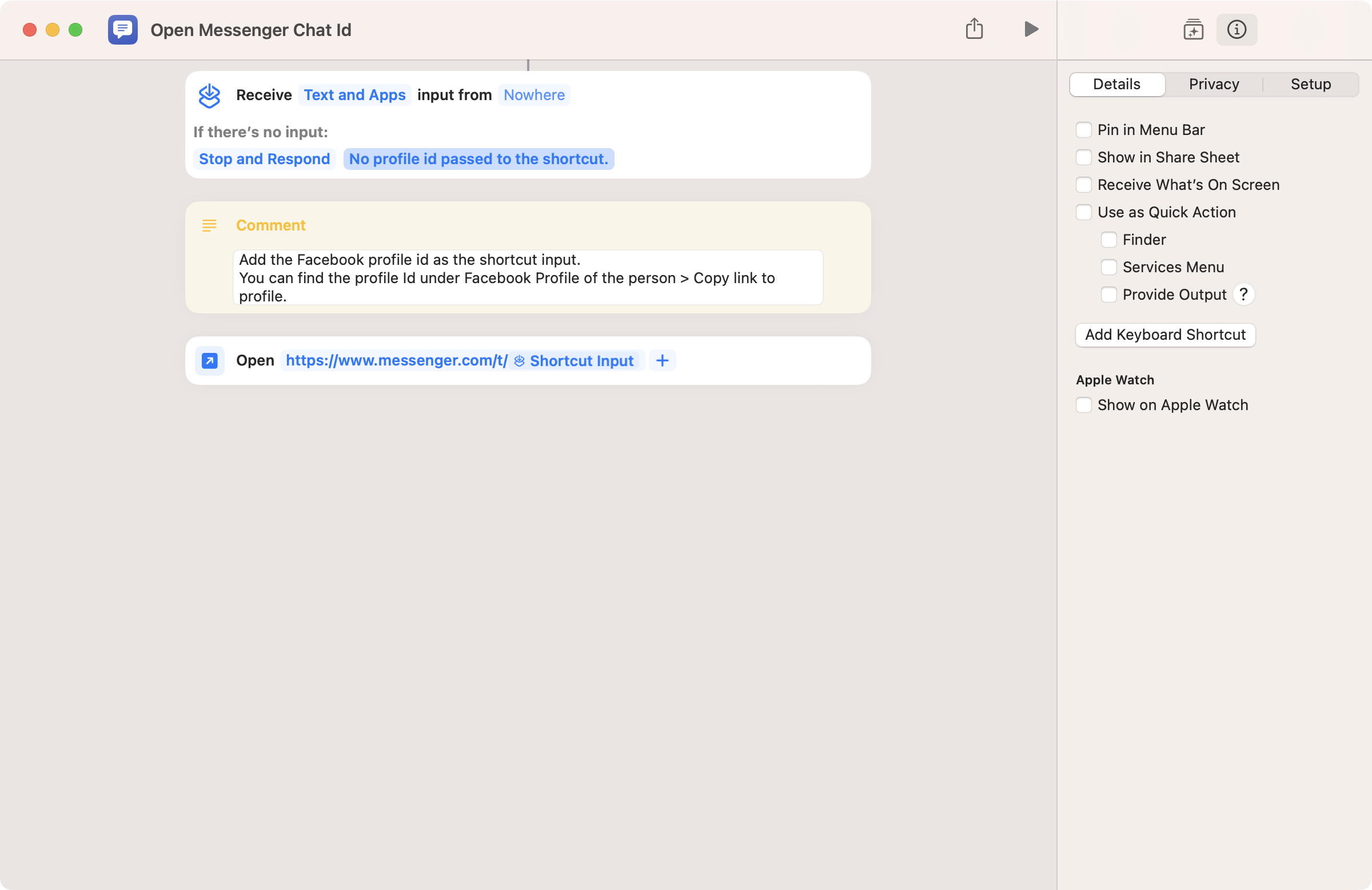
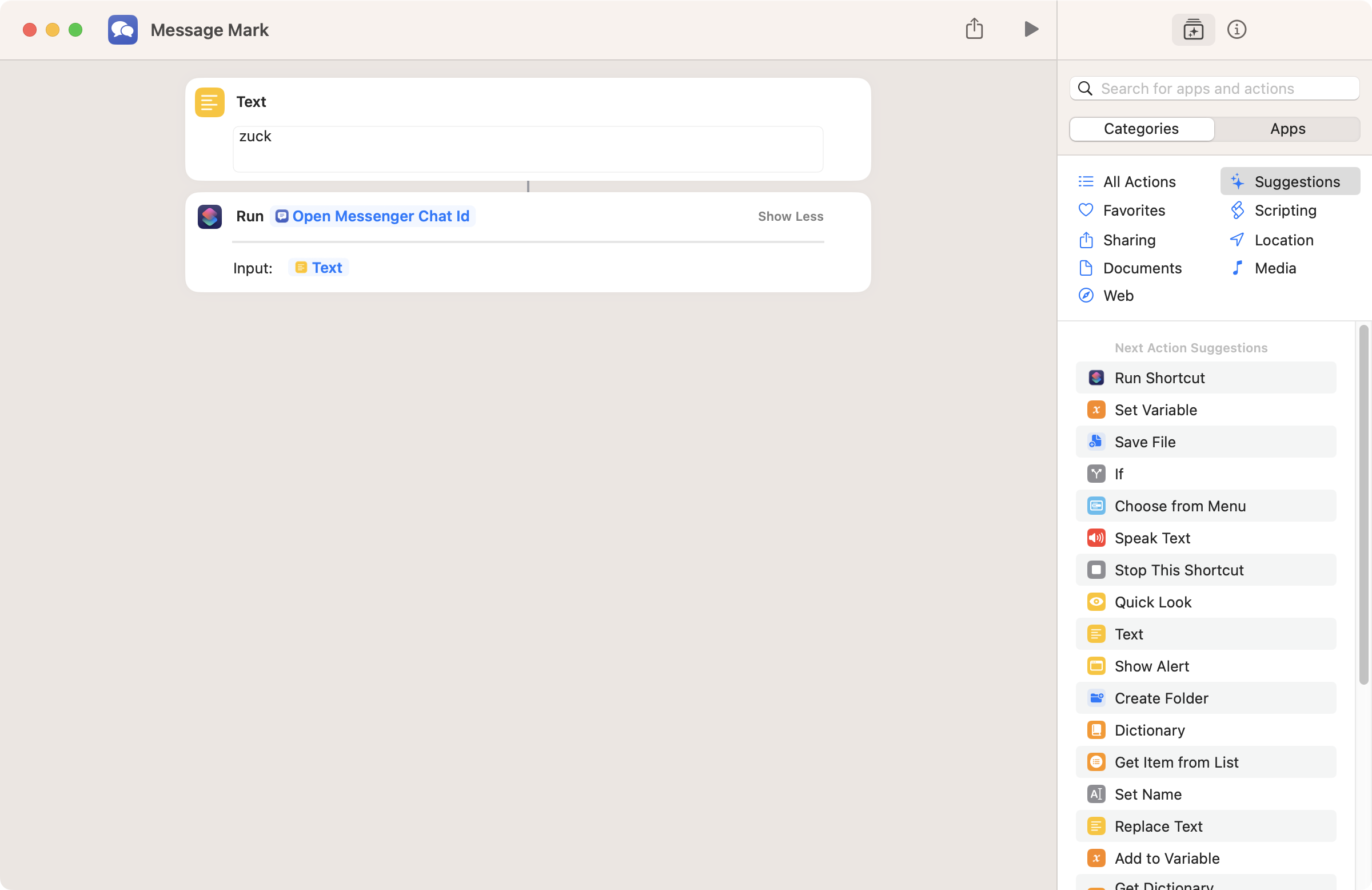
        <content type="html"><![CDATA[<p>In his <a href="https://evantravers.com/articles/2024/01/05/ios-homescreen-2024/" rel="nofollow">iOS homescreen setup</a>, Evan has the aspiration of a "magic button" phone: Touch your device once to do an action, then set it down. Inspired by this idea, I also wanted to consolidate the way I use my phone.</p><p>One of the most frequent things I do when picking up the phone is to message specific people, mostly my wife. After a bit of trial and error, I came up with a shortcut that bypasses the chat overview and jumps directly to a conversation in Facebook Messenger.</p><h2 id="the-shortcut">The shortcut</h2><p>With this iCloud link, you can add the Shortcut to your library: <a href="https://www.icloud.com/shortcuts/b913f8e7d18f428195e4308d6d6dd5a7" rel="nofollow">Open Messenger Chat Id</a>.</p><p><img alt="Screenshot of the Shortcut. First the Shortcut receives text, then opens a url specific to Facebook Messenger" src="/images/posts/2024/02/messenger-shortcut/screenshot-id-shortcut.png">The Shortcut receives <code class="">text</code> (the Facebook profile id) as an input, and then opens the Messenger url to the specific chat.</p><p>The Shortcut itself is simple. But finding the right Facebook Messenger url took a bit of experimentation.</p><ol><li>The url to open a specific messenger chat is <code class="">https://www.messenger.com/t/{user id} </code>.</li><li>The <code class="">user id</code> is the last part of a Facebook profile url. For example, for <code class="">https://www.facebook.com/zuck</code>, it's <code class="">zuck</code>.</li><li>The direct Messenger url then is <code class="">https://www.messenger.com/t/zuck</code>. If you have the app installed, opening that url is going to open that chat directly in the app.</li></ol><h2 id="running-the-shortcut">Running the shortcut</h2><p>You can then use the "Open Messenger Chat Id" shortcut to open any chat directly in the Facebook Messenger app on mobile.</p><p><img alt="Shortcut where text &#x27;zuck&#x27; is passed to the &#x27;Open Messenger Chat Id&#x27; shortcut" src="/images/posts/2024/02/messenger-shortcut/screenshot-using-shortcut.png">Here we pass <code class="">zuck</code> to the Shortcut to open the chat directly in the Messenger app.</p><h2 id="conclusion">Conclusion</h2><p>Just this small automation has increased the quality of life of using my phone. I press the shortcut, skip the distraction of unread chats and new Stories on the Messenger homescreen, and jump directly to the person I want to talk to. It's one step closer to the <em>magic button phone</em>™.</p>]]></content>
        <author>
            <name>Joschua Glau</name>
        </author>
    </entry>
    <entry>
        <title type="html"><![CDATA[DJ Sets]]></title>
        <id>/posts/2023/11/25/dj-sets</id>
        <link href="https://joschua.io/posts/2023/11/25/dj-sets"/>
        <updated>2023-11-25T01:12:14.000Z</updated>
        <summary type="html"><![CDATA[DJ mixes help me to focus while I work. Here is a tier list of BBC One Essential Mixes based on my personal preference and suitability for Deep Work.]]></summary>
        <content type="html"><![CDATA[<p>Recently, I have been listening to more and more DJ mixes while programming. The seamless transitions of hours-long sets help me get into Flow and are uplifting to work to. I mostly listened to BBC Radio One's Essential Mix. Here is a tier list of what I have listened to recently, based on my personal preference and suitability for Deep Work.</p><h2 id="ranking">Ranking</h2><h3 id="s-tier">🔴 S tier:</h3><ul><li><strong><a href="https://soundcloud.com/retailgroup/daft-punk-essential-mix-1997" rel="nofollow">Daft Punk (1997)</a></strong>. This set was my introduction to the Essential Mix (via <a href="https://kottke.org/22/12/daft-punk-live-set-from-1997" rel="nofollow">kottke</a>). It's a driving, varied set that has energised me through many afternoon slumps.</li></ul><h3 id="a-tier">🟠 A tier:</h3><ul><li><strong><a href="https://soundcloud.com/tiesto-bbc-radio-1/ti-sto-bbc-radio-1-essential" rel="nofollow">Tiësto (2014)</a></strong>. The Dutch DJ curates some of his favourite Deep House tracks on this mix. It features some catchy melodies and great vocals without being distracting.</li><li><strong><a href="https://soundcloud.com/bonobo/essential-mix" rel="nofollow">Bonobo (2014 )</a></strong>. A very layered set, with a steady, head-bobbing rhythm as the foundation and jazzy, varied melodies on top.</li></ul><h3 id="b-tier">🟡 B tier:</h3><ul><li><strong><a href="https://soundcloud.com/rufusdusol/bbc-radio-1-essential-mix" rel="nofollow">Rüfüs Du Sol (2018)</a></strong>. For me to get fully into flow, this set's amount of vocals is a bit too distracting. Nonetheless it's a solid and steady mix.</li><li><strong><a href="https://soundcloud.com/ben-bohmer/bbc-radio-1-essential-mix" rel="nofollow">Ben Böhmer (2021)</a></strong>. This set is very chill and atmospheric, and features plenty of piano. It just misses the drive of the beat to push me along.</li><li><strong><a href="https://soundcloud.com/gettheman/disclosure-bbc-radio-1" rel="nofollow">Disclosure (2013)</a></strong>. The J Dilla section at the start doesn't work for me. But then the set really picks up.</li></ul><h3 id="c-tier">🟢 C tier:</h3><ul><li><strong><a href="https://soundcloud.com/user-243134876/jamie-xx-bbc-radio-1-essential-mix" rel="nofollow">Jamie xx (2020)</a></strong>. I enjoy the start of this mix but eventually it becomes too abstract and strange.</li><li><strong><a href="https://soundcloud.com/achch/four-tet-and-jamie-xx-essential-mix" rel="nofollow">Four Tet and Jamie xx (2015)</a></strong>. Similar to the above, the mix becomes too "out there" for my taste.</li></ul><h3 id="d-tier">🔵 D tier:</h3><ul><li><strong><a href="https://soundcloud.com/djsnake/dj-snake-essential-mix-bbc" rel="nofollow">DJ Snake (2014)</a></strong>. This set is considered as one of the best Essential Mixes<sup><a href="#user-content-fn-1" aria-describedby="footnote-label" data-footnote-ref="" id="user-content-fnref-1">1</a></sup>, but for me it's just confusing, there is too much going on.</li><li><strong><a href="https://soundcloud.com/noraenpureessentialmix/nora-en-pure-essential-mix-2016-07-16" rel="nofollow">Nora en Pure (2016)</a></strong>. With other Deep House sets ranking high, I would have expected to enjoy this set more. But I found it just too boring.</li></ul><h2 id="other-mixes">Other mixes</h2><p>DJ sets that aren't suited to Deep Work but are still really good.</p><ul><li><strong><a href="https://www.youtube.com/watch?v=c0-hvjV2A5Y" rel="nofollow">Fred Again.. | Boiler Room</a></strong>. There is something special about this set. It's too good to just listen to in the background.<sup><a href="#user-content-fn-2" aria-describedby="footnote-label" data-footnote-ref="" id="user-content-fnref-2">2</a></sup></li><li><strong><a href="https://www.youtube.com/watch?v=ZZVJ2lCHnF0" rel="nofollow">Kygo | Live at Sunnmøre Alps, Norway</a></strong>. The location for this mix is just stunning. The visuals are cinematic and the music is uplifting and fun, and both culminate in a wild finale.</li><li><strong><a href="https://www.youtube.com/watch?v=ahe9baHOWIg" rel="nofollow">Four Tet, Fred Again.. &#x26; Skrillex | Times Square</a></strong>. This is a great set to work out to as the pumping beats of three world-class DJs get you to push that bit harder.</li></ul><h2 id="conclusion">Conclusion</h2><p>Of course, this "ranking" is completely based on my personal preference. Music is subjective and I have no qualification to actually decide what makes a mix "good" or "bad".</p><p>These are my favourites, your mileage may vary. But if Electronic Music is your thing, I hope you have found some new artists to listen to. For an updating list of Essential Mixes I have listened to, have a look at <a href="https://notes.joschua.io/dgU9XiAj1Ru6XMPceWKBE5" rel="nofollow">this note</a>.</p><section class="footnotes" data-footnotes=""><h2 class="sr-only" id="footnote-label">Footnotes</h2><ol><li id="user-content-fn-1"><a href="https://www.dirtydiscoradio.com/the-15-best-radio-1-essential-mixes-list-ever-broadcasted/" rel="nofollow">Our List of the 15 Best Radio 1 Essential Mixes Ever Broadcasted.</a> <a href="#user-content-fnref-1" aria-label="Back to reference 1" class="data-footnote-backref" data-footnote-backref="">↩</a></li><li id="user-content-fn-2">If you aren't familiar with Fred Again.., I recommend you check out his <a href="https://www.youtube.com/watch?v=4iQmPv_dTI0" rel="nofollow">Tiny Desk concert</a>. <a href="#user-content-fnref-2" aria-label="Back to reference 2" class="data-footnote-backref" data-footnote-backref="">↩</a></li></ol></section>]]></content>
        <author>
            <name>Joschua Glau</name>
        </author>
    </entry>
    <entry>
        <title type="html"><![CDATA[Recent new tools]]></title>
        <id>/posts/2023/11/22/new-tools</id>
        <link href="https://joschua.io/posts/2023/11/22/new-tools"/>
        <updated>2023-11-22T21:04:40.000Z</updated>
        <summary type="html"><![CDATA[AI code suggestions, keyboard-based browsing, and a universal package manager. These are the three tools I have recently installed.]]></summary>
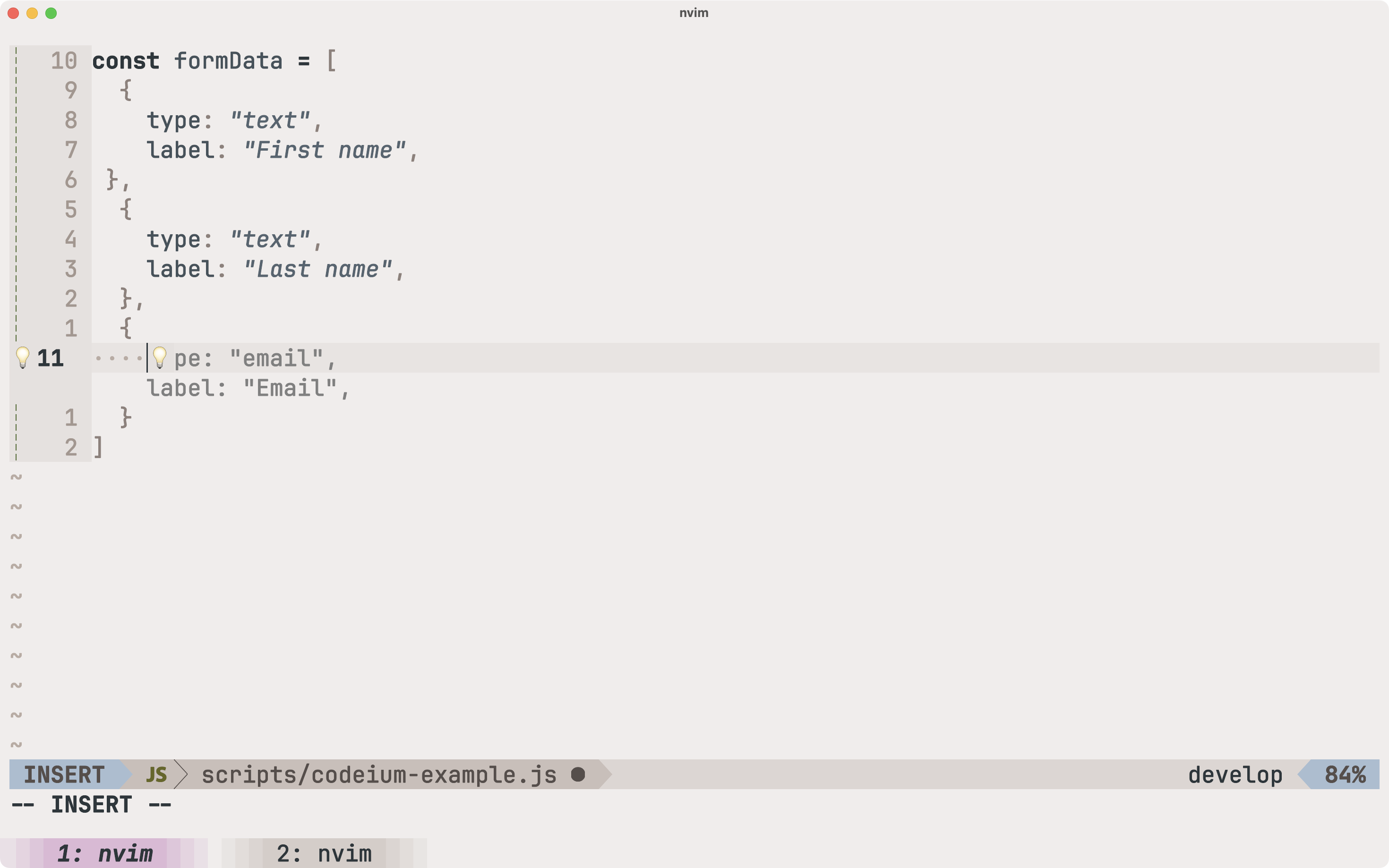
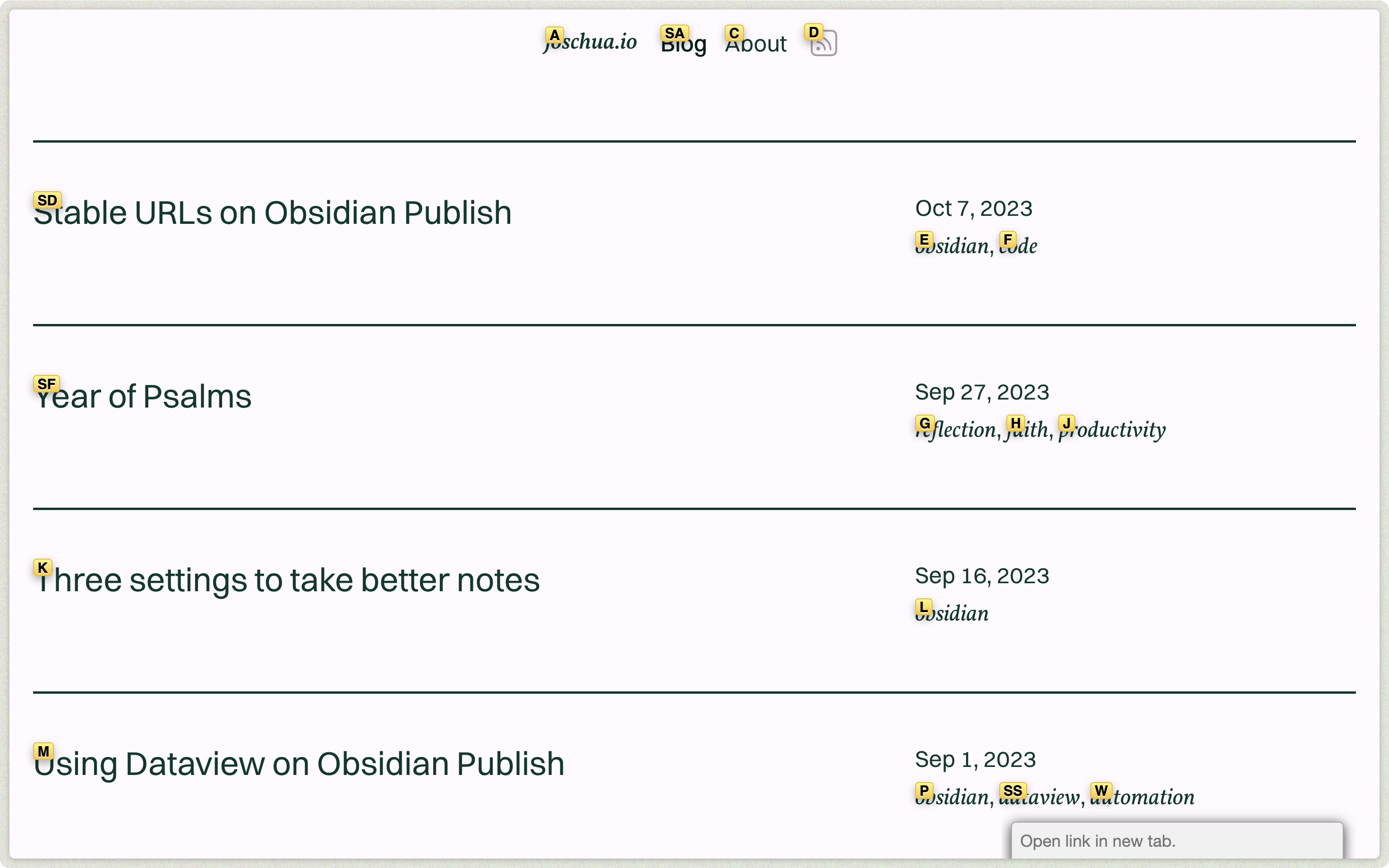
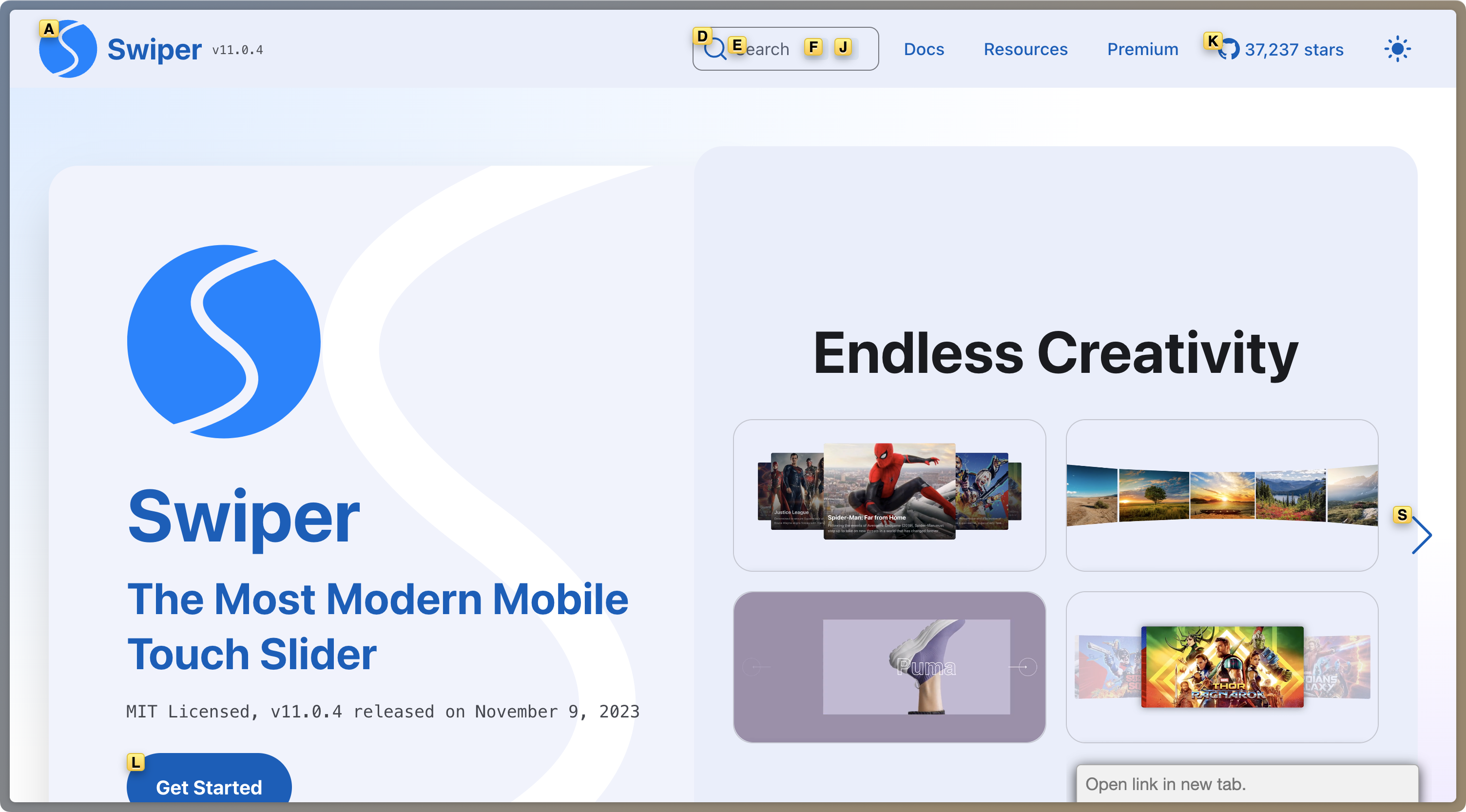
        <content type="html"><![CDATA[<h2 id="codeium"><a href="https://codeium.com/" rel="nofollow">Codeium</a></h2><p><img alt="AI code suggestion in a Terminal window" src="/images/posts/2023/11/new-tools/screenshot-terminal.png"></p><p><a href="https://codeium.com/" rel="nofollow">Codeium</a> is an AI code completion tool like <a href="https://github.com/features/copilot" rel="nofollow">GitHub Copilot</a>, but it's free! I’m a bit skeptical of all things AI but wanted to try it.</p><p>To my surprise, I have been using it for a few months now and haven't turned it off. Occasionally, the code suggestions it generates can be distracting and unhelpful. However, most of the time, it's actually quite useful, especially for repetitive code or boilerplate. It just feels really efficient to simply hit the tab key and have the rest of the code completed. There have been instances, particularly when working with unfamiliar APIs like Tensorflow, where Codeium has suggested solutions that I wouldn't have come up with on my own. For now, it remains a part of my workflow.</p><h2 id="vimium"><a href="https://github.com/philc/vimium" rel="nofollow">Vimium</a></h2><p><img alt="Website where links have key codes above them" src="/images/posts/2023/11/new-tools/screenshot-findmode.png">Vimium's Find Mode</p><p>After my mouse battery went dead in the middle of a workday, I was forced into a bit of an involuntary <a href="https://evantravers.com/articles/2023/05/31/keyboard-only-day/" rel="nofollow">keyboard-only day</a>. I remembered Evan mentioning <a href="https://github.com/philc/vimium" rel="nofollow">Vimium</a>, a browser extension that lets you navigate the web through the keyboard in a Vim-like manner.</p><p>While I am unsure if this is actually faster than using the mouse, it sure feels very efficient and satisfying to use the keyboard to browse. Vimium's Find Mode is very well done, and scrolling via <code class="">j</code> or <code class="">k</code> is smooth. The extension also adds some commands that aren't directly accessible in the browser. For example, <code class="">gu</code> goes up one level in the URL hierarchy, and <code class="">gU</code> goes to the root of the URL hierarchy.</p><p>It doesn't allow me to completely ditch the mouse though. For example, Vimium doesn't work well with Arc Splits. Find Mode works great on most websites but is clunky on others. Understanding which websites work well for keyboard-based navigation and which don't is helpful for me as a web developer though. After all, "<a href="https://www.w3.org/WAI/perspective-videos/keyboard/" rel="nofollow">Websites should not require a mouse</a>" is a foundational principle of accessibility.</p><p><img alt="Swiper.js website, some links, like Search or Github are highlighted in Find Mode, others, like Docs and Resources, aren&#x27;t" src="/images/posts/2023/11/new-tools/screenshot-swiper.png">For example, the top navigation on <a href="https://swiperjs.com/" rel="nofollow">Swiper.js</a> (Docs, Resources, Premium), is not accessible via the keyboard.</p><p>While Vimium hasn't taken over my whole browsing yet, it makes me more aware of accessibility on the web, is highly customisable and allows me to keep my hands on the keyboard even more throughout the day.</p><h2 id="ni"><a href="https://github.com/antfu/ni" rel="nofollow">Ni</a></h2><p>Lastly, <a href="https://github.com/antfu/ni" rel="nofollow">ni</a> is a universal package manager. The biggest thing that stopped me from trying out new package managers like <a href="https://bun.sh/" rel="nofollow">bun</a> was the inconvenience  of having to remember which manager I was using for each project. Anthony summed it up nicely in ni's Readme: “<em>npm i in a yarn project, again? F**k!</em>” 😅</p><p>Ni automatically detects the package manager being used for the project and uses the corresponding command.</p><pre class="language-bash" code="ni vite

# npm i vite
# yarn add vite
# pnpm add vite
# bun add vite
" language="bash" meta=""><code __ignoreMap="">ni vite

# npm i vite
# yarn add vite
# pnpm add vite
# bun add vite
</code></pre><p>I installed ni and it just works seamlessly. I can switch projects and run <code class="">nr dev</code>, knowing it knowing that it will function regardless of the installed package manager. It is the tool that finally convinced me to migrate this blog to bun.</p><h2 id="three-handy-tools">Three handy tools</h2><p>Code suggestions through <a href="https://codeium.com/" rel="nofollow">Codeium</a>, keyboard-based browsing with <a href="https://github.com/philc/vimium" rel="nofollow">Vimium</a> and <a href="https://github.com/antfu/ni" rel="nofollow">ni</a> as a universal package manager. Three small tools I installed recently that make working just a bit easier.</p>]]></content>
        <author>
            <name>Joschua Glau</name>
        </author>
    </entry>
    <entry>
        <title type="html"><![CDATA[Stable URLs on Obsidian Publish]]></title>
        <id>/posts/2023/10/07/stable-publish-urls</id>
        <link href="https://joschua.io/posts/2023/10/07/stable-publish-urls"/>
        <updated>2023-10-07T07:10:00.000Z</updated>
        <summary type="html"><![CDATA[Obsidian Publish is a great tool to share your emerging thoughts. But the  changing nature of your notes also means a lot of broken links for end users. Through Publish's permalink feature and UUIDs you can create stable URLs.]]></summary>
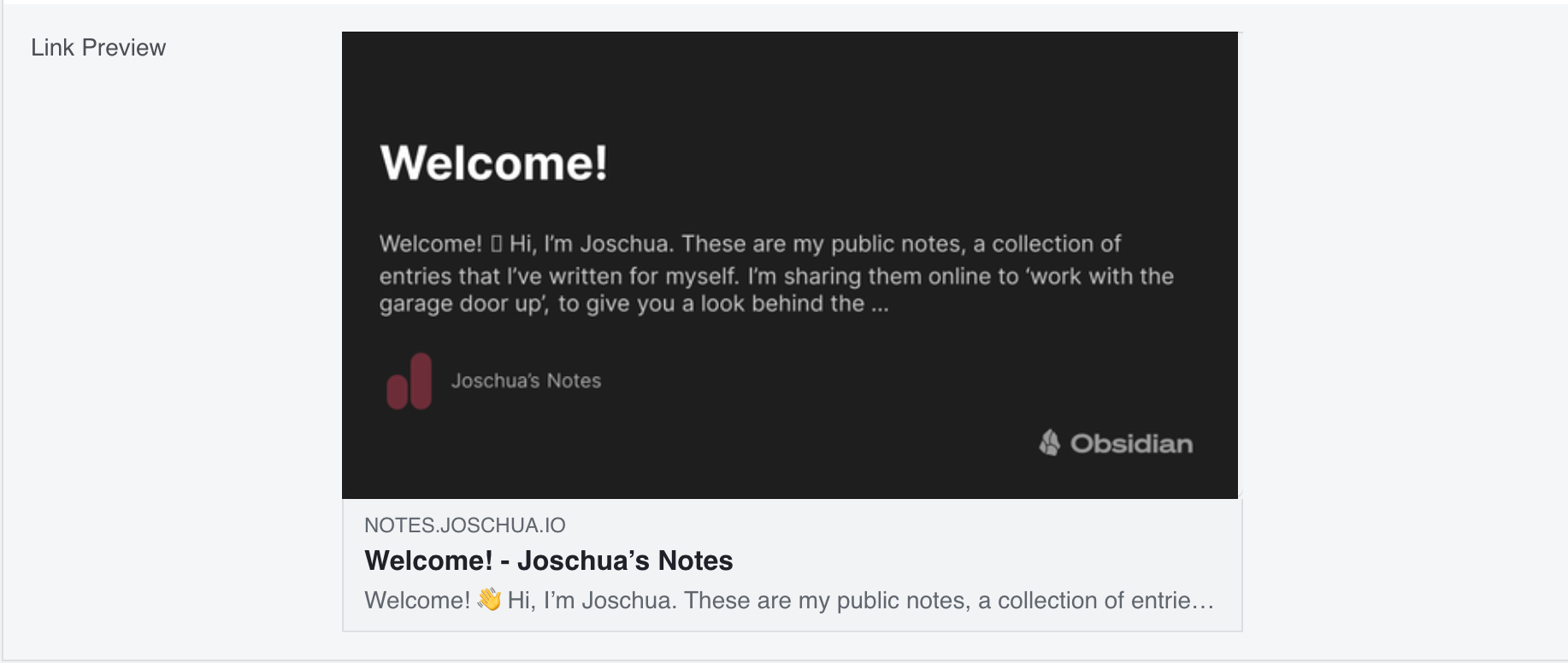
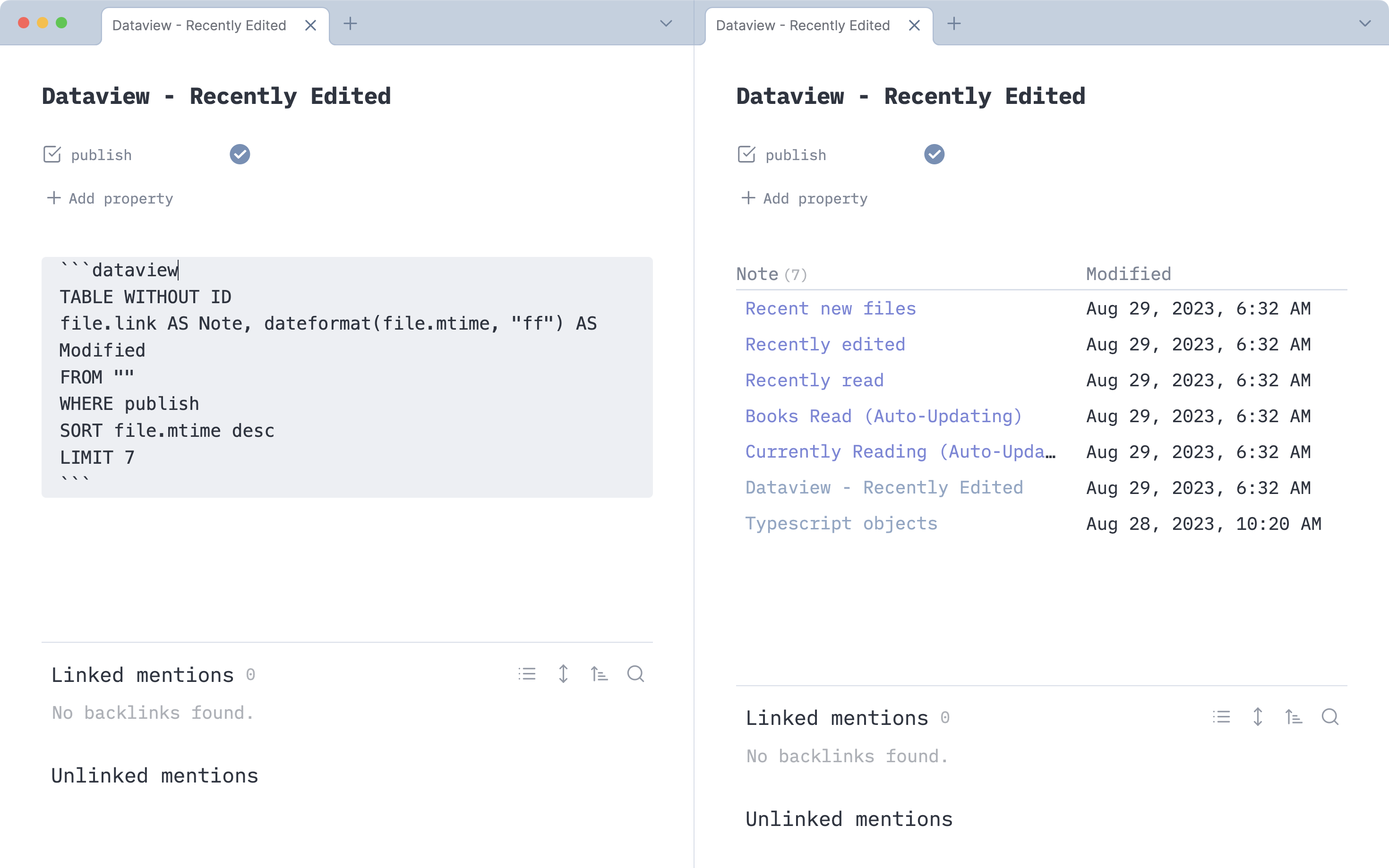
        <content type="html"><![CDATA[<p>It is considered best practice on the web that “<a href="https://www.w3.org/Provider/Style/URI.html" rel="nofollow">Cool URIs don't change</a>”: The link you copy today should still work tomorrow.</p><p>That is why I always felt uneasy about <a href="https://notes.joschua.io/" rel="nofollow">hosting my notes</a> on Obsidian Publish. A major appeal of Evergreen notetaking is thought evolution: Over time, notes are reworded, improved and moved. But since Obsidian Publish builds the URL based on the note path, that also means a lot of changed URLs, which results in a lot of 404s.</p><p>I accepted this tradeoff and made the decision to prioritise notetaking ergonomics over stable links. If I thought twice about changing any note, my notetaking practice would stall, ultimately defeating the purpose of this Digital Garden.</p><h2 id="permalinks-on-publish">Permalinks on Publish</h2><p>But a few months ago <a href="https://obsidian.md/changelog/2023-04-18-publish/" rel="nofollow">Obsidian released</a> <a href="https://help.obsidian.md/Obsidian+Publish/Publish+and+unpublish+notes#Permalinks" rel="nofollow">permalinks in Obsidian Publish</a>. The <code class="">permalink</code> field allows you to specify an URL that is used instead of the auto-generated URL from the title. This finally enables "cool", stable, URLs in Obsidian.</p><p>I decided to use a unique ID as the permalink for each note. This way, the URL remains the same even if I move or rename the file.</p><p>Luckily, I don't have to go through 500+ published notes by hand and come up with a unique name for each (😅) but code can accomplish that for me:</p><ol><li>Find all notes where the frontmatter includes <code class="">publish: true</code> and the <code class="">permalink</code> field holds no value (to not overwrite existing permalinks).</li><li>For each note, write a universally unique identifier (UUID) in the <code class="">permalink</code> field.</li></ol><p>JavaScript can produce UUIDs with the <code class="">crypto.randomUUID()</code> method (more on <a href="https://developer.mozilla.org/en-US/docs/Web/API/Crypto/randomUUID" rel="nofollow">MDN</a>). This produces a link like this: <code class="">notes.joschua.io/14a3b208-c496-4888-93b9-e3bfa160e5d8</code>. It's unique, but it's also kind of ugly 🤷‍♂️.</p><p>Instead, an API call to <a href="https://uuid.rocks/" rel="nofollow">uuid.rocks</a> can generate a short UUID through the aptly named package <a href="https://www.npmjs.com/package/short-uuid" rel="nofollow">short-uuid</a>. A link might look like this: <code class="">notes.joschua.io/x2HYMKwttrCCoaznbBbSqb</code>.</p><p>Surprisingly, this shorter UUID has the same risk of collisions (two IDs being the same) as the longer UUID mentioned above<sup><a href="#user-content-fn-2" aria-describedby="footnote-label" data-footnote-ref="" id="user-content-fnref-2">1</a></sup>. That likelihood, by the way, is incredibly low: To have a 50% probability of at least one collision you need to <em>generate 1 billion UUIDs per second</em> for about <em>86 years</em> (according to <a href="https://en.wikipedia.org/wiki/Universally_unique_identifier#Collisions" rel="nofollow">Wikipedia</a>). If my notetaking becomes that prolific, I can bear some duplicates 😅.</p><p>Even shorter UUIDs are not pretty. But they're good enough for me<sup><a href="#user-content-fn-1" aria-describedby="footnote-label" data-footnote-ref="" id="user-content-fnref-1">2</a></sup>, especially because social previews and browsers tabs still use the title of the note.</p><p><img alt="Link preview image that shows Welcome as the title of the note" src="/images/posts/2023/10/stable-publish-urls/social-preview.png">The URL for this note is <em><a href="https://notes.joschua.io/x2HYMKwttrCCoaznbBbSqb" rel="nofollow">notes.joschua.io/x2HYMKwttrCCoaznbBbSqb</a></em> but the social preview uses the readable title.</p><h2 id="updating-all-published-notes">Updating all published notes</h2><p>I ran this code in a <a href="https://silentvoid13.github.io/Templater/" rel="nofollow">Templater Plugin</a> template file. It also requires the <a href="https://blacksmithgu.github.io/obsidian-dataview/" rel="nofollow">Dataview Plugin</a>.</p><p><strong>Note</strong>: This template modifies your notes without warning. I recommend backing up your notes before running it.</p><pre class="language-js" code="// Write Permalinks.md

<%*
// Reference the Dataview API concisely
const dv = app.plugins.plugins[&#x22;dataview&#x22;].api;
// Get all notes through dataview
const notes = dv.pages();

// Filter to get only pages that have &#x60;publish: true&#x60; in the frontmatter and no &#x60;permalink&#x60; frontmatter field
const publishedNotesWithoutPermalink = notes.values.filter(
  (el) => el.file.frontmatter?.publish &#x26;&#x26; !el.file.frontmatter?.permalink
);

// If there are no notes with that condition, exit early
if (!publishedNotesWithoutPermalink?.length) {
  new Notice(&#x22;No notes without permalink found&#x22;);
  return;
}

// Create an array of paths
const paths = publishedNotesWithoutPermalink.map((note) => note.file.path);

// Get the tFile object for each note
const tFiles = paths.map((el) => app.vault.getAbstractFileByPath(el));

// Get a short UUID for each note through API call
const response = await (
  await fetch(&#x60;https://uuid.rocks/json/bulk/?short&#x26;count=${tFiles.length}&#x60;)
).json();
const uuids = response.uuids;

// Loop through each note
await tFiles.forEach(async (tFile, index) => {
  const find = &#x22;publish: true&#x22;;

  // instead of the API call above, you could also use the built-in browser method:
  // const uuid = crypto.randomUUID()
  const uuid = uuids[index]; // Get the UUID from the uuids array

  // Insert the permalink field into the frontmatter
  const insert = &#x60;\npermalink: ${uuid}&#x60;;
  const content = await app.vault.read(tFile);
  const contentInserted = content.replace(find, &#x60;${find}${insert}&#x60;);
  await app.vault.modify(tFile, contentInserted);
  console.log(&#x60;🔗 Added permalink ${uuid} in &#x22;${tFile.basename}&#x22;&#x60;);
});

// Show a notification with changed files
new Notice(
  &#x60;🔗 Added ${tFiles.length} permalink${tFiles.length > 1 ? &#x22;s&#x22; : &#x22;&#x22;}&#x60;
);
%>
" language="js" meta=""><code __ignoreMap="">// Write Permalinks.md

&#x3C;%*
// Reference the Dataview API concisely
const dv = app.plugins.plugins["dataview"].api;
// Get all notes through dataview
const notes = dv.pages();

// Filter to get only pages that have `publish: true` in the frontmatter and no `permalink` frontmatter field
const publishedNotesWithoutPermalink = notes.values.filter(
  (el) => el.file.frontmatter?.publish &#x26;&#x26; !el.file.frontmatter?.permalink
);

// If there are no notes with that condition, exit early
if (!publishedNotesWithoutPermalink?.length) {
  new Notice("No notes without permalink found");
  return;
}

// Create an array of paths
const paths = publishedNotesWithoutPermalink.map((note) => note.file.path);

// Get the tFile object for each note
const tFiles = paths.map((el) => app.vault.getAbstractFileByPath(el));

// Get a short UUID for each note through API call
const response = await (
  await fetch(`https://uuid.rocks/json/bulk/?short&#x26;count=${tFiles.length}`)
).json();
const uuids = response.uuids;

// Loop through each note
await tFiles.forEach(async (tFile, index) => {
  const find = "publish: true";

  // instead of the API call above, you could also use the built-in browser method:
  // const uuid = crypto.randomUUID()
  const uuid = uuids[index]; // Get the UUID from the uuids array

  // Insert the permalink field into the frontmatter
  const insert = `\npermalink: ${uuid}`;
  const content = await app.vault.read(tFile);
  const contentInserted = content.replace(find, `${find}${insert}`);
  await app.vault.modify(tFile, contentInserted);
  console.log(`🔗 Added permalink ${uuid} in "${tFile.basename}"`);
});

// Show a notification with changed files
new Notice(
  `🔗 Added ${tFiles.length} permalink${tFiles.length > 1 ? "s" : ""}`
);
%>
</code></pre><p>The code updated all files, and I uploaded the changes to Publish with trepidation. It took a bit for social previews to update, but nothing broke. Now I can link to notes with the certainty of stable URLs.</p><p>You can poke around this new structure on <a href="https://notes.joschua.io" rel="nofollow">notes.joschua.io</a>.</p><h2 id="handling-new-files">Handling new files</h2><p>Just like that, all published notes have a unique permalink. But what about new files?</p><p>I already have a <a href="https://joschua.io/posts/2023/09/01/obsidian-publish-dataview/#final-template" rel="nofollow">"pre-publish" template</a> that I call to publish new files. By adding the code above to it, each time I publish new notes, it makes sure each note has a unique permalink.</p><p>The full template is available in a <a href="https://gist.github.com/selfire1/3b73e1e981ae37b14977660f753e2263" rel="nofollow">Github Gist</a>.</p><section class="footnotes" data-footnotes=""><h2 class="sr-only" id="footnote-label">Footnotes</h2><ol><li id="user-content-fn-2">I think that is because it uses uppercase as well as lowercase characters, while <code class="">crypto.randomUUID()</code> only uses lowercase characters. <a href="#user-content-fnref-2" aria-label="Back to reference 1" class="data-footnote-backref" data-footnote-backref="">↩</a></li><li id="user-content-fn-1">Obsidian Publish has the option to <a href="https://help.obsidian.md/Obsidian+Publish/Redirecting+old+notes" rel="nofollow">Redirect old notes</a> through the <code class="">aliases</code> key in the frontmatter. But keeping track of every rename or move of a file would introduce a lot of maintenance into notetaking. <a href="#user-content-fnref-1" aria-label="Back to reference 2" class="data-footnote-backref" data-footnote-backref="">↩</a></li></ol></section>]]></content>
        <author>
            <name>Joschua Glau</name>
        </author>
    </entry>
    <entry>
        <title type="html"><![CDATA[Year of Psalms]]></title>
        <id>/posts/2023/09/28/year-of-psalms</id>
        <link href="https://joschua.io/posts/2023/09/28/year-of-psalms"/>
        <updated>2023-09-27T20:00:00.000Z</updated>
        <summary type="html"><![CDATA[My last 12 weeks that were guided by the theme of "Psalms and Prayer". I reflect on what was hard, what went well and what I learned.]]></summary>
        <content type="html"><![CDATA[<p>Since the start of 2022, I have been following the <a href="https://notes.joschua.io/30+External/31+Books/The+12+Week+Year" rel="nofollow">12 Week Year</a> framework. You treat every twelve weeks as if they were a new year by reflecting and setting resolutions. My theme for Quarter 3 of 2023 was "Psalms and Prayer".</p><p>In a past <a href="https://evantravers.com/articles/2023/03/28/obsidian-12wy-review-template/" rel="nofollow">quarterly review</a> I noticed how my intentions around being a follower of Jesus were low.</p><p><img alt="Rader chart of roles in my life, Friends and Work is high, Follower is low." src="/assets/2023/09/year-screenshot.png">Follower was at 6 in Quarter 1 and 7.5 in Q2.</p><p>I was also reading the book <a href="https://notes.joschua.io/30+External/31+Books/Deeper" rel="nofollow">Deeper</a> which emphasises the importance of spending time in the Bible:</p><blockquote><p>So as you seek to grow in Christ by becoming a deeper human, accept and embrace the truth that you will go deeper with Christ no further than you go into Scripture.</p></blockquote><p>Ortlund compares Scripture and Prayer to breathing:</p><blockquote><p>And praying is exhaling. Breathe in; breathe out. We take in the life-giving words of God, and we breathe them back out to God in prayer.</p></blockquote><p>I took an honest look at my prayer and Bible reading practice. They were terrible! 😬 I rarely open the Bible outside of church. My prayer habit was essentially non-existent, I mostly prayed ad-hoc in reaction to my circumstances.</p><p>I wanted to try sitting in prayer and Scripture through my everyday. So I decided to start the <em>Year of Psalms and Prayer</em><sup><a href="#user-content-fn-1" aria-describedby="footnote-label" data-footnote-ref="" id="user-content-fnref-1">1</a></sup>. For twelve weeks, I would read three Psalms daily: Morning, Noon and Night. I would then respond to this Scripture in Prayer.</p><p>This is my reflection on what was hard, what went well and what I learned.</p><h2 id="what-was-hard">What was hard</h2><h3 id="it-is-hard-to-hear-yourself-pray">It is hard to hear yourself pray</h3><p>I was mostly consistent and read three Psalms every day. But it is sort of hard to evaluate of how deep I actually went. Some days, I just skimmed over the words in a minute and was done. Sure, I read the words, but did they actually sink deep?</p><p>It is sort of hard to hear yourself pray. When I pray silently, there isn't a clear starting or stopping point. It is more that I am thinking towards God (?). Often it was hard to evaluate whether I actually prayed or "just" thought. Occasionally, I wrote down my prayers. That helped to centre me and gave me something to return to whenever my thoughts drifted.</p><h3 id="psalms-were-hard-to-relate-to">Psalms were hard to relate to</h3><p>Many Psalms were hard to relate to. David often feared for his literal life, being pursued by people who would kill him, and he prayed against them. I don't really have enemies 🤷‍♂️. I could make the "enemies" metaphorical, abstracting them into fear, insecurity, etc. But that feels reductive of the actual fear for his life that David writes of.</p><p>Life in those last twelve weeks was actually pretty good! There was no hardship in my life that compared to David's distress. So my prayers often quickly moved away from the essence of the Psalm to what was going on in my life.</p><p>At times though, when I felt lonely or overwhelmed, the Psalmist's utter reliance and trust in God were a real balm.</p><h3 id="hoping-for-more-transformation">Hoping for more transformation</h3><p>When reading in my lunch break at work, I hoped that reading a Psalm would centre me more. Sitting in God's presence and word definitely made me step outside the normal set of priorities and the bustle of the day job. It put things into perspective. But there wasn't a specific moment where I read a Psalm over lunch that really changed my behaviour going into work for the rest of the day.</p><h3 id="encountering-resistance">Encountering Resistance</h3><p>It was shocking to notice, but at times I <em>really</em> didn't want to open the Bible. I was almost repulsed by the idea of stepping into God's word. In <a href="https://notes.joschua.io/30+External/31+Books/The+War+Of+Art" rel="nofollow">The War Of Art</a> Pressfield talks about how the more upbuilding an activity is to your soul, the more Resistance comes in. I think the believer can recognise how behind this "Resistance" there are spiritual powers who want to stop us from getting closer to God. I knew I would encounter God if I started reading, but something in me really didn't want to.<sup><a href="#user-content-fn-2" aria-describedby="footnote-label" data-footnote-ref="" id="user-content-fnref-2">2</a></sup></p><p>It's important to recognise for the believer that the fight of building habits isn't just around willpower and systems. Meaningful change also faces spiritual resistance.</p><p>In the end, whenever I encountered resistance like this, it was my cue that I definitely needed to open Scripture.</p><h2 id="what-went-well">What went well</h2><h3 id="i-stuck-with-it">I stuck with it</h3><p>In general, I prayed three Psalms every day. Over twelve weeks, that's 234 Psalms. I only missed 18 Psalms during that time. I am happy with that.</p><p>David was someone who utterly relied on God. I hope by spending so much time in his humility and dependence, I internalised some of that as well. There were also many moments where the Holy Spirit made the words a reality for me. I was often touched by God's presence and felt the reality of God's goodness beyond the specific words in the Psalm. I was often overcome with awe and gratitude. When we seek him, he shows up.</p><p>Ironically, this happened most strikingly on the Psalm that people warned me most about. Whenever I would talk to people about reading through the Psalms, they'd jokingly reply "Oh, watch out for Psalm 119!"<sup><a href="#user-content-fn-3" aria-describedby="footnote-label" data-footnote-ref="" id="user-content-fnref-3">3</a></sup>, which is the longest one. But when it came time to actually read Psalm 119, the way the Psalmist unfolded the goodness of God and his word just left me in awe.</p><h3 id="community">Community</h3><p>I kicked this 12WY off by bringing some guys from church along. We read a Psalm daily and shared what stood out to us. That extra fellowship at the start boosted motivation and helped me establish the habit.</p><h3 id="sung-psalms">Sung Psalms</h3><p>Occasionally, I listened to Psalms turned into song. There is a great <a href="https://open.spotify.com/playlist/5NhoK56UPOG09wX94YSUcs?si=ac241abc3444460b" rel="nofollow">Psalms playlist on Spotify</a>. Especially the interpretations of a duo called <a href="https://open.spotify.com/artist/7AgYdpiGbObyY3WVJXxhi0?si=Fg3LV_9TSX2XwGtiWJiC9Q" rel="nofollow">Poor Bishop Hooper</a><sup><a href="#user-content-fn-4" aria-describedby="footnote-label" data-footnote-ref="" id="user-content-fnref-4">4</a></sup> opened up the Scripture in a new way.</p><h3 id="space-to-intercede">Space to intercede</h3><p>I often didn't dwell on the Psalm but moved into personal prayer. Partly that was disappointing, but it also created a new space for prayer in my life. After reading a Psalm, often people would pop into my head and I'd start praying for them.</p><p>In one specific moment, a friend's daughter was sick, and they asked for prayer. During my Psalms routine, that came into mind and I prayed for her. God brought healing and she recovered quickly. Just by having space to pray in my everyday, I can make a difference in people's life by interceding for them.</p><h3 id="bias-to-grace">Bias to grace</h3><p>I counted a Psalm as "done" if I read it. I am glad I kept the metric simple. If I had forced myself to evaluate the "depth" of reading on each Psalm, I would have spent less time praying and more time double-guessing. A bias to grace in counting a habit successful produced momentum.</p><h3 id="clear-cues">Clear cues</h3><p>I always read the morning Psalms over breakfast, the noon Psalm during my lunch break and the night Psalm in bed before going to sleep. Clearly defined places and times make following a habit easier. <a href="https://notes.joschua.io/30+External/31+Books/Atomic+Habits+%E2%80%93+An+Easy+&#x26;+Proven+Way+to+Build+Good+Habits+&#x26;+Break+Bad+Ones" rel="nofollow">Atomic Habits</a> introduces the concept of "habit stacking": after <em>existing habit</em>, I will <em>new habit</em>. Anchoring a new habit to everyday routines like meals provided a clear cue for me.</p><h3 id="sense-of-speed">Sense of speed</h3><p>After a few weeks, I lost momentum. I was excited in the start. But now skipping an individual Psalm didn't feel that bad.</p><p>The silver bullet were a few lines in my bullet journal. I remembered how <a href="https://andymatuschak.org/" rel="nofollow">Andy Matuschak</a> talked about the concept of "sense of speed": In app design, you want to clearly show users their progress and establish a feeling of them moving forward.</p><p>In my tracking so far, I just had a long list of Psalms that I ticked off every day. But there was no feeling of momentum.</p><p>I added a simple chart on my bullet journal spread.</p><p><img alt="Line chart that takes a dip around week 5 then rises" src="/assets/2023/09/year-stats.jpg">
Week 5 is where I started the chart. Y axis: Psalms read, X axis: Weeks.</p><p>Each week, I'd score how many Psalms I read. This visualised clearly how well I did that week. It also made me competitive to beat last week's score. If you want to motivate a nerd like me, give them some nice visualisation 🤓</p><h2 id="what-i-learned">What I learned</h2><p>My biggest takeaways around starting new habits were to have a clear cue by anchoring a habit unto existing ones and to create a sense of speed by tracking progress. It is also important to be aware that Resistance will try to counter any meaningful change.</p><p>When it comes to the practice itself, I am leaving this 12 Week Year with a new appreciation for Scripture. Reading God's word is just so good for the soul. I also enjoyed having space for prayer in my day and loved how much I prayed for other people. I want to keep creating room for that in my day.</p><section class="footnotes" data-footnotes=""><h2 class="sr-only" id="footnote-label">Footnotes</h2><ol><li id="user-content-fn-1">The Psalms as the prayer book of the Church felt like a natural starting point. <a href="#user-content-fnref-1" aria-label="Back to reference 1" class="data-footnote-backref" data-footnote-backref="">↩</a></li><li id="user-content-fn-2">This is confronting to recognise. It is also encouraging. The Bible is so powerful, the Enemy throws everything he has at you to stop you from reading it. <a href="#user-content-fnref-2" aria-label="Back to reference 2" class="data-footnote-backref" data-footnote-backref="">↩</a></li><li id="user-content-fn-3">I was a bit peeved by comments like this. We exalt Bible Reading, but once it is more than three paragraphs, that's too hard? 🤷‍♂️ <a href="#user-content-fnref-3" aria-label="Back to reference 3" class="data-footnote-backref" data-footnote-backref="">↩</a></li><li id="user-content-fn-4"><em>Poor Bishop Hooper</em> <a href="https://www.everypsalm.com/" rel="nofollow">released a psalm-based song every week</a> for nearly three years! <a href="#user-content-fnref-4" aria-label="Back to reference 4" class="data-footnote-backref" data-footnote-backref="">↩</a></li></ol></section>]]></content>
        <author>
            <name>Joschua Glau</name>
        </author>
    </entry>
    <entry>
        <title type="html"><![CDATA[Three settings to take better notes]]></title>
        <id>/posts/2023/09/16/three-tips-for-better-obsidian-notes</id>
        <link href="https://joschua.io/posts/2023/09/16/three-tips-for-better-obsidian-notes"/>
        <updated>2023-09-16T00:00:00.000Z</updated>
        <summary type="html"><![CDATA[Learn how to improve your Obsidian note-taking with quick and easy tips, including font size adjustments, inline titles, and choosing the right font for creative thinking.]]></summary>
        <content type="html"><![CDATA[<p>When note-taking, small notes are better<sup><a href="#user-content-fn-1" aria-describedby="footnote-label" data-footnote-ref="" id="user-content-fnref-1">1</a></sup>. There is low-hanging fruit in the Obsidian settings to encourage writing them.</p><h2 id="_1-increase-the-font-size">1. Increase the font size</h2><p>Consider this note.</p><p><img alt="Screenshot of the Obsidian app. The text is set in 16px and roughly fills half the screen." src="/assets/2023/09/smallnotes-screenshot-1.png"></p><p>This is the default font size. The text only fills up half the screen. The note feels short and incomplete.</p><p><img alt="The same note in the previous screenshot on 20px. The text now fill almost the whole space" src="/assets/2023/09/smallnotes-screenshot-2.png"></p><p>The same note, but with an increased text size. The note fills the space. It feels complete.</p><p>Writing in 16px or writing in 20px is the difference between mind-mapping with a pencil or a marker. In your personal notes, go for big.</p><p>Adjust the font size in <em>Settings / Appearance / Font / Font size.</em></p><h2 id="_2-enable-inline-titles">2. Enable inline titles</h2><p>The title of an Evergreen note is crucial. It contains the full idea in a concise claim.</p><p><img alt="The same note as previously with the title of the note displayed inline" src="/assets/2023/09/smallnotes-screenshot-3.png"></p><p>Have this title always visible to reword and improve as the note evolves.</p><p>I used to maintain two note headings: The file title, and a <code class=""># title</code> tag in the note. Don't be like past me. Remove the unnecessary overhead.</p><p>Enable inline titles in <em>Settings / Appearance / Advanced / Inline titles</em>.</p><h2 id="_3-set-a-messy-font">3. Set a messy font</h2><p><a href="https://notes.joschua.io/stateofmind-fonts" rel="nofollow">Different fonts when writing encourage different states of mind</a>.</p><p><img alt="The same note in Obsidian with a font that is almost monospaced and looks like a typewrite font" src="/assets/2023/09/smallnotes-screenshot-4.png"></p><p>Choose a font that makes you feel like doing messy, bold, creative thinking. <a href="https://github.com/iaolo/iA-Fonts/tree/master" rel="nofollow">iA Writer Quattro</a> works for me.</p><p>Set a font in <em>Settings / Appearance / Font / Text font.</em></p><h2 id="">…</h2><p>Our digital environment affects how we think.</p><p>These simple adjustments to Obsidian improve the ease of taking notes, ultimately fostering a more creative and productive note-taking experience.</p><section class="footnotes" data-footnotes=""><h2 class="sr-only" id="footnote-label">Footnotes</h2><ol><li id="user-content-fn-1">Shorter notes encourage <a href="https://notes.andymatuschak.org/zNUaiGAXp21eorsER1Jm9yU" rel="nofollow">Atomicity</a> and dense linking. Also, the effort per note is low. Therefore, you create more notes. This gives you more to work with. <a href="#user-content-fnref-1" aria-label="Back to reference 1" class="data-footnote-backref" data-footnote-backref="">↩</a></li></ol></section>]]></content>
        <author>
            <name>Joschua Glau</name>
        </author>
    </entry>
    <entry>
        <title type="html"><![CDATA[Using Dataview on Obsidian Publish]]></title>
        <id>/posts/2023/09/01/obsidian-publish-dataview</id>
        <link href="https://joschua.io/posts/2023/09/01/obsidian-publish-dataview"/>
        <updated>2023-09-01T07:30:00.000Z</updated>
        <summary type="html"><![CDATA[By default, you cannot use the Obsidian Dataview plugin on Obsidian Publish. But this blog post shows you how to use Dataview queries on you digital garden by using methods built into the Dataview API. We run through this by solving the problem of how to display recently edited files on Obsidian Publish.]]></summary>
        <content type="html"><![CDATA[<p>On the homepage of my <a href="https://notes.joschua.io/50+Slipbox/Welcome!" rel="nofollow">Obsidian Publish page</a>, I have a section called "Recent Notes". But often I would create a note, and forget to update the list. At some point, I even got a message asking if the site was still active, since the Recent Notes section didn't seem to be changing. 😬</p><p>When our ability to remember a repetitive job fails, automation comes in!</p><h2 id="dataview-plugin-on-obsidian-publish">Dataview Plugin on Obsidian Publish</h2><p>To get recently edited notes in my local vault, I would use an <a href="https://github.com/blacksmithgu/obsidian-dataview" rel="nofollow">Obsidian Dataview</a> query like this:</p><pre class="language-sql" code="TABLE WITHOUT ID
file.link AS Note, dateformat(file.mtime, &#x22;ff&#x22;) AS Modified
FROM &#x22;&#x22;
WHERE publish
SORT file.mtime desc
LIMIT 7
" language="sql" meta=""><code __ignoreMap="">TABLE WITHOUT ID
file.link AS Note, dateformat(file.mtime, "ff") AS Modified
FROM ""
WHERE publish
SORT file.mtime desc
LIMIT 7
</code></pre><p>This works well locally:</p><p><img alt="Split window of Obsidian with source mode dataview query on the left and the dynamic output on the right" src="/assets/2023/08/publish-dataview-1-screenshot.png"></p><p>But on Publish it just renders a code block:</p><p><img alt="Obsidian Publish site where the Dataview query code is displayed in a code block" src="/assets/2023/08/publish-dataview-2-screenshot.png"></p><p>This is because the Dataview Plugin is not "installed" on Obsidian Publish. Publish sites can only render Markdown files; they do not support dynamic queries.</p><h2 id="outputting-markdown-from-dataview-queries">Outputting Markdown from Dataview Queries</h2><p>Luckily for us, Dataview <em>can</em> output the result of a query in plain Markdown. The <a href="https://blacksmithgu.github.io/obsidian-dataview/api/code-reference/#dvquerymarkdownsource-file-settings" rel="nofollow"><code class="">dv.queryMarkdown</code></a> method receives a query and returns Markdown:</p><pre class="language-javascript" code="await dv.queryMarkdown(&#x22;LIST FROM #tag&#x22;);
// => { successful: true, value: { &#x22;- [[Page 1]]\n- [[Page 2]]&#x22; } }
" language="javascript" meta=""><code __ignoreMap="">await dv.queryMarkdown("LIST FROM #tag");
// => { successful: true, value: { "- [[Page 1]]\n- [[Page 2]]" } }
</code></pre><p>We can run this method in an <a href="https://silentvoid13.github.io/Templater/" rel="nofollow">Obsidian Templater</a> template to write the Markdown output of a query to a file.</p><pre class="language-javascript" code="// Update Publish Files.md
<%*
const dv = app.plugins.plugins[&#x22;dataview&#x22;].api;
const filename = &#x22;Recently Edited&#x22;;
const query = &#x60;TABLE WITHOUT ID
file.link AS Note, dateformat(file.mtime, &#x22;ff&#x22;) AS Modified
FROM &#x22;&#x22;
WHERE publish SORT file.mtime desc
LIMIT 7&#x60;;

const tFile = tp.file.find_tfile(filename);
const queryOutput = await dv.queryMarkdown(query);

// write query output to file
await app.vault.modify(tFile, queryOutput.value);
%>
" language="javascript" meta=""><code __ignoreMap="">// Update Publish Files.md
&#x3C;%*
const dv = app.plugins.plugins["dataview"].api;
const filename = "Recently Edited";
const query = `TABLE WITHOUT ID
file.link AS Note, dateformat(file.mtime, "ff") AS Modified
FROM ""
WHERE publish SORT file.mtime desc
LIMIT 7`;

const tFile = tp.file.find_tfile(filename);
const queryOutput = await dv.queryMarkdown(query);

// write query output to file
await app.vault.modify(tFile, queryOutput.value);
%>
</code></pre><p>Whenever this template is run, the Markdown result of the <code class="">TABLE…</code> Dataview query is written to the file "Recently Edited".</p><p><img alt="Split window of Obsidian where a static Markdown table is displayed on the left in source mode and the same table is shown on the right in preview mode." src="/assets/2023/08/publish-dataview-source-lp-screenshot.png">Notice how Source Mode on the left displays a standard Markdown table.</p><p><strong>Important</strong>: This code <em>completely overwrites</em> the target note.</p><h3 id="writing-to-multiple-files">Writing to multiple files</h3><p>We can rewrite the code to support multiple filenames and queries:</p><pre class="language-javascript" code="// Update Publish Files.md
<%*
const dv = app.plugins.plugins[&#x22;dataview&#x22;].api;
const openPublishPanel = app.commands.commands[&#x22;publish:view-changes&#x22;].callback;

const fileAndQuery = new Map([
  [
    &#x22;Recently edited&#x22;,
    &#x27;TABLE WITHOUT ID file.link AS Note, dateformat(file.mtime, &#x22;ff&#x22;) AS Modified FROM &#x22;50 Slipbox&#x22; OR &#x22;30 External&#x22; WHERE publish SORT file.mtime desc LIMIT 7&#x27;,
  ],
  [
    &#x22;Recent new files&#x22;,
    &#x27;TABLE WITHOUT ID file.link AS Note, dateformat(file.ctime, &#x22;DD&#x22;) AS Added FROM &#x22;50 Slipbox&#x22; OR &#x22;30 External&#x22; WHERE publish SORT file.ctime desc LIMIT 7&#x27;,
  ],
]);

await fileAndQuery.forEach(async (query, filename) => {

  const tFile = tp.file.find_tfile(filename);
  const queryOutput = await dv.queryMarkdown(query);

  // write query output to file
  await app.vault.modify(tFile, queryOutput.value);

});
%>
" language="javascript" meta=""><code __ignoreMap="">// Update Publish Files.md
&#x3C;%*
const dv = app.plugins.plugins["dataview"].api;
const openPublishPanel = app.commands.commands["publish:view-changes"].callback;

const fileAndQuery = new Map([
  [
    "Recently edited",
    'TABLE WITHOUT ID file.link AS Note, dateformat(file.mtime, "ff") AS Modified FROM "50 Slipbox" OR "30 External" WHERE publish SORT file.mtime desc LIMIT 7',
  ],
  [
    "Recent new files",
    'TABLE WITHOUT ID file.link AS Note, dateformat(file.ctime, "DD") AS Added FROM "50 Slipbox" OR "30 External" WHERE publish SORT file.ctime desc LIMIT 7',
  ],
]);

await fileAndQuery.forEach(async (query, filename) => {

  const tFile = tp.file.find_tfile(filename);
  const queryOutput = await dv.queryMarkdown(query);

  // write query output to file
  await app.vault.modify(tFile, queryOutput.value);

});
%>
</code></pre><p>When we run this template, the query outputs are written into the files <code class="">Recently edited</code> and <code class="">Recent new files</code>. You can add as many queries and filenames as you'd like!</p><p>I wanted to try out the new-ish <code class="">Map()</code> syntax, but an array of objects would have worked as well! If you're unfamiliar with Maps in JavaScript, it is worth to <a href="https://developer.mozilla.org/en-US/docs/Web/JavaScript/Reference/Global_Objects/Map" rel="nofollow">read more on MDN</a>.</p><p>Now we have a template that writes the Markdown output of multiple queries into corresponding files. But at this point, we still need to remember to run this template before uploading changes to Obsidian Publish.</p><h2 id="final-template">Final template</h2><p>To upload changes to Obsidian Publish, we would usually open the Command Palette and then run the <code class="">Publish: Publish changes…</code> command.</p><p>But we can move this step into the "Update Publish Files" template, so that all of our Publish-related actions are in one place:</p><ol><li>The template first writes query results to the corresponding files,</li><li>then opens the "Publish Changes" dialog</li></ol><p>The "Update Publish Files" template now acts as a replacement for the <code class="">Publish: Publish changes…</code> command.</p><p>In the Templater Options, we can assign a hotkey to our "Update Publish Files" template. I had <code class="">CMD + P</code> bound to open the Publish panel. Now I assigned this hotkey to the template. I keep the muscle memory of publishing new notes, and every time the Dataview files are updated in the background.</p><p>Here is the final template, including some other improvements:</p><ol><li>Writes <code class="">publish: true</code> in the Frontmatter of the file and adds a comment,</li><li>Creates a file if the filename doesn't exist,</li><li>Includes error handling and progress notifications.</li></ol><pre class="language-javascript" code="// Update Publish Files.md

<%*
const dv = app.plugins.plugins[&#x22;dataview&#x22;].api;
const openPublishPanel = app.commands.commands[&#x22;publish:view-changes&#x22;].callback;

// Add as many filenames and queries as you&#x27;d like!
const fileAndQuery = new Map([
  [
    &#x22;Recently edited&#x22;,
    &#x27;TABLE WITHOUT ID file.link AS Note, dateformat(file.mtime, &#x22;ff&#x22;) AS Modified FROM &#x22;50 Slipbox&#x22; OR &#x22;30 External&#x22; WHERE publish SORT file.mtime desc LIMIT 7&#x27;,
  ],
  [
    &#x22;Recent new files&#x22;,
    &#x27;TABLE WITHOUT ID file.link AS Note, dateformat(file.ctime, &#x22;DD&#x22;) AS Added FROM &#x22;50 Slipbox&#x22; OR &#x22;30 External&#x22; WHERE publish SORT file.ctime desc LIMIT 7&#x27;,
  ],
]);

await fileAndQuery.forEach(async (query, filename) => {
  if (!tp.file.find_tfile(filename)) {
    await tp.file.create_new(&#x22;&#x22;, filename);
    new Notice(&#x60;Created ${filename}.&#x60;);
  }
  const tFile = tp.file.find_tfile(filename);
  const queryOutput = await dv.queryMarkdown(query);
  const fileContent = &#x60;---\npublish: true\n---\n%% update via &#x22;Update Publish Files&#x22; template %% \n\n${queryOutput.value}&#x60;;
  try {
    await app.vault.modify(tFile, fileContent);
    new Notice(&#x60;Updated ${tFile.basename}.&#x60;);
  } catch (error) {
    new Notice(&#x22;⚠️ ERROR updating! Check console. Skipped file: &#x22; + filename , 0);
  }
});
openPublishPanel();
%>
" language="javascript" meta=""><code __ignoreMap="">// Update Publish Files.md

&#x3C;%*
const dv = app.plugins.plugins["dataview"].api;
const openPublishPanel = app.commands.commands["publish:view-changes"].callback;

// Add as many filenames and queries as you'd like!
const fileAndQuery = new Map([
  [
    "Recently edited",
    'TABLE WITHOUT ID file.link AS Note, dateformat(file.mtime, "ff") AS Modified FROM "50 Slipbox" OR "30 External" WHERE publish SORT file.mtime desc LIMIT 7',
  ],
  [
    "Recent new files",
    'TABLE WITHOUT ID file.link AS Note, dateformat(file.ctime, "DD") AS Added FROM "50 Slipbox" OR "30 External" WHERE publish SORT file.ctime desc LIMIT 7',
  ],
]);

await fileAndQuery.forEach(async (query, filename) => {
  if (!tp.file.find_tfile(filename)) {
    await tp.file.create_new("", filename);
    new Notice(`Created ${filename}.`);
  }
  const tFile = tp.file.find_tfile(filename);
  const queryOutput = await dv.queryMarkdown(query);
  const fileContent = `---\npublish: true\n---\n%% update via "Update Publish Files" template %% \n\n${queryOutput.value}`;
  try {
    await app.vault.modify(tFile, fileContent);
    new Notice(`Updated ${tFile.basename}.`);
  } catch (error) {
    new Notice("⚠️ ERROR updating! Check console. Skipped file: " + filename , 0);
  }
});
openPublishPanel();
%>
</code></pre><h2 id="result">Result</h2><p>On my Publish site, I have added five Dataview-powered query notes so far: <a href="https://notes.joschua.io/60+Outputs/Recently+edited" rel="nofollow">Recently edited notes</a> and <a href="https://notes.joschua.io/60+Outputs/Recent+new+files" rel="nofollow">recently created ones</a>, books that I am <a href="https://notes.joschua.io/60+Outputs/Currently+Reading+%28Auto-Updating%29" rel="nofollow">currently reading</a> and that I <a href="https://notes.joschua.io/60+Outputs/Recently+read" rel="nofollow">read recently</a>, as well as a <a href="https://notes.joschua.io/60+Outputs/Books+Read+%28Auto-Updating%29" rel="nofollow">list of 80+ books</a> that I read.</p><p><img alt="Obsidian Publish site showing a table of books with three columns: Cover (showing the thumbnail), title and type (eg. non-fiction or fiction)" src="/assets/2023/08/publish-booklist-screenshot.png">Dataview queries can be as complex as you like, even including images and tags.</p><p>I embedded a few of those notes into the <a href="https://notes.joschua.io" rel="nofollow">homepage of my Publish page</a>. Whenever I publish new notes with the template, those files are automatically updated.</p><p><img alt="Obsidian Publish site with the sections &#x22;Recent new notes&#x22; and &#x22;Recently edited&#x22;  and a table of notes underneath each" src="/assets/2023/08/publish-hero-screenshot.png"></p><p>Now when a reader stumbles upon the page, they immediately see the most recent notes — with minimal upkeep on my end!</p>]]></content>
        <author>
            <name>Joschua Glau</name>
        </author>
    </entry>
    <entry>
        <title type="html"><![CDATA[How to use Astro’s Image Optimization with Tina CMS]]></title>
        <id>/posts/2023/08/16/how-to-use-astro-assets-with-tina-cms</id>
        <link href="https://joschua.io/posts/2023/08/16/how-to-use-astro-assets-with-tina-cms"/>
        <updated>2023-08-16T03:17:27.000Z</updated>
        <summary type="html"><![CDATA[The web framework Astro offers powerful image optimisation. Many git-based CMS like TinaCMS or Decap CMS use a different path syntax. This can lead to Astro images not being optimised. We can use Astro Asset's images in TinaCMS by adding a prebuild script.]]></summary>
        <content type="html"><![CDATA[<p>Note: <strong>This guide was originally written for Astro version 2.x. If you are using Astro 3.x, you can jump straight to the <em><a href="#update-for-astro-30" title="Update for Astro 3.0">Update for Astro 3.0</a></em> section</strong>; or read ahead for context.</p><p>…</p><p><a href="https://docs.astro.build/en/guides/assets/" rel="nofollow">Astro Assets</a> ("Astro Images" in v3) is a powerful image optimisation tool built into <a href="https://astro.build/" rel="nofollow">Astro</a>. It is <strong>experimental</strong> in Astro 2.x, but stable in Astro 3.x.</p><p>By default, the path syntax that <a href="https://tina.io/docs/" rel="nofollow">Tina CMS</a> uses to reference images is incompatible with Astro Asset's syntax. However, we can make those two tools work together by adding a <em>prebuild</em> script.</p><h2 id="the-problem-different-path-syntax">The problem: Different path syntax</h2><p>In order for Astro Assets to process a file, it needs to be</p><ol><li>Placed in the <code class="">/src/assets</code> folder</li><li>Referenced with a <em>path alias</em><sup><a href="#user-content-fn-1" aria-describedby="footnote-label" data-footnote-ref="" id="user-content-fnref-1">1</a></sup> like this: <code class="">~/src/assets</code>.</li></ol><p>In a markdown file, this is the syntax for an image to be optimised by Astro:</p><pre class="language-markdown" code="![alt text](~/assets/image.png)
" language="markdown" meta=""><code __ignoreMap="">![alt text](~/assets/image.png)
</code></pre><p>However, Tina cannot resolve Astro’s path alias. Therefore images are broken:</p><p><img alt="Screenshot of the TinaCMS interface. Instead of images, a broken image icon is displayed." src="/assets/2023/08/screenshot-tina-editor-broken.png"></p><p>We could switch all images to the Tina-compatible syntax:</p><pre class="language-markdown" code="![alt text](/assets/image.png)
" language="markdown" meta=""><code __ignoreMap="">![alt text](/assets/image.png)
</code></pre><p>But then we loose Astro Asset's image optimisation.</p><h2 id="solution-use-a-tina-friendly-path-and-adapt-it-on-build">Solution: Use a Tina-friendly path and adapt it on build</h2><h3 id="step-1-change-the-tina-media-folder">Step 1: Change the Tina media folder</h3><p>At the time of writing, the default path for media in TinaCMS is <code class="">/public</code>. Change the path to <code class="">/src/assets</code> in the Tina config:</p><pre class="language-javascript" code="// tina/config.ts

export default defineConfig({
  media: {
    tina: {
      mediaRoot: &#x22;/src/assets&#x22;,
      publicFolder: &#x22;&#x22;,
    },
  },
  {
    schema: {
      // other configuration…
    }
  },
});
" language="javascript" meta=""><code __ignoreMap="">// tina/config.ts

export default defineConfig({
  media: {
    tina: {
      mediaRoot: "/src/assets",
      publicFolder: "",
    },
  },
  {
    schema: {
      // other configuration…
    }
  },
});
</code></pre><p>TinaCMS now places images in the <code class="">/src/assets</code> folder.</p><h3 id="step-2-add-a-script-that-adapts-the-path-on-build">Step 2: Add a script that adapts the path on build</h3><p>When we edit our site locally, we leave the image paths in the Tina-friendly <code class="">/src/assets</code> syntax. But when we build our site on a server, we run a script that replaces the path with the Astro Assets-friendly <code class="">~/src/assets</code> path alias.</p><p>Add a <code class="">prebuild</code> script to <code class="">package.json</code>:</p><pre class="language-json" code="{
  &#x22;scripts&#x22;: {
    &#x22;dev&#x22;: &#x22;tinacms dev -c &#x27;astro dev&#x27;&#x22;,
    &#x22;prebuild&#x22;: &#x22;node scripts/replaceAssetPaths.js&#x22;,
    &#x22;build&#x22;: &#x22;astro build&#x22;
  }
}
" language="json" meta=""><code __ignoreMap="">{
  "scripts": {
    "dev": "tinacms dev -c 'astro dev'",
    "prebuild": "node scripts/replaceAssetPaths.js",
    "build": "astro build"
  }
}
</code></pre><p>At the root of the project, create a <code class="">scripts</code> folder and create the file <code class="">replaceAssetPaths.js</code> in it.</p><p>This script will find all occurrences of <code class="">/src/assets/</code> and replace it with <code class="">~/src/assets/</code>:</p><pre class="language-javascript" code="// /scripts/replaceAssetPaths.js

// all .md files in this directory and subdirectories will be processed
const postsDirectory = &#x22;/src/content/posts/&#x22;;

// Find and replace strings
const find = &#x22;/src/assets/&#x22;;
const replace = &#x22;~/assets/&#x22;;
// Special characters (https://en.wikipedia.org/wiki/Regular_expression#POSIX_basic_and_extended) need to be escaped

import { exec } from &#x22;child_process&#x22;;
// execute bash command
exec(
  &#x60;find ${process.cwd()}${postsDirectory} -type f -name &#x27;*.md&#x27; -print0 | xargs -0 sed -i -e &#x27;s:${find}:${replace}:g&#x27;&#x60;,
  // Note: GNU sed that runs on Linux but not on mac (most servers use Linux)
  (error, stdout, stderr) => {
    // error handling
    if (error) {
      console.log(&#x60;error: ${error.message}&#x60;);
      return;
    }
    if (stderr) {
      console.log(&#x60;stderr: ${stderr}&#x60;);
      return;
    }
    // success
    console.log(stdout);
    console.log(&#x22;🖼️ Successfully replaced asset paths&#x22;);
  },
);
" language="javascript" meta=""><code __ignoreMap="">// /scripts/replaceAssetPaths.js

// all .md files in this directory and subdirectories will be processed
const postsDirectory = "/src/content/posts/";

// Find and replace strings
const find = "/src/assets/";
const replace = "~/assets/";
// Special characters (https://en.wikipedia.org/wiki/Regular_expression#POSIX_basic_and_extended) need to be escaped

import { exec } from "child_process";
// execute bash command
exec(
  `find ${process.cwd()}${postsDirectory} -type f -name '*.md' -print0 | xargs -0 sed -i -e 's:${find}:${replace}:g'`,
  // Note: GNU sed that runs on Linux but not on mac (most servers use Linux)
  (error, stdout, stderr) => {
    // error handling
    if (error) {
      console.log(`error: ${error.message}`);
      return;
    }
    if (stderr) {
      console.log(`stderr: ${stderr}`);
      return;
    }
    // success
    console.log(stdout);
    console.log("🖼️ Successfully replaced asset paths");
  },
);
</code></pre><p>Running this locally, you might run into a gotcha with the <code class="">sed</code> command. Linux uses <code class="">sed -i</code> (GNU); MacOS uses <code class="">sed -i ''</code> (BSD). So the script might not work locally on your Mac. But it runs on the (likely) Linux-based server which hosts your website<sup><a href="#user-content-fn-2" aria-describedby="footnote-label" data-footnote-ref="" id="user-content-fnref-2">2</a></sup>.</p><h2 id="tinacms-astro-assets-the-best-of-both-worlds">TinaCMS &#x26; Astro Assets: The best of both worlds!</h2><p>When writing locally, you can edit your website in TinaCMS, adding images to your heart’s delight!</p><p>On deploy, npm runs <code class="">prebuild</code>, which executes <code class="">replaceAssetPaths.js</code>. After that, <code class="">build</code> runs with Astro Assets-compatible paths. Once the site is built, you can inspect any images on the site to check that they were processed correctly.</p><p>Now have a website with the best of both worlds: Tina’s simple CMS experience and Astro Assets' powerful image optimisation.</p><h2 id="update-for-astro-30">Update for Astro 3.0</h2><p>In Astro 3.0, support for path aliases (eg. <code class="">~/assets</code>) has been removed. Images need to be referenced with relative paths instead (eg. <code class="">../../assets</code>).</p><p>In a nutshell, these are the steps to use Astro's Image Optimisation with a CMS provider like TinaCMS:</p><ol><li><a href="#step-1-change-the-tina-media-folder">Change the CMS media folder</a></li><li><a href="#step-2-add-a-script-that-adapts-the-path-on-build">Add a <code class="">prebuild</code> script in <code class="">package.json</code></a></li><li>Create the script file (see below)</li></ol><pre class="language-javascript" code="// scripts/replaceAssetPaths.js

// all .md files in this directory will be processed
// specify from the root of your project
const postsDirectory = &#x22;/src/content/posts/&#x22;;

// Find and replace strings
const find = &#x22;/src/assets/&#x22;;
let replace = &#x22;../../../../../assets/&#x22;; // update this path based on where files are located

replace = replace.replaceAll(&#x22;.&#x22;, &#x22;\\.&#x22;);
// Special characters (https://en.wikipedia.org/wiki/Regular_expression#POSIX_basic_and_extended) need to be escaped

import { exec } from &#x22;child_process&#x22;;
// execute bash command
exec(
  &#x60;find ${process.cwd()}${postsDirectory} -type f -name &#x27;*.md&#x27; -print0 | xargs -0 sed -i -e &#x27;s:${find}:${replace}:g&#x27;&#x60;,
  // GNU sed that runs on Linux but not on mac
  (error, stdout, stderr) => {
    // error handling
    if (error) {
      console.log(&#x60;error: ${error.message}&#x60;);
      return;
    }
    if (stderr) {
      console.log(&#x60;stderr: ${stderr}&#x60;);
      return;
    }
    // success
    console.log(stdout);
    console.log(&#x22;🖼️ Successfully replaced asset paths&#x22;);
  },
);
" language="javascript" meta=""><code __ignoreMap="">// scripts/replaceAssetPaths.js

// all .md files in this directory will be processed
// specify from the root of your project
const postsDirectory = "/src/content/posts/";

// Find and replace strings
const find = "/src/assets/";
let replace = "../../../../../assets/"; // update this path based on where files are located

replace = replace.replaceAll(".", "\\.");
// Special characters (https://en.wikipedia.org/wiki/Regular_expression#POSIX_basic_and_extended) need to be escaped

import { exec } from "child_process";
// execute bash command
exec(
  `find ${process.cwd()}${postsDirectory} -type f -name '*.md' -print0 | xargs -0 sed -i -e 's:${find}:${replace}:g'`,
  // GNU sed that runs on Linux but not on mac
  (error, stdout, stderr) => {
    // error handling
    if (error) {
      console.log(`error: ${error.message}`);
      return;
    }
    if (stderr) {
      console.log(`stderr: ${stderr}`);
      return;
    }
    // success
    console.log(stdout);
    console.log("🖼️ Successfully replaced asset paths");
  },
);
</code></pre><section class="footnotes" data-footnotes=""><h2 class="sr-only" id="footnote-label">Footnotes</h2><ol><li id="user-content-fn-1">Images can also be referenced by <em>relative path</em>: <code class="">../../../assets/image.png</code>. But I prefer the alias syntax since it is more concise. <a href="#user-content-fnref-1" aria-label="Back to reference 1" class="data-footnote-backref" data-footnote-backref="">↩</a></li><li id="user-content-fn-2">I tried using <code class="">perl</code> to have a macOS and Linux compatible version. I couldn’t get it to work. If you know how to construct a version that works on Linux and MacOS, please <a href="/about" title="About page">let me know</a> and I will update the blog post! <a href="#user-content-fnref-2" aria-label="Back to reference 2" class="data-footnote-backref" data-footnote-backref="">↩</a></li></ol></section>]]></content>
        <author>
            <name>Joschua Glau</name>
        </author>
    </entry>
    <entry>
        <title type="html"><![CDATA[Blog version 3.0]]></title>
        <id>/posts/2023/08/10/blog-version-3</id>
        <link href="https://joschua.io/posts/2023/08/10/blog-version-3"/>
        <updated>2023-08-09T14:00:00.000Z</updated>
        <summary type="html"><![CDATA[It's a bit embarrassing…

Since starting this blog ~8 months ago, I completely rewrote it into a different framework three times. During that time, I wrote nine blog posts…]]></summary>
        <content type="html"><![CDATA[<p>It’s a bit embarrassing…</p><p>Since starting this blog ~8 months ago, I completely rewrote it <em>three times</em>. During that time, I published nine blog posts.</p><p>A 3/1 ratio of blog post to framework is not great. 😅</p><p>That being said, I was quite unhappy with version 2.0 of this blog.</p><p>But let’s go back to see how we ended up here. Version 1 of this site was built with <a href="https://www.11ty.dev/" rel="nofollow">Eleventy</a>, a static site generator.</p><p><img alt="Screenshot of version 1.0 of this blog" src="/assets/2023/08/screenshot-version-1.0.png"><em>Version 1.0 with Eleventy</em></p><p>After just three months, I switched to <a href="https://nuxt.com/" rel="nofollow">Nuxt</a> and rewrote the whole site. I had just started a new job, which used this Vue framework. So I wanted to get comfortable with it. But a full-blown SPA builder was way too feature-rich for a humble personal blog. I didn't like the design I went for, and the site constantly threw errors.</p><p><img alt="Screenshot of version 2.0 of the blog" src="/assets/2023/08/screenshot-version-2.0.png"><em>Version 2.0 with Nuxt</em></p><p>So I knew I had to switch things up…</p><h2 id="inspiration-and-iterations">Inspiration and iterations</h2><p>I started collecting inspiration for (yet) another redesign.</p><p><img alt="Website with multiple screenshots, arrows and annotations" src="/assets/2023/08/easel.png"></p><p>This <strong><a href="https://arc.net/e/25D8DC71-920A-45C7-BE78-067810680027" rel="nofollow">Easel</a></strong><sup><a href="#user-content-fn-1" aria-describedby="footnote-label" data-footnote-ref="" id="user-content-fnref-1">1</a></sup> holds those influences. It's a visual history of the blog, and I am adding inspiration as I come across it. So feel free to explore and be inspired!</p><h2 id="version-3-back-to-simplicity">Version 3: Back to simplicity</h2><p>For this rewrite, I went back to static site generation, this time with <a href="https://astro.build/" rel="nofollow">Astro</a>. I took what I liked about the design from version 1 and simplified things to place more emphasis on the actual content.</p><p><img alt="" src="/assets/2023/08/screenshot-version-3.0.png"><em>Version 3.0 with Astro</em></p><p>I am really happy with how the site turned out! My hope is that with this version, I will spend less time tinkering and more time writing.</p><section class="footnotes" data-footnotes=""><h2 class="sr-only" id="footnote-label">Footnotes</h2><ol><li id="user-content-fn-1">An <a href="https://www.youtube.com/watch?v=ukquBSOpmTk" rel="nofollow">Easel</a> is a free-form web canvas built into <a href="https://arc.net/" rel="nofollow">Arc Browser</a>. <a href="#user-content-fnref-1" aria-label="Back to reference 1" class="data-footnote-backref" data-footnote-backref="">↩</a></li></ol></section>]]></content>
        <author>
            <name>Joschua Glau</name>
        </author>
    </entry>
    <entry>
        <title type="html"><![CDATA[Setting up Neovim for Astro development]]></title>
        <id>/posts/2023/06/22/set-up-nvim-for-astro</id>
        <link href="https://joschua.io/posts/2023/06/22/set-up-nvim-for-astro"/>
        <updated>2023-06-22T00:00:00.000Z</updated>
        <summary type="html"><![CDATA[How to setup of Neovim for developing with Astro. Including syntax highlighting with Treesitter, code completion with LSP and icons with web devicons.]]></summary>
        <content type="html"><![CDATA[<p>This post gives an overview on how to set up Neovim for developing in the web framework <a href="https://astro.build/" rel="nofollow">Astro</a>. We’ll configure <a href="https://github.com/neovim/nvim-lspconfig" rel="nofollow">nvim-lspconfig</a> for code completion and errors, <a href="https://github.com/nvim-treesitter/nvim-treesitter" rel="nofollow">nvim-treesitter</a> for syntax highlighting, and <a href="https://github.com/nvim-tree/nvim-web-devicons" rel="nofollow">nvim-web-devicons</a> for icons.</p><p>Note: This setup assumes you’ve already got these plugins installed and configured.</p><h2 id="astro-lsp">Astro LSP</h2><p>Install the Astro language server by running this anywhere on the command line:</p><pre code="npm install -g @astrojs/language-server
" language="bash" meta="" class="language-bash"><code __ignoreMap="">npm install -g @astrojs/language-server
</code></pre><p>Add the language server to lspconfig:</p><pre code="-- init.lua
require(&#x22;lspconfig&#x22;).astro.setup({})
" language="lua" meta="" class="language-lua"><code __ignoreMap="">-- init.lua
require("lspconfig").astro.setup({})
</code></pre><h3 id="read-more">Read more</h3><ul><li><a href="https://github.com/neovim/nvim-lspconfig/blob/master/doc/server%5C_configurations.md#astro" rel="nofollow">https://github.com/neovim/nvim-lspconfig/blob/master/doc/server\_configurations.md#astro</a></li></ul><h2 id="treesitter-highlighting-for-astro-files">Treesitter highlighting for <em>.astro</em> files</h2><p>Run inside any open neovim buffer:</p><pre code=":TSInstall Astro
"><code __ignoreMap="">:TSInstall Astro
</code></pre><p>Create a new file at <code class="">nvim/ftdetect/astro.lua</code>. Add this for vim to correctly associate the <em>.astro</em> file types.</p><pre code="vim.filetype.add({
    extension = {
        astro = &#x22;astro&#x22;
    }
})
" language="lua" meta="" class="language-lua"><code __ignoreMap="">vim.filetype.add({
    extension = {
        astro = "astro"
    }
})
</code></pre><h3 id="read-more-1">Read more</h3><ul><li><a href="https://github.com/virchau13/tree-sitter-astro#troubleshooting" rel="nofollow">https://github.com/virchau13/tree-sitter-astro#troubleshooting</a></li></ul><h2 id="treesitter-highlighting-for-mdx-files">Treesitter highlighting for <em>.mdx</em> files</h2><p>Tell nvim to use the Markdown parser for <code class="">mdx</code> files:</p><pre code="-- init.lua

vim.filetype.add({
    extension = {
        mdx = &#x22;mdx&#x22;,
    },
})


vim.treesitter.language.register(&#x22;markdown&#x22;, &#x22;mdx&#x22;) -- the mdx filetype will use the markdown parser and queries.
" language="lua" meta="" class="language-lua"><code __ignoreMap="">-- init.lua

vim.filetype.add({
    extension = {
        mdx = "mdx",
    },
})


vim.treesitter.language.register("markdown", "mdx") -- the mdx filetype will use the markdown parser and queries.
</code></pre><p>Run in any nvim buffer to install <code class="">tsx</code> highlighting for Treesitter:</p><pre code=":TSInstall tsx
"><code __ignoreMap="">:TSInstall tsx
</code></pre><p>Create a new file at <code class="">nvim/after/queries/markdown/injections.scm</code>:</p><pre code="; extends
((inline) @_inline (#match? @_inline &#x22;^\(import\|export\)&#x22;)) @tsx
"><code __ignoreMap="">; extends
((inline) @_inline (#match? @_inline "^\(import\|export\)")) @tsx
</code></pre><p>This Treesitter query will use the <code class="">tsx</code> parser for lines that start with <code class="">import</code> or <code class="">export</code>.</p><h3 id="read-more-2">Read more</h3><ul><li><a href="https://phelipetls.github.io/posts/mdx-syntax-highlight-treesitter-nvim/" rel="nofollow">Good enough syntax highlight for MDX in Neovim using Treesitter | Phelipe Teles</a></li><li><a href="https://github.com/nvim-treesitter/nvim-treesitter/#adding-parsers" rel="nofollow">Treesitter: Adding parsers</a></li><li><a href="https://github.com/nvim-treesitter/nvim-treesitter/#adding-queries" rel="nofollow">Treesitter: Adding queries</a></li><li><a href="https://react.dev/learn/writing-markup-with-jsx" rel="nofollow">https://react.dev/learn/writing-markup-with-jsx</a></li></ul><h2 id="devicons">Devicons</h2><p>Add the icon for <code class="">.astro</code> files:</p><pre code="-- init.lua

-- devicons
require(&#x22;nvim-web-devicons&#x22;).setup({
    strict = true,
    override_by_extension = {
        astro = {
            icon = &#x22;&#x22;,
            color = &#x22;#EF8547&#x22;,
            name = &#x22;astro&#x22;,
        },
    },
})
" language="lua" meta="" class="language-lua"><code __ignoreMap="">-- init.lua

-- devicons
require("nvim-web-devicons").setup({
    strict = true,
    override_by_extension = {
        astro = {
            icon = "",
            color = "#EF8547",
            name = "astro",
        },
    },
})
</code></pre><p>NerdFonts doesn’t include the Astro logo (yet). So I went with a rocket icon in the brand colour. You can replace the icon with any NerdFonts icon.</p><h3 id="read-more-3">Read more</h3><ul><li><a href="https://github.com/nvim-tree/nvim-web-devicons#setup" rel="nofollow">https://github.com/nvim-tree/nvim-web-devicons#setup</a></li><li><a href="https://www.nerdfonts.com/cheat-sheet" rel="nofollow">https://www.nerdfonts.com/cheat-sheet</a></li></ul><h2 id="takeaway">Takeaway</h2><p>With Astro being a younger framework, plugins for Neovim are less established than for other frameworks. After a few steps of setup, Neovim proves to be a powerful and light-weight development environment for Astro.</p><h2 id="read-more-4">Read more</h2><ul><li><a href="https://docs.astro.build/en/editor-setup/#other-code-editors" rel="nofollow">https://docs.astro.build/en/editor-setup/#other-code-editors</a></li></ul>]]></content>
        <author>
            <name>Joschua Glau</name>
        </author>
    </entry>
    <entry>
        <title type="html"><![CDATA[Matching Obsidian links with Regex]]></title>
        <id>/posts/2023/06/01/regex-for-obsidian-links</id>
        <link href="https://joschua.io/posts/2023/06/01/regex-for-obsidian-links"/>
        <updated>2023-06-01T00:00:00.000Z</updated>
        <summary type="html"><![CDATA[How to find Obsidian Markdown links using Regex and JavaScript.]]></summary>
        <content type="html"><![CDATA[<h2 id="links-to-match">Links to match</h2><p>To match the basic types<sup><a href="#user-content-fn-1" aria-describedby="footnote-label" data-footnote-ref="" id="user-content-fnref-1">1</a></sup> of links in Obsidian, we need a Regex that captures the below:</p><ul><li>Simple Markdown links (<code class="">[[Obsidian]]</code>)</li><li>Markdown links with alias (<code class="">[[PKM app|Obsidian]]</code>)</li><li>File embeds (<code class="">![[obsidian-banner.png]]</code>)</li><li>File embeds with aliases (<code class="">![[Obsidian Banner|obsidian-banner.png]]</code>)</li></ul><h2 id="regex-that-matches-links">Regex that matches links</h2><p>This regular expression captures all link types mentioned before:</p><pre class="language-js" code="const mdReg = /(!)?\[\[(?:(.+?)\|)?(.+?)\]\]/g;
" language="js" meta=""><code __ignoreMap="">const mdReg = /(!)?\[\[(?:(.+?)\|)?(.+?)\]\]/g;
</code></pre><p>Let’s break that down:</p><ol><li><code class="">(!)?</code> (Optional capture group): Captures the <code class="">!</code> character before a link. If there is none, returns <code class="">null</code>.</li><li><code class="">\[\[</code>: Two open square brackets. The <code class="">[</code> character needs to be escaped with a backslash in regular expressions.</li><li><code class="">(?:(.+?)\|)?</code> (Optional capture group): Matches characters between the open brackets and a pipe <code class="">|</code>. This is the alias of a link or embed. If no match, returns <code class="">null</code>.</li><li><code class="">(.+?)</code> (Capture group): Captures all characters within double square brackets. This matches the text within <code class="">[[ ]]</code>.</li><li><code class="">\]\]</code>: Closing square brackets (need to be escaped with <code class="">\</code>).</li></ol><p>You can test this RegEx and see a visual explanation on <a href="https://regexr.com/7ehng" rel="nofollow">Regexr</a>.</p><h2 id="using-the-regex-in-javascript">Using the Regex in JavaScript</h2><p>Using JavaScript, we can then iterate over those matches:</p><pre class="language-js" code="const content = &#x22;…&#x22;; // A string with some links in it

const mdRegex = /(!)?\[\[(?:(.+?)\|)?(.+?)\]\]/g;
const matches = content.matchAll(mdRegex);

for (const match of matchesMd) {
  const embedPrefix = match[1]; // -> &#x22;!&#x22; or &#x60;null&#x60;
  const alt = match[2]; // -> alt text or &#x60;null&#x60;
  const link = match[3]; // -> link text or &#x60;null&#x60;
  console.log([embedPrefix, alt, link]);
}
" language="js" meta=""><code __ignoreMap="">const content = "…"; // A string with some links in it

const mdRegex = /(!)?\[\[(?:(.+?)\|)?(.+?)\]\]/g;
const matches = content.matchAll(mdRegex);

for (const match of matchesMd) {
  const embedPrefix = match[1]; // -> "!" or `null`
  const alt = match[2]; // -> alt text or `null`
  const link = match[3]; // -> link text or `null`
  console.log([embedPrefix, alt, link]);
}
</code></pre><p>This is the output we get when replacing the <code class="">content</code> variable with different types of Markdown:</p><h3 id="matching-a-simple-link">Matching a simple link</h3><pre class="language-js" code="const content = &#x22;[[Get started with Obsidian]]&#x22;;
// … running the match of matchesMd loop

// -> [null,null,&#x22;Get started with Obsidian&#x22;]
" language="js" meta=""><code __ignoreMap="">const content = "[[Get started with Obsidian]]";
// … running the match of matchesMd loop

// -> [null,null,"Get started with Obsidian"]
</code></pre><h3 id="matching-a-link-with-alias">Matching a link with alias</h3><pre class="language-js" code="const content =
  &#x22;[[From plain-text note-taking|I have used plain-text based apps]]&#x22;;
// … running the match of matchesMd loop

// -> [null,&#x22;From plain-text note-taking&#x22;,&#x22;I have used plain-text based apps&#x22;]
" language="js" meta=""><code __ignoreMap="">const content =
  "[[From plain-text note-taking|I have used plain-text based apps]]";
// … running the match of matchesMd loop

// -> [null,"From plain-text note-taking","I have used plain-text based apps"]
</code></pre><h3 id="matching-an-embed">Matching an Embed</h3><pre class="language-js" code="const content = &#x22;![[obsidian-banner.png]]&#x22;;
// … running the match of matchesMd loop

// -> [&#x22;!&#x22;,null,&#x22;obsidian-banner.png&#x22;]
" language="js" meta=""><code __ignoreMap="">const content = "![[obsidian-banner.png]]";
// … running the match of matchesMd loop

// -> ["!",null,"obsidian-banner.png"]
</code></pre><h3 id="matching-an-embed-with-alias">Matching an Embed with alias</h3><pre class="language-js" code="const content = &#x22;![[screenshot of an obsidian graph|obsidian-graph.png]]&#x22;;
// -> [&#x22;!&#x22;,&#x22;screenshot of an obsidian graph&#x22;,&#x22;obsidian-graph.png&#x22;]
" language="js" meta=""><code __ignoreMap="">const content = "![[screenshot of an obsidian graph|obsidian-graph.png]]";
// -> ["!","screenshot of an obsidian graph","obsidian-graph.png"]
</code></pre><h2 id="function-to-return-obsidian-links-from-text">Function to return Obsidian links from text</h2><p>That’s pretty good already!</p><p>But we can make this even more convinient and powerful by moving the logic into a reusable function. When we call <code class="">getMdMatches()</code> and pass it a string, the function returns an object for each match.</p><pre class="language-js" code="const getMdMatches = (content) => {
  const mdReg = /(!)?\[\[(?:(.+?)\|)?(.+?)\]\]/g;
  const matchesMd = content.matchAll(mdReg);
  const matchesArr = [...matchesMd];
  const outputArray = matchesArr.map((match) => ({
    link: match[3],
    alt: match[2] ?? &#x22;&#x22;,
    isEmbed: Boolean(match[1]),
    original: match[0],
  }));

  return outputArray;
};
" language="js" meta=""><code __ignoreMap="">const getMdMatches = (content) => {
  const mdReg = /(!)?\[\[(?:(.+?)\|)?(.+?)\]\]/g;
  const matchesMd = content.matchAll(mdReg);
  const matchesArr = [...matchesMd];
  const outputArray = matchesArr.map((match) => ({
    link: match[3],
    alt: match[2] ?? "",
    isEmbed: Boolean(match[1]),
    original: match[0],
  }));

  return outputArray;
};
</code></pre><h3 id="example-output-of-the-function">Example output of the function</h3><pre class="language-js" code="const content = &#x60;[[Get started with Obsidian]]
[[From plain-text note-taking|I have used plain-text based apps]]
![[obsidian-banner.png]]
![[screenshot of an obsidian graph|obsidian-graph.png]]&#x60;;

const mdMatches = getMdMatches(content);
console.log(mdMatches);

// [
//   {
//     &#x22;link&#x22;: &#x22;Get started with Obsidian&#x22;,
//     &#x22;alt&#x22;: &#x22;&#x22;,
//     &#x22;isEmbed&#x22;: false,
//     &#x22;original&#x22;: &#x22;[[Get started with Obsidian]]&#x22;
//   },
//   {
//     &#x22;link&#x22;: &#x22;I have used plain-text based apps&#x22;,
//     &#x22;alt&#x22;: &#x22;From plain-text note-taking&#x22;,
//     &#x22;isEmbed&#x22;: false,
//     &#x22;original&#x22;: &#x22;[[From plain-text note-taking|I have used plain-text based apps]]&#x22;
//   },
//   {
//     &#x22;link&#x22;: &#x22;obsidian-banner.png&#x22;,
//     &#x22;alt&#x22;: &#x22;&#x22;,
//     &#x22;isEmbed&#x22;: true,
//     &#x22;original&#x22;: &#x22;![[obsidian-banner.png]]&#x22;
//   },
//   {
//     &#x22;link&#x22;: &#x22;obsidian-graph.png&#x22;,
//     &#x22;alt&#x22;: &#x22;screenshot of an obsidian graph&#x22;,
//     &#x22;isEmbed&#x22;: true,
//     &#x22;original&#x22;: &#x22;![[screenshot of an obsidian graph|obsidian-graph.png]]&#x22;
//   }
// ]
" language="js" meta=""><code __ignoreMap="">const content = `[[Get started with Obsidian]]
[[From plain-text note-taking|I have used plain-text based apps]]
![[obsidian-banner.png]]
![[screenshot of an obsidian graph|obsidian-graph.png]]`;

const mdMatches = getMdMatches(content);
console.log(mdMatches);

// [
//   {
//     "link": "Get started with Obsidian",
//     "alt": "",
//     "isEmbed": false,
//     "original": "[[Get started with Obsidian]]"
//   },
//   {
//     "link": "I have used plain-text based apps",
//     "alt": "From plain-text note-taking",
//     "isEmbed": false,
//     "original": "[[From plain-text note-taking|I have used plain-text based apps]]"
//   },
//   {
//     "link": "obsidian-banner.png",
//     "alt": "",
//     "isEmbed": true,
//     "original": "![[obsidian-banner.png]]"
//   },
//   {
//     "link": "obsidian-graph.png",
//     "alt": "screenshot of an obsidian graph",
//     "isEmbed": true,
//     "original": "![[screenshot of an obsidian graph|obsidian-graph.png]]"
//   }
// ]
</code></pre><p>The function works with any amount of text in between links:</p><pre class="language-js" code="const content = &#x60;First of all, tell me a little bit about what&#x27;s your experience with note-taking apps like?

-> [[No prior experience|I have no prior experience]]
-> [[From standard note-taking|I’ve used note-taking apps like Evernote and OneNote]]
-> [[From plain-text note-taking|I have used plain-text based apps]]

![[obsidian-banner.png]]

→ [[Get started with Obsidian]]&#x60;;

const mdMatches = getMdMatches(content);
console.log(mdMatches);

// [
//   {
//     &#x22;link&#x22;: &#x22;I have no prior experience&#x22;,
//     &#x22;alt&#x22;: &#x22;No prior experience&#x22;,
//     &#x22;isEmbed&#x22;: false,
//     &#x22;original&#x22;: &#x22;[[No prior experience|I have no prior experience
// ]]&#x22;
//   },
//   {
//     &#x22;link&#x22;: &#x22;I’ve used note-taking apps like Evernote and OneNote
// &#x22;,
//     &#x22;alt&#x22;: &#x22;From standard note-taking&#x22;,
//     &#x22;isEmbed&#x22;: false,
//     &#x22;original&#x22;: &#x22;[[From standard note-taking|I’ve used note-takin
// g apps like Evernote and OneNote]]&#x22;
//   },
//   {
//     &#x22;link&#x22;: &#x22;I have used plain-text based apps&#x22;,
//     &#x22;alt&#x22;: &#x22;From plain-text note-taking&#x22;,
//     &#x22;isEmbed&#x22;: false,
//     &#x22;original&#x22;: &#x22;[[From plain-text note-taking|I have used plain-
// text based apps]]&#x22;
//   },
//   {
//     &#x22;link&#x22;: &#x22;obsidian-banner.png&#x22;,
//     &#x22;alt&#x22;: &#x22;&#x22;,
//     &#x22;isEmbed&#x22;: true,
//     &#x22;original&#x22;: &#x22;![[obsidian-banner.png]]&#x22;
//   },
//   {
//     &#x22;link&#x22;: &#x22;Get started with Obsidian&#x22;,
//     &#x22;alt&#x22;: &#x22;&#x22;,
//     &#x22;isEmbed&#x22;: false,
//     &#x22;original&#x22;: &#x22;[[Get started with Obsidian]]&#x22;
//   }
// ]
" language="js" meta=""><code __ignoreMap="">const content = `First of all, tell me a little bit about what's your experience with note-taking apps like?

-> [[No prior experience|I have no prior experience]]
-> [[From standard note-taking|I’ve used note-taking apps like Evernote and OneNote]]
-> [[From plain-text note-taking|I have used plain-text based apps]]

![[obsidian-banner.png]]

→ [[Get started with Obsidian]]`;

const mdMatches = getMdMatches(content);
console.log(mdMatches);

// [
//   {
//     "link": "I have no prior experience",
//     "alt": "No prior experience",
//     "isEmbed": false,
//     "original": "[[No prior experience|I have no prior experience
// ]]"
//   },
//   {
//     "link": "I’ve used note-taking apps like Evernote and OneNote
// ",
//     "alt": "From standard note-taking",
//     "isEmbed": false,
//     "original": "[[From standard note-taking|I’ve used note-takin
// g apps like Evernote and OneNote]]"
//   },
//   {
//     "link": "I have used plain-text based apps",
//     "alt": "From plain-text note-taking",
//     "isEmbed": false,
//     "original": "[[From plain-text note-taking|I have used plain-
// text based apps]]"
//   },
//   {
//     "link": "obsidian-banner.png",
//     "alt": "",
//     "isEmbed": true,
//     "original": "![[obsidian-banner.png]]"
//   },
//   {
//     "link": "Get started with Obsidian",
//     "alt": "",
//     "isEmbed": false,
//     "original": "[[Get started with Obsidian]]"
//   }
// ]
</code></pre><h2 id="use-case-transforming-text-for-blog-posts">Use case: Transforming text for blog posts</h2><p>I write my blog posts in Obsidian and then move them into a <a href="https://notes.joschua.io/50+Slipbox/Nuxt" rel="nofollow">Nuxt</a> site. There are a few transformations that I need to apply to make Obsidian’s markdown work with Nuxt.</p><ul><li>Internal links (<code class="">[[…]]</code>) are replaced with the equivalent <a href="https://notes.joschua.io/" rel="nofollow">public note</a></li><li>Embeds (<code class="">![[…]]</code>) are replaced with the Markdown syntax (<code class="">![alt](link)</code>) and the files are moved to the blog folder.</li></ul><p>Using <code class="">getMdMatches()</code> makes it easy to match all links, format them in the way I need and replace the original link.</p><p>Beyond that, there may be many use cases where it is helpful to extract Obsidian links and embeds from a body of text. The regex and functions mentioned in this post provide a reliable and convenient way to transform your notes to your heart’s desire!</p><h2 id="further-reading">Further reading</h2><ul><li><a href="https://developer.mozilla.org/en-US/docs/Web/JavaScript/Reference/Operators/Spread_syntax" rel="nofollow">Spread syntax (...) - JavaScript | MDN</a></li><li><a href="https://developer.mozilla.org/en-US/docs/Web/JavaScript/Guide/Regular_Expressions" rel="nofollow">Regular expressions - JavaScript | MDN</a></li><li><a href="https://developer.mozilla.org/en-US/docs/Web/JavaScript/Reference/Global_Objects/String/matchAll" rel="nofollow">String.prototype.matchAll() - JavaScript | MDN</a></li></ul><section class="footnotes" data-footnotes=""><h2 class="sr-only" id="footnote-label">Footnotes</h2><ol><li id="user-content-fn-1">This list doesn’t include heading links (<code class="">#</code>) or block references (<code class="">^</code>). I don’t use them often enough. 🤷‍♂️ <a href="#user-content-fnref-1" aria-label="Back to reference 1" class="data-footnote-backref" data-footnote-backref="">↩</a></li></ol></section>]]></content>
        <author>
            <name>Joschua Glau</name>
        </author>
    </entry>
    <entry>
        <title type="html"><![CDATA[Automating Arc Browser with AppleScript]]></title>
        <id>/posts/2023/05/24/automating-arc-applescript</id>
        <link href="https://joschua.io/posts/2023/05/24/automating-arc-applescript"/>
        <updated>2023-05-24T00:00:00.000Z</updated>
        <summary type="html"><![CDATA[Showcasing scripts for automating Arc Browser with AppleScript, including opening new tabs in Arc with AppleScript, focusing a specific Arc Space and focusing a specific tab in an Arc Space.]]></summary>
        <content type="html"><![CDATA[<p>A while back I switched to using <a href="https://arc.net" rel="nofollow">Arc</a> as my daily browser. It boasts neat features and a delightful design. On top of that, it also integrates nicely with AppleScript.</p><h2 id="focus-a-specific-arc-space-from-applescript">Focus a specific Arc Space from AppleScript</h2><p>The following AppleScript focuses the Space <em>“Personal”</em>.</p><pre class="language-applescript" code="tell application &#x22;Arc&#x22;
  tell front window
    tell space &#x22;Personal&#x22; to focus
  end tell
  activate
end tell
" language="applescript" meta=""><code __ignoreMap="">tell application "Arc"
  tell front window
    tell space "Personal" to focus
  end tell
  activate
end tell
</code></pre><h3 id="open-an-arc-space-through-apple-shortcuts">Open an Arc Space through Apple Shortcuts</h3><p>The code above can be executed in Shortcuts using the <em>Run AppleScript</em> action. I organized the logic into a reusable shortcut for conveniently setting an Arc Space from other shortcuts.</p><p>↪ <a href="https://www.icloud.com/shortcuts/88280c8c061146c18d4be164edeedeaf" rel="nofollow">Open Arc Space shortcut | iCloud</a></p><p><img alt="Screenshot of the open arc space shortcut" src="/assets/2023/05/shortcut1-screenshot.png"> Reusable shortcut <em>“Open Arc Space”</em></p><p><img alt="screenshot of the open arc space shortcut being used in another shortcut" src="/assets/2023/05/shortcut2-screenshot.png">
Running the <em>“Open Arc Space”</em> shortcut from another shortcut.</p><h2 id="focus-a-tab-in-a-specific-space">Focus a tab in a specific Space</h2><p>Let’s take it a step further! This script switches to a Space in Arc and focuses on a tab using the specified index.</p><p>This snippet focuses the first tab of the space <em>Personal</em>:</p><pre class="language-applescript" code="tell application &#x22;Arc&#x22;
  tell front window
    tell space &#x22;Personal&#x22;
      tell tab 1 to select
    end tell
  end tell
  activate
end tell
" language="applescript" meta=""><code __ignoreMap="">tell application "Arc"
  tell front window
    tell space "Personal"
      tell tab 1 to select
    end tell
  end tell
  activate
end tell
</code></pre><p>Arc’s count includes Pinned Tabs. So <code class="">tab 1</code> is always the first pinned tab.</p><h3 id="focus-pinned-tab-on-key-combination">Focus pinned tab on key combination</h3><p>I created a space with <code class="">localhost:3000</code> pinned as the first tab. With <a href="https://notes.joschua.io/50+Slipbox/Hammerspoon" rel="nofollow">Hammerspoon</a>, I can assign a keystroke to jump to that tab. Now, pressing <code class="">Hyper + a</code> focuses <code class="">localhost:3000</code> for development, regardless of the active window.</p><pre class="language-lua" code="-- init.lua

-- focus localhost
Hyper:bind({}, &#x22;a&#x22;, nil, function()
  hs.osascript.applescript([[
    tell application &#x22;Arc&#x22;
      tell front window
        tell space &#x22;Develop&#x22;
          tell tab 1 to select
        end tell
      end tell
      activate
    end tell
    ]])
end)
" language="lua" meta=""><code __ignoreMap="">-- init.lua

-- focus localhost
Hyper:bind({}, "a", nil, function()
  hs.osascript.applescript([[
    tell application "Arc"
      tell front window
        tell space "Develop"
          tell tab 1 to select
        end tell
      end tell
      activate
    end tell
    ]])
end)
</code></pre><h2 id="open-multiple-links-in-arc">Open multiple links in Arc</h2><p>There is a bit of “gotcha” when automating Arc. Which behaviour would you expect out when running the code blow?</p><pre class="language-applescript" code="open location &#x22;https://google.com&#x22;
open location &#x22;https://duckduckgo.com&#x22;
" language="applescript" meta=""><code __ignoreMap="">open location "https://google.com"
open location "https://duckduckgo.com"
</code></pre><p>My guess is, you’d expect two tabs to open. One containing Google, one containing DuckDuckGo. Instead, Arc opens the first url in a “Little Arc” window and then <em>replaces</em> it with the second url in the same window. For a brief moment Google is opened, then replaced by DuckDuckGo.</p><p><img alt="arc window opens Google, then replaces it with DuckDuckGo" src="https://i.ibb.co/h7fqTp9/littlearcreplace.gif">
Running a script that opens Google, waits for three seconds and then opens DuckDuckGo.</p><p>Luckily, AppleScript can help us out here. By specifying a Space for tabs to open, Arc opens the urls in a “full” window.</p><pre class="language-applescript" code="tell application &#x22;Arc&#x22;
  tell front window
    tell space &#x22;Personal&#x22;
      make new tab with properties {URL:&#x22;https://google.com/&#x22;}
      make new tab with properties {URL:&#x22;https://www.duckduckgo.com/&#x22;}
    end tell
  end tell
  activate
end tell
" language="applescript" meta=""><code __ignoreMap="">tell application "Arc"
  tell front window
    tell space "Personal"
      make new tab with properties {URL:"https://google.com/"}
      make new tab with properties {URL:"https://www.duckduckgo.com/"}
    end tell
  end tell
  activate
end tell
</code></pre><h2 id="digging-into-the-source-code-of-arcs-raycast-extension">Digging into the source code of Arc’s Raycast extension</h2><p>Arc has an <a href="https://www.raycast.com/the-browser-company/arc#readme" rel="nofollow">official extension for Raycast</a> which uses these AppleScript scripts under the hood. The source code is <a href="https://github.com/raycast/extensions/blob/387a038126b0f417c850be55b61bd6c4f6a7e459/extensions/arc/src/arc.ts" rel="nofollow">openly available</a>. It contains the functions above and a few more. Happy scripting!</p>]]></content>
        <author>
            <name>Joschua Glau</name>
        </author>
    </entry>
    <entry>
        <title type="html"><![CDATA[Five Obsidian templates to manage 200+ book notes]]></title>
        <id>/posts/2023/04/30/obsidian-book-templates</id>
        <link href="https://joschua.io/posts/2023/04/30/obsidian-book-templates"/>
        <updated>2023-04-30T00:00:00.000Z</updated>
        <summary type="html"><![CDATA[The five note templates I use to manage my book reading in Obsidian.]]></summary>
        <content type="html"><![CDATA[<h1 id="the-five-obsidian-templates-i-use-to-manage-200-book-notes">The five Obsidian templates I use to manage 200+ book notes</h1><p>Obsidian is my PKM of choice to keep track of the books I am reading, have read and want to read. I use five templates to manage this digital bookshelf. This might be too much for your use case, but I hope you can still take away some templating inspiration and find handy code snippets.</p><h2 id="background">Background</h2><p><strong>Breakdown</strong>: The <a href="https://notes.joschua.io/50+Slipbox/Books" rel="nofollow">242 book notes</a> in my vault are currently distributed like this:</p><ul><li>92 books noted</li><li>13 books interested</li><li>2 books held</li><li>4 books reading</li><li>131 books read</li></ul><p><strong>Your mileage might vary</strong>. Having five book templates is likely too much for most people. I don’t recommend you copy and paste the whole system but pluck out the parts that complement yours.</p><p>All of these templates require the <a href="https://github.com/SilentVoid13/Templater" rel="nofollow">Templater</a> plugin and some the <a href="https://blacksmithgu.github.io/obsidian-dataview/" rel="nofollow">Dataview</a> plugin.</p><h3 id="one-book-one-file">One book, one file</h3><p>There are many apps to keep track of what you’re reading. I started with <a href="https://www.goodreads.com/" rel="nofollow">Goodreads</a>. After a while I switched to <a href="https://www.thestorygraph.com/" rel="nofollow">The StoryGraph</a> which is a great Amazon-free alternative, started out as a side-project and features gorgeous reading stats.</p><p>The “killer feature” about Obsidian though is its interconnectedness.</p><p>The first clue that a book might be worth reading for me is if it comes up a lot. Having a note for a book since the first time I hear about it allows me to keep track of it. A title gets mentioned in a podcast — I add a backlink to it. A friend recommends a book — I add a note in the book file. Once a book has accumulated enough of those notes and backlinks it is probably time to start reading it.</p><p>Also, it provides context. For example, the <a href="https://www.relay.fm/cortex" rel="nofollow">Cortex Podcast</a> mentioned <a href="https://notes.joschua.io/30+External/31+Books/31.00+Backshelf/Thinking,+Fast+and+Slow" rel="nofollow">Thinking, Fast and Slow</a> in an episode, connecting it to the <a href="https://en.wikipedia.org/wiki/Replication_crisis" rel="nofollow">Replication crisis</a>. I quickly jot that down and if I read the book at a later date, there is that context in the book note already.</p><h2 id="steps">Steps</h2><p>In order to keep track of all the book notes in my vault, I categorise them into five stages:</p><ol><li><strong><a href="#stage-1-noted">Noted</a></strong>: Someone mentions a book and I want to remember the title.</li><li><strong><a href="#stage-2-interested">Interested</a></strong>: A book keeps coming up again and sounds interesting.</li><li><strong><a href="#stage-3-held">Held</a></strong>: Books that I own or have reserved at the library.</li><li><strong><a href="#stage-4-currently-reading">Currently reading</a></strong>: Books that I am reading at the moment.</li><li><strong><a href="#stage-5-read">Read</a></strong>: Books that I’ve read.</li></ol><p>Below you can find the template for each step broken down, and a Templater code snippet that might be valuable for you regardless of the use case.</p><p>If you just want to skip to the implementation, the code for each template is available on <a href="https://github.com/selfire1/obsidian-templates/blob/main/Books/" rel="nofollow">GitHub</a>.</p><h2 id="stage-1-noted">Stage 1: Noted</h2><p>When I first hear a book that I want to keep track of, I run this template. It is designed to be quick and work on- or offline.</p><p><strong>This is what happens:</strong></p><ol><li>Enter the book title into a prompt</li><li>The template fetches three fitting titles from the Google Books API. Choose one.</li><li>Select genre: Fiction, non-fiction or biographical</li><li>Set author, year published, pages, thumbnail and id from Google Books</li><li>Set the added field to today’s date and the status to <em>noted</em>.</li><li>Move the file to the books folder (in my case, <code class="">30 External/31 Books/31.00 Backshelf</code><sup><a href="#user-content-fn-1" aria-describedby="footnote-label" data-footnote-ref="" id="user-content-fnref-1">1</a></sup>)</li></ol><p>In case the Google Books API is unavailable, like when I’m running the template without internet access, the template creates a book note with the entered title and fills in the baseline template.</p><p><a href="https://github.com/selfire1/obsidian-templates/blob/main/Books/30.00%20Book%20%E2%80%94%20Noted.md?plain=1" rel="nofollow">See the template for <em>Books — Noted</em> on GitHub</a></p><p><img alt="Screen recording of the steps of the template" src="https://i.ibb.co/JrTLFmf/templates1.gif"></p><p>If you’re just looking for a basic book note template that set things up for you, out of the five templates this is the one you would want to use.</p><h3 id="code-snippet-fetch-from-the-google-books-api">Code snippet: Fetch from the Google Books API</h3><pre class="language-js" code="// fields to fetch from Google API
const fields =
  &#x22;fields=items/volumeInfo(title,authors,pageCount,publishedDate,imageLinks/*),items/id&#x22;;

const bookQuery = await tp.system.prompt(&#x22;Enter book&#x22;);
const url = &#x60;https://www.googleapis.com/books/v1/volumes?q=${encodeURI(
  bookQuery
)}&#x26;maxResults=${limit}&#x26;${fields}&#x60;;

// Call API
try {
  // successful response
  const response = await requestUrl({
    url: url,
  });
  const bookObj = response.json;
  // pick a book from the suggestions
  const chosenIndex = await chooseBook(response.json);

  const chosenBook = bookObj.items[chosenIndex];
  // keep processing the chosenBook data…
} catch (error) {
  // error handling...
  new Notice(&#x22;📶 No Signal: &#x22; + error);
}
" language="js" meta=""><code __ignoreMap="">// fields to fetch from Google API
const fields =
  "fields=items/volumeInfo(title,authors,pageCount,publishedDate,imageLinks/*),items/id";

const bookQuery = await tp.system.prompt("Enter book");
const url = `https://www.googleapis.com/books/v1/volumes?q=${encodeURI(
  bookQuery
)}&#x26;maxResults=${limit}&#x26;${fields}`;

// Call API
try {
  // successful response
  const response = await requestUrl({
    url: url,
  });
  const bookObj = response.json;
  // pick a book from the suggestions
  const chosenIndex = await chooseBook(response.json);

  const chosenBook = bookObj.items[chosenIndex];
  // keep processing the chosenBook data…
} catch (error) {
  // error handling...
  new Notice("📶 No Signal: " + error);
}
</code></pre><h2 id="stage-2-interested">Stage 2: Interested</h2><p>Once a book gets mentioned a couple of times in different conversations or podcasts, I move it to the <em>Interested</em> stage.</p><ol><li>Change the <em>status</em> field to <em>interested</em>.</li><li>Open a browser window to the search results of the book title of the local library. Open a prompt to ask for the library book URL.</li><li>Open a browser window to search for the <a href="https://en.wikipedia.org/wiki/Dewey_Decimal_Classification" rel="nofollow">DDC number</a> of the book.</li><li>Open a browser window to Amazon to copy the Kindle link of the book.</li><li>If the Google Books API request failed on the previous attempt (so there is no <code class="">id</code> in the note), run another request to fetch the missing fields.</li></ol><p><img alt="Screen recording of the steps of the template" src="https://i.ibb.co/19Y1RcF/templates2.gif"></p><p>↪ <a href="https://github.com/selfire1/obsidian-templates/blob/main/Books/30.01%20Book%20%E2%80%94%20Interested.md?plain=1" rel="nofollow">View the template for <em>Books — Interested</em> on GitHub</a></p><h3 id="code-snippet-replace-dataview-fields">Code snippet: Replace dataview fields</h3><p>This snippet replaces the value inside an inline dataview field like this: <code class="">[status:: held]</code>.</p><pre class="language-js" code="const replaceField = async (field, newValue) => {
  const content = tp.file.content;
  const find = new RegExp(&#x60;\\[${field}:: .*?\\]&#x60;, &#x22;g&#x22;);
  const replace = &#x60;[${field}:: ${newValue}]&#x60;;
  const newContent = content.replace(find, replace);

  // Write content
  const tFile = tp.file.find_tfile(tp.file.title);
  await app.vault.modify(tFile, newContent);
};

// called like this:
await replaceField(&#x22;status&#x22;, &#x22;interested&#x22;);
" language="js" meta=""><code __ignoreMap="">const replaceField = async (field, newValue) => {
  const content = tp.file.content;
  const find = new RegExp(`\\[${field}:: .*?\\]`, "g");
  const replace = `[${field}:: ${newValue}]`;
  const newContent = content.replace(find, replace);

  // Write content
  const tFile = tp.file.find_tfile(tp.file.title);
  await app.vault.modify(tFile, newContent);
};

// called like this:
await replaceField("status", "interested");
</code></pre><h2 id="stage-3-held">Stage 3: Held</h2><p>Once I reserved a book at the local library or have bought it, I move the book to this stage.</p><p>This is what happens in the template:</p><ol><li>Choose whether to replace the thumbnail. Most book covers from the Google Books API are low resolution, and I like to replace it with an image with better resolution from Amazon.</li><li>Update <em>status</em> to <em>held</em>.</li></ol><p><img alt="Screen recording of the steps of the template" src="https://i.ibb.co/r2TnRrP/templates3.gif"></p><p>↪ <a href="https://github.com/selfire1/obsidian-templates/blob/main/Books/30.02%20Book%20%E2%80%94%20Held.md?plain=1" rel="nofollow">See the template for <em>Books — Held</em> on GitHub</a></p><h3 id="code-snippet-open-browser-url">Code snippet: Open browser URL</h3><pre class="language-js" code="const url = &#x22;https://obsidian.md/&#x22;;
window.open(url);
" language="js" meta=""><code __ignoreMap="">const url = "https://obsidian.md/";
window.open(url);
</code></pre><h2 id="stage-4-currently-reading">Stage 4: Currently-Reading</h2><p>This stage kicks in once I start reading a book.</p><ol><li>Choose whether to have this book note public on <a href="https://notes.joschua.io" rel="nofollow">Publish</a>.</li><li>Set <em>status</em> to <em>currently-reading</em></li><li>Update <em>started</em> to today's date</li><li>Add <em>#currently-reading</em> tag</li><li>Move book out of the backshelf folder into <code class="">30 External/31 Books</code>.</li></ol><p>↪ <a href="https://github.com/selfire1/obsidian-templates/blob/main/Books/30.03%20Book%20%E2%80%94%20Currently-Reading.md" rel="nofollow">See the template for <em>Books — Currently-Reading on GitHub</em></a></p><p><img alt="Screen recording of the steps of the template" src="https://i.ibb.co/1fH9V6y/templates4.gif"></p><h3 id="code-snippet-append">Code snippet: Append</h3><p>Insert content in a specific place in a note.</p><pre class="language-js" code="async function append(place, add) {
  const content = tp.file.content;
  const find = place;
  const replace = place + &#x22;\n&#x22; + add;
  const newContent = content.replace(find, replace);

  // Write content
  const tFile = tp.file.find_tfile(tp.file.title);
  await app.vault.modify(tFile, newContent);
}

// Usage
append(&#x22;up:: [[Books]]&#x22;, &#x22;#currently-reading&#x22;);
" language="js" meta=""><code __ignoreMap="">async function append(place, add) {
  const content = tp.file.content;
  const find = place;
  const replace = place + "\n" + add;
  const newContent = content.replace(find, replace);

  // Write content
  const tFile = tp.file.find_tfile(tp.file.title);
  await app.vault.modify(tFile, newContent);
}

// Usage
append("up:: [[Books]]", "#currently-reading");
</code></pre><h2 id="stage-5-read">Stage 5: Read</h2><p>Once I finished reading a book, this template gets run.</p><ol><li>Choose a rating for the book. Set the <em>rating</em> field to the chosen book.</li><li>Update <em>status</em> to read.</li><li>Set the <em>read</em> field to today's date.</li><li>Add a heading for <em>Summary/Reflection</em>.</li></ol><p>↪ <a href="https://github.com/selfire1/obsidian-templates/blob/main/Books/30.04%20Book%20%E2%80%94%20Read.md?plain=1" rel="nofollow">See the template for <em>Books — Read</em> on GitHub</a></p><p><img alt="Screen recording of the steps of the template" src="https://i.ibb.co/nnnnt0w/templates5.gif"></p><h3 id="code-snippet-rating-chooser">Code snippet: Rating chooser</h3><pre class="language-js" code="async function ratingStars() {
  var displayArr = [];
  var ratingArr = [];

  // Populate Array
  for (let i = 5; i >= 0; i = i - 0.25) {
    ratingArr.push(i);

    if (i <= 1.25) {
      displayArr.push(&#x22;✨ &#x22; + i);
    } else if (i > 1.25 &#x26;&#x26; i <= 2.5) {
      displayArr.push(&#x22;💫 &#x22; + i);
    } else if (i > 2.5 &#x26;&#x26; i <= 3.75) {
      displayArr.push(&#x22;⭐️ &#x22; + i);
    } else if (i > 3.75 &#x26;&#x26; i <= 5) {
      displayArr.push(&#x22;🌟 &#x22; + i);
    }
  }
  return await tp.system.suggester(displayArr, ratingArr);
}
" language="js" meta=""><code __ignoreMap="">async function ratingStars() {
  var displayArr = [];
  var ratingArr = [];

  // Populate Array
  for (let i = 5; i >= 0; i = i - 0.25) {
    ratingArr.push(i);

    if (i &#x3C;= 1.25) {
      displayArr.push("✨ " + i);
    } else if (i > 1.25 &#x26;&#x26; i &#x3C;= 2.5) {
      displayArr.push("💫 " + i);
    } else if (i > 2.5 &#x26;&#x26; i &#x3C;= 3.75) {
      displayArr.push("⭐️ " + i);
    } else if (i > 3.75 &#x26;&#x26; i &#x3C;= 5) {
      displayArr.push("🌟 " + i);
    }
  }
  return await tp.system.suggester(displayArr, ratingArr);
}
</code></pre><h2 id="conclusion">Conclusion</h2><p>The great thing about Obsidian is that it creates space for so much context. Backlinks are one way in which context is generated. Front matter is another.</p><p>Keeping track of the metadata of books, I can filter, sort and query my personal digital library. I can create my own <a href="/posts/2023/01/11/mermaid-reading-gantt-charts">custom charts</a> based on started and end dates, see the statistics for my reading <a href="/posts/2023/01/03/books-of-2022/#stats">on a whole year</a> and find my next read based on length, genre and level of interest.</p><p>Obsidian’s powerful templating capabilities make building and navigating that personal treasure trove of books a breeze.</p><section class="footnotes" data-footnotes=""><h2 class="sr-only" id="footnote-label">Footnotes</h2><ol><li id="user-content-fn-1">This note gives an overview of what the folder structure in my vault looks like: <a href="https://notes.joschua.io/00+Meta/03+Structure/JD+System+2022-03-26" rel="nofollow">JD System 2022-03-26</a> <a href="#user-content-fnref-1" aria-label="Back to reference 1" class="data-footnote-backref" data-footnote-backref="">↩</a></li></ol></section>]]></content>
        <author>
            <name>Joschua Glau</name>
        </author>
    </entry>
    <entry>
        <title type="html"><![CDATA[Tailwind Breakpoints Bookmarklet]]></title>
        <id>/posts/2023/04/11/tailwind-breakpoints-bookmarklet</id>
        <link href="https://joschua.io/posts/2023/04/11/tailwind-breakpoints-bookmarklet"/>
        <updated>2023-04-11T00:00:00.000Z</updated>
        <summary type="html"><![CDATA[How to view the current breakpoint for TailwindCSS with a JavaScript Bookmarklet.]]></summary>
        <content type="html"><![CDATA[<p>Debugging across different viewports in Tailwind can mean a lot of tedious window-resizing. With a simple Bookmarklet, we can make that process a bit easier.</p><p><a href="https://tailwindcss.com/" rel="nofollow">TailwindCSS</a> has multiple <a href="https://notes.joschua.io/50+Slipbox/Tailwind+Breakpoints" rel="nofollow">pre-defined breakpoints</a>. The class <code class="">md:text-red-500</code>, for example, only applies the red text color on the <code class="">md</code> viewport and bigger.</p><p>When coding for such viewports, you often debug styles across them. Especially when dealing with a different resolution on a secondary monitor, it is often unclear how wide your browser window actually is.</p><p><img alt="Screenshot of Dev Tools displaying viewport dimensions" src="/assets/2023/04/dev-tools-resizer-screenshot.png"></p><p>The Chrome Dev Tool show the viewport dimensions only for few seconds after resizing the window. Constantly adjusting the size of the window is tedious. The mental maths of <em>Which viewport is 1192px again?</em><sup><a href="#user-content-fn-1" aria-describedby="footnote-label" data-footnote-ref="" id="user-content-fnref-1">1</a></sup> is still required as well.</p><h2 id="stackoverflow-to-the-rescue">StackOverflow to the rescue!</h2><p>After a quick google, StackOverflow pointed me in the right direction with a script that logs the viewport dimensions to the console<sup><a href="#user-content-fn-2" aria-describedby="footnote-label" data-footnote-ref="" id="user-content-fnref-2">2</a></sup>. Some refactoring and the functionality is there:</p><pre code="var b = document.createElement(&#x22;div&#x22;);
var bS = b.style;
const prefixText = () => {
  const width = window.innerWidth;
  let prefix = &#x22;&#x22;;
  if (width > 1536) {
    prefix = &#x22;2xl&#x22;;
  } else if (width > 1280) {
    prefix = &#x22;xl&#x22;;
  } else if (width > 1024) {
    prefix = &#x22;lg&#x22;;
  } else if (width > 768) {
    prefix = &#x22;md&#x22;;
  } else if (width > 640) {
    prefix = &#x22;sm&#x22;;
  }
  return &#x60;${prefix} (${width})&#x60;;
};
bS.position = &#x22;fixed&#x22;;
bS.bottom = 0;
bS.right = 0;
bS.background = &#x22;#fff&#x22;;
bS.padding = &#x22;5px&#x22;;
bS.zIndex = 100000;
bS.display = &#x22;block&#x22;;
bS.fontSize = &#x22;12px&#x22;;
bS.fontFamily = &#x22;JetBrains Mono&#x22;;
b.innerText = prefixText();
b.addEventListener(
  &#x22;click&#x22;,
  function () {
    bS.display = &#x22;none&#x22;;
  },
  false,
);
document.body.appendChild(b);
window.addEventListener(&#x22;resize&#x22;, function (event) {
  bS.display = &#x22;block&#x22;;
  b.innerText = prefixText();
});
" language="js" meta="" class="language-js"><code __ignoreMap="">var b = document.createElement("div");
var bS = b.style;
const prefixText = () => {
  const width = window.innerWidth;
  let prefix = "";
  if (width > 1536) {
    prefix = "2xl";
  } else if (width > 1280) {
    prefix = "xl";
  } else if (width > 1024) {
    prefix = "lg";
  } else if (width > 768) {
    prefix = "md";
  } else if (width > 640) {
    prefix = "sm";
  }
  return `${prefix} (${width})`;
};
bS.position = "fixed";
bS.bottom = 0;
bS.right = 0;
bS.background = "#fff";
bS.padding = "5px";
bS.zIndex = 100000;
bS.display = "block";
bS.fontSize = "12px";
bS.fontFamily = "JetBrains Mono";
b.innerText = prefixText();
b.addEventListener(
  "click",
  function () {
    bS.display = "none";
  },
  false,
);
document.body.appendChild(b);
window.addEventListener("resize", function (event) {
  bS.display = "block";
  b.innerText = prefixText();
});
</code></pre><p>It’s a bit verbose but works! (You can test the code by pasting it into the Dev Tools console).</p><p><img alt="Screenshot of Dev Tools displaying viewport dimensions" src="/assets/2023/04/breakpoint-indicator-screenshot.png"></p><p>A container at the bottom right of the screen now always shows the current viewport and the width in px.</p><h2 id="bookmarklet-it">Bookmarklet it!</h2><p><a href="https://en.wikipedia.org/wiki/Bookmarklet" rel="nofollow">Bookmarklets</a> are a bit of a throwback but they work great for this use case. They behave just like a regular site bookmark but run JavaScript when clicked.</p><p>This is what our code from above looks like when formatted for a bookmarklet.</p><pre code="javascript: (() => { var b = document.createElement(&#x22;div&#x22;); var bS = b.style; const prefixText = () => { const width = window.innerWidth; let prefix = &#x22;&#x22;; if (width > 1536) { prefix = &#x22;2xl&#x22;; } else if (width > 1280) { prefix = &#x22;xl&#x22;; } else if (width > 1024) { prefix = &#x22;lg&#x22;; } else if (width > 768) { prefix = &#x22;md&#x22;; } else if (width > 640) { prefix = &#x22;sm&#x22;; } return &#x60;${prefix} (${width})&#x60;; }; bS.position = &#x22;fixed&#x22;; bS.bottom = 0; bS.right = 0; bS.background = &#x22;#fff&#x22;; bS.padding = &#x22;5px&#x22;; bS.zIndex = 100000; bS.display = &#x22;block&#x22;; bS.fontSize = &#x22;12px&#x22;; bS.fontFamily = &#x22;system-ui&#x22;; b.innerText = prefixText(); b.addEventListener( &#x22;click&#x22;, function () { bS.display = &#x22;none&#x22;; }, false); document.body.appendChild(b); window.addEventListener(&#x22;resize&#x22;, function (event) { bS.display = &#x22;block&#x22;; b.innerText = prefixText(); }); })();
"><code __ignoreMap="">javascript: (() => { var b = document.createElement("div"); var bS = b.style; const prefixText = () => { const width = window.innerWidth; let prefix = ""; if (width > 1536) { prefix = "2xl"; } else if (width > 1280) { prefix = "xl"; } else if (width > 1024) { prefix = "lg"; } else if (width > 768) { prefix = "md"; } else if (width > 640) { prefix = "sm"; } return `${prefix} (${width})`; }; bS.position = "fixed"; bS.bottom = 0; bS.right = 0; bS.background = "#fff"; bS.padding = "5px"; bS.zIndex = 100000; bS.display = "block"; bS.fontSize = "12px"; bS.fontFamily = "system-ui"; b.innerText = prefixText(); b.addEventListener( "click", function () { bS.display = "none"; }, false); document.body.appendChild(b); window.addEventListener("resize", function (event) { bS.display = "block"; b.innerText = prefixText(); }); })();
</code></pre><p>You can create a new bookmarklet by adding a new bookmark and pasting the code above into it. Anytime you click the bookmark, this code gets executed and provides you with a handy overview of the current viewport!</p><h2 id="conclusion">Conclusion</h2><p>This solution is much better than my previous dev-tools-resizing workflow. One click at the bookmarks bar and I know exactly which viewport I’m in. The only thing that’s missing is that the container is not persistent. It disappears on a page reload. Still, it works well so far and has lead me to using my bookmarks bar a lot more!</p><section class="footnotes" data-footnotes=""><h2 class="sr-only" id="footnote-label">Footnotes</h2><ol><li id="user-content-fn-1">It’s <code class="">lg</code> in case you were wondering. <a href="#user-content-fnref-1" aria-label="Back to reference 1" class="data-footnote-backref" data-footnote-backref="">↩</a></li><li id="user-content-fn-2">I couldn't find the link to the original answer. Regardless, thank you helpful people on Stack Overflow! <a href="#user-content-fnref-2" aria-label="Back to reference 2" class="data-footnote-backref" data-footnote-backref="">↩</a></li></ol></section>]]></content>
        <author>
            <name>Joschua Glau</name>
        </author>
    </entry>
    <entry>
        <title type="html"><![CDATA[Emphasis–Relevance and the problem with hyperlinks]]></title>
        <id>/posts/2023/01/19/links-emphasis-relevance</id>
        <link href="https://joschua.io/posts/2023/01/19/links-emphasis-relevance"/>
        <updated>2023-01-19T00:00:00.000Z</updated>
        <summary type="html"><![CDATA[By default, links are too highlighted for their relevance to the reader.]]></summary>
        <content type="html"><![CDATA[<p>When styling text on the web, there are several different options to add visual<sup><a href="#user-content-fn-1" aria-describedby="footnote-label" data-footnote-ref="" id="user-content-fnref-1">1</a></sup> emphasis: Text can be <strong>bolded</strong>, it can be rendered <em>italic</em> or an <u>underline</u> can be added. Additional to those common methods of highlighting, there is another interesting way that we can use in our projects.</p><h2 id="emphasis-by-text-contrast">Emphasis by text contrast</h2><p>In Version 0.1 of this blog, I used a drop-in collection of CSS styles called <a href="https://watercss.kognise.dev/" rel="nofollow">water.css</a>. It applies some basic styling after being added to the <code class="">&#x3C;head></code> of a website. This helped me to get started writing blog posts (the hard part for me) instead of fiddling with the CSS (the easy part for me).</p><p><img alt="Older screenshot of this website" src="/assets/2023/01/joschuaio01.22.08.png"></p><p>One thing that I really liked about water.css is the <code class="">--text-bright</code> property. It makes text stand out from the surrounding text by having a higher contrast. You can see the difference between the text that is <em>strong</em> and the text that is <em>bold</em>.</p><p><img alt="Paragraph of water.css&#x27;s typography" src="/assets/2023/01/water-typography.png"></p><p>I shamelessly <a href="https://notes.joschua.io/50+Slipbox/Steal+from+your+heroes" rel="nofollow">stole</a> this idea and implemented it in this blog. Links and inline code is slightly darker than the surrounding text:</p><p><img alt="screenshot of a paragraph of text, links and code is darker than surrounding text" src="/assets/2023/01/link-text.png"></p><p>Once I was aware of this ‘design pattern’ I started seeing it being used in multiple places:</p><p><a href="https://kentcdodds.com/blog/" rel="nofollow">Kent C. Dodds’ blog</a> highlights bold text and code through use of text contrast:</p><p><img alt="paragraph of text where bold text is white while other text is gray" src="/assets/2023/01/dodds1.43.26.png"><em>— <a href="https://kentcdodds.com/blog/how-i-am-so-productive" rel="nofollow">How I am so productive</a></em></p><p><img alt="website where text is grey and code text is white" src="/assets/2023/01/dodds2.43.48.png"><em>— <a href="https://kentcdodds.com/blog/get-a-catch-block-error-message-with-typescript" rel="nofollow">Get a catch block error message with TypeScript</a></em></p><p>Chris Coyier’s blog also highlights text, code and links through higher text contrast:
<img alt="website with bold white text contrasting against grey text" src="/assets/2023/01/coyier.44.58.png"><em>— <a href="https://chriscoyier.net/2023/01/17/scalable-css/" rel="nofollow">Scalable CSS - Chris Coyier</a></em></p><h2 id="responsible-emphasis">Responsible Emphasis</h2><p>It is great to see creative ways of highlighting text because it lets us fine-tune how much weight to give. Contrasting text color is more subtle than bolding and underlining it. The degree of emphasis to an element should correspond to its relevance for the user.</p><p>The <em>Emphasis–Relevance Matrix</em>:
<img alt="matrix between emphasis and relevance" src="/assets/2023/01/matrix.png"></p><ul><li><strong>High emphasis and high relevance</strong>: Content that is important to the user and hence is highlighted. Real-life examples are red lights, ambulance sirens or a phone ringing.</li><li><strong>Low emphasis and low relevance</strong>: Content that isn’t relevant to the user and thus doesn’t require attention. In long-form writing, each individual word is a part of a greater paragraph and recedes into the background.</li><li><strong>High emphasis and low relevance</strong>: Unfortunately, in the ‘attention economy’ of the internet, this design pattern is all around us. Clickbait, pop-up banners and animated ads are just some examples of how content that is unimportant competes to get our attention.</li><li><strong>Low emphasis and high relevance</strong>: Content that is important but hard to make out. Insufficient <a href="https://wcag.com/designers/1-4-3-color-contrast/" rel="nofollow">colour contrast</a> like light grey text on a white background obscures relevant information to the user.</li></ul><p>There are several ways to use this matrix as a mental model. <a href="https://bionic-reading.com/br-method/" rel="nofollow">Bionic Reading</a> highlights only the beginning letters of each word in an attempt to improve reading speed and comprehension<sup><a href="#user-content-fn-2" aria-describedby="footnote-label" data-footnote-ref="" id="user-content-fnref-2">2</a></sup>. Low-contrast colours schemes like <a href="https://github.com/mcchrish/zenbones.nvim/" rel="nofollow">Zenbones</a> can help to actually read the code instead of jumping from keyword to keyword<sup><a href="#user-content-fn-3" aria-describedby="footnote-label" data-footnote-ref="" id="user-content-fnref-3">3</a></sup>.</p><h2 id="the-problem-with-link-styling">The problem with link styling</h2><p>By default, hyperlinks are underlined and in blue. While the styling might change from site to site, this design pattern still influences what links look like on the web.</p><p>Often, this is not a problem. However, if applied without reflection, link styling often gets the balance between relevance and emphasis wrong.</p><p><img alt="article where &#x27;the demon lover&#x27; is underlined" src="/assets/2023/01/wired.50.51.screenshot.png"></p><p>The text that clearly stands out in emphasis from the surrounding part is “The Demon Lover”. However, the title of this book is hardly the most important takeaway from this paragraph.</p><p>Highly emphasised links, as they are so common around the web, impart a significant penalty on our comprehension of a text. This has been found by <a href="https://www.wired.com/2010/05/ff-nicholas-carr/" rel="nofollow">a study</a> which the website above describes. When scanning a text, our eyes jump to the emphasised links that rarely are the key points of the paragraph.</p><p>In most use cases, specially long-form writing, argue that links are more comparable footnotes in relevance. Footnotes provide reference material that is supplementary to the main text, but not relevant to understand it. In the same way, links allow you to go deeper or check the sources, but they aren’t required to follow the text nor are they the main point.</p><p>Hence, links should be styled with similar emphasis to footnotes.</p><h3 id="subtler-link-styling">Subtler link styling</h3><p>I first came across a less attention demanding link styling in Matthew Butterick’s web-published book <em><a href="https://practicaltypography.com/" rel="nofollow">Practical Typography</a></em>. Links are indicated by a degree sign (°) in red instead of an underline and colour. This allows the reader to focus on the text, rather than scanning the links.</p><p>The <a href="https://www.lesswrong.com/" rel="nofollow">LessWrong forum</a> does a similar thing:</p><p><img alt="lesswrong forum website screenshot" src="/assets/2023/01/lesswrong.04.48-screenshot.png"></p><p>Links are highlighted by colour, with internal links being denoted by a degree sign.</p><h3 id="link-styling-on-this-blog">Link styling on this blog</h3><p>Inspired by the above examples, I try to reduce cognitive load through links by keeping them subtle.</p><p><img alt="link are followed by a circle" src="/assets/2023/01/joschuaio-links.png"></p><p>Links are denoted by a circle character and are highlighted on hover<sup><a href="#user-content-fn-4" aria-describedby="footnote-label" data-footnote-ref="" id="user-content-fnref-4">4</a></sup>. Internal links (to other blog posts or <a href="https://notes.joschua.io" rel="nofollow">public notes</a>) are followed by a filled, green circle, while external links are indicated by an outlined, bright pink circle.</p><p>Behind the scenes, this is powered by pseudo-selectors in CSS:</p><pre class="language-css" code="a {
  --clr-sign: var(--clr-accent);
}
a::after {
  content: &#x22;◦&#x22;;
  color: var(--clr-sign);
  position: relative;
  margin-left: 0.05em;
  font-size: 90%;
  top: -0.35em;
}

.internal-link {
  --clr-sign: var(--clr-accent-secondary);
}
.internal-link::after {
  content: &#x22;•&#x22;;
  margin-left: 0;
}
" language="css" meta=""><code __ignoreMap="">a {
  --clr-sign: var(--clr-accent);
}
a::after {
  content: "◦";
  color: var(--clr-sign);
  position: relative;
  margin-left: 0.05em;
  font-size: 90%;
  top: -0.35em;
}

.internal-link {
  --clr-sign: var(--clr-accent-secondary);
}
.internal-link::after {
  content: "•";
  margin-left: 0;
}
</code></pre><h2 id="conclusion">Conclusion</h2><p>I am not a UX designer and have not studied graphic design. There is a good chance that my aversion to underlined links misses the mark and that there are benefits that I missed. If so, please <a href="/about">point them out</a> to me!</p><p>As people who paint the web, we have a responsibility over the attention of the people who look at our sites. By thinking about the way our design impacts users and exploring novel ways, we might be able to build a web that is clearer, more harmonious and better for everyone.</p><section class="footnotes" data-footnotes=""><h2 class="sr-only" id="footnote-label">Footnotes</h2><ol><li id="user-content-fn-1">As a sidenote: Visual emphasis is not the same as semantic emphasis. Although <code class="">&#x3C;em></code> and <code class="">&#x3C;i></code> both render text italicised by default, their semantic meaning is different: <a href="https://developer.mozilla.org/en-US/docs/Web/HTML/Element/em" rel="nofollow">The Emphasis element - HTML | MDN</a>. Markdown-it compiles <code class="">*italic*</code> to <code class="">&#x3C;em>italic&#x3C;/em></code> by default. This is incorrect semantics for many use cases, like <a href="https://joschua.io/posts/2023/01/03/books-of-2022/" rel="nofollow">book titles</a>, where <code class="">&#x3C;i></code> is the appropriate element. I am unsure how to square Markdown’s simplicity of writing with its lack of fine-grained semantics. <a href="#user-content-fnref-1" aria-label="Back to reference 1" class="data-footnote-backref" data-footnote-backref="">↩</a></li><li id="user-content-fn-2">Bionic reading sounds pretty neat. However, a preliminary study by Readwise found no positive effect on reading speed when using bionic reading. In fact, speed was actually slower: <a href="https://blog.readwise.io/bionic-reading-results/" rel="nofollow">Does Bionic Reading actually work? — Readwise Blog</a>. <a href="#user-content-fnref-2" aria-label="Back to reference 2" class="data-footnote-backref" data-footnote-backref="">↩</a></li><li id="user-content-fn-3"><a href="https://evantravers.com/articles/2022/02/08/light-dark-toggle-for-neovim-fish-and-kitty/" rel="nofollow">Light/Dark Toggle for Neovim, Fish, and Kitty — Evan Travers</a> <a href="#user-content-fnref-3" aria-label="Back to reference 3" class="data-footnote-backref" data-footnote-backref="">↩</a></li><li id="user-content-fn-4">The neat hover animation comes from a <a href="https://css-tricks.com/adam-argyles-sick-mouse-out-css-hover-effect/#comment-1787995" rel="nofollow">comment in a CSS-Tricks article</a>. <a href="#user-content-fnref-4" aria-label="Back to reference 4" class="data-footnote-backref" data-footnote-backref="">↩</a></li></ol></section>]]></content>
        <author>
            <name>Joschua Glau</name>
        </author>
    </entry>
    <entry>
        <title type="html"><![CDATA[Book reading Gantt charts with Mermaid and Obsidian]]></title>
        <id>/posts/2023/01/11/mermaid-reading-gantt-charts</id>
        <link href="https://joschua.io/posts/2023/01/11/mermaid-reading-gantt-charts"/>
        <updated>2023-01-11T00:00:00.000Z</updated>
        <summary type="html"><![CDATA[You can use Obsidian and Mermaid to create Gantt charts which give you an overview of your reading. Using Dataview, it's simple to create those charts in minutes!]]></summary>
        <content type="html"><![CDATA[<h1 id="how-to-create-a-reading-gantt-chart-with-obsidian-and-mermaid">How to create a Reading Gantt chart with Obsidian and Mermaid</h1><p>In my <a href="/posts/2023/01/03/books-of-2022/">Books of 2022</a> blog post, I shared a chart which gives an overview of my reading throughout the past year:</p><p><img alt="gantt chart of books read in 2022" src="/assets/2023/01/book-gantt.svg"></p><p>In this post, I’ll walk you through how you can create a chart like this in minutes!</p><p>These charts are generated by <a href="https://mermaid.js.org/" rel="nofollow">Mermaid</a> which uses a simple syntax similar to Markdown. It’s accessible directly in Obsidian, but also has an online <a href="https://mermaid.live/" rel="nofollow">live editor</a>.</p><p>We'll have a look at two approaches to create an overview Gantt chart:</p><ol><li>Dynamically within Obsidian: Your chart updates automatically.</li><li>Statically, with the Mermaid Live Editor: You have more options for tweaking the chart and can export is as an image.</li></ol><h2 id="requirements">Requirements</h2><p>You need to have the <a href="https://notes.joschua.io/50+Slipbox/Dataview+Plugin" rel="nofollow">Dataview plugin</a> installed for this to work. Each of your book notes should have a <code class="">started</code> and an <code class="">added</code> field. Both dates should be formatted in a <a href="https://blacksmithgu.github.io/obsidian-dataview/annotation/types-of-metadata/#date" rel="nofollow">dataview compatible notation</a>, which is simply <code class="">YYYY-MM-DD</code> (e.g. <code class="">2023-10-31</code>). This is what a book note could look like:</p><pre class="language-md" code="---
started: 2022-10-01
read: 2022-10-29
---

# Book title
" language="md" meta=""><code __ignoreMap="">---
started: 2022-10-01
read: 2022-10-29
---

# Book title
</code></pre><p>Or, if you go with <a href="https://blacksmithgu.github.io/obsidian-dataview/annotation/add-metadata/#inline-fields" rel="nofollow">inline fields</a> (my preferred approach):</p><pre class="language-md" code="# Book title

[started:: 2022-10-01]
[read:: 2022-10-29]
" language="md" meta=""><code __ignoreMap=""># Book title

[started:: 2022-10-01]
[read:: 2022-10-29]
</code></pre><h2 id="dynamic-chart">Dynamic Chart</h2><p>This approach uses <a href="https://blacksmithgu.github.io/obsidian-dataview/api/intro/" rel="nofollow">DataviewJS</a> under the hood, which you might need to enable in the Dataview plugin settings. If you’re not familiar with JavaScript, the code might look a bit intimidating. But don’t fret, you only need to tweak a few things, and it works right out of the box!</p><ol><li><strong>Copy and paste</strong> the below code into an Obsidian note. Delete the <code class="">//</code> at the start and the end of the code block to create a DataviewJS block.</li><li><strong>Tweak the query</strong>: If you look at the code, you might notice that the text stored in <code class="">prompt</code> looks familiar. This is a plain Dataview query. You can see in the <code class="">FROM</code> field that we pull in all notes with the tag <code class="">#book</code>. Your tag or folder for books is likely different, so you might need to change that in the code. There is more info on the <code class="">FROM</code> field in the <a href="https://blacksmithgu.github.io/obsidian-dataview/reference/sources/" rel="nofollow">Dataview Documentation</a>.</li><li><strong>Further customisation</strong>: To display a chart from another year, you can change the variable <code class="">targetYear</code>. It looks a bit funky if changed to the current year, but still works. If you edit the <code class="">mermaidConf</code> variable, you can also change the behaviour of the chart. You can read about the options in the <a href="https://mermaid.js.org/syntax/gantt.html" rel="nofollow">Mermaid Documentation</a>.</li></ol><pre class="language-js" code="//&#x60;&#x60;&#x60;dataviewjs

const targetYear = 2022; // For which year do you want to generate a chart?

// Below is the Dataview query. You might need to change the &#x22;FROM&#x22; field depending on your vault structure
const prompt = &#x60;LIST WITHOUT ID 
file.name + &#x22; :&#x22; + 
started.day + &#x22;-&#x22; + started.month + &#x22;-&#x22; + started.year +
&#x22;, &#x22; + 
read.day + &#x22;-&#x22; + read.month + &#x22;-&#x22; + read.year
FROM #book
WHERE date(read).year = ${targetYear}
SORT read desc &#x60;;

// This is the Mermaid configuration.
const mermaidConf = &#x60;mermaid
gantt
    title Book Reading Chart
    dateFormat  D-M-YYYY
    axisFormat  %B
    todaymarker off&#x60;;

const te = await dv.queryMarkdown(prompt);
const prefixedList = te.value;
const list = prefixedList.replaceAll(/^-\s/gm, &#x22;&#x22;); // Dataview prefixes each list item with a hyphen. That would break Mermaid&#x27;s render, so we remove it.
const backticks = &#x22;&#x60;&#x60;&#x60;&#x22;;

dv.paragraph(
  &#x60;${backticks}${mermaidConf}
${list}
${backticks} 
&#x60;,
);

//&#x60;&#x60;&#x60;
" language="js" meta=""><code __ignoreMap="">//```dataviewjs

const targetYear = 2022; // For which year do you want to generate a chart?

// Below is the Dataview query. You might need to change the "FROM" field depending on your vault structure
const prompt = `LIST WITHOUT ID 
file.name + " :" + 
started.day + "-" + started.month + "-" + started.year +
", " + 
read.day + "-" + read.month + "-" + read.year
FROM #book
WHERE date(read).year = ${targetYear}
SORT read desc `;

// This is the Mermaid configuration.
const mermaidConf = `mermaid
gantt
    title Book Reading Chart
    dateFormat  D-M-YYYY
    axisFormat  %B
    todaymarker off`;

const te = await dv.queryMarkdown(prompt);
const prefixedList = te.value;
const list = prefixedList.replaceAll(/^-\s/gm, ""); // Dataview prefixes each list item with a hyphen. That would break Mermaid's render, so we remove it.
const backticks = "```";

dv.paragraph(
  `${backticks}${mermaidConf}
${list}
${backticks} 
`,
);

//```
</code></pre><p>If all went to plan, there should be a pretty, automatically updating Gantt chart sitting in your notes.</p><p><img alt="gantt chart in an Obsidian note" src="/assets/2023/01/dynamic-gantt.png"></p><h2 id="static-chart">Static chart</h2><p>This approach might be even a bit more straightforward than the dynamic chart.</p><ol><li>Paste the below query into any note, surrounded by a dataview query block. Change the <code class="">FROM</code> and <code class="">WHERE</code> fields depending on your vault structure and target year.</li></ol><pre class="language-sql" code="LIST WITHOUT ID
file.name + &#x22; :&#x22; +
started.day + &#x22;-&#x22; + started.month + &#x22;-&#x22; + started.year +
&#x22;, &#x22; +
read.day + &#x22;-&#x22; + read.month + &#x22;-&#x22; + read.year
FROM #book
WHERE date(read).year = 2022
SORT read desc
" language="sql" meta=""><code __ignoreMap="">LIST WITHOUT ID
file.name + " :" +
started.day + "-" + started.month + "-" + started.year +
", " +
read.day + "-" + read.month + "-" + read.year
FROM #book
WHERE date(read).year = 2022
SORT read desc
</code></pre><ol start="2"><li>Open the <a href="https://mermaid.live/" rel="nofollow">Mermaid live editor</a> and select the Gantt Sample Diagram. Replace the top configuration section with this:</li></ol><pre class="language-mermaid" code="gantt
  title Book Reading Chart
  dateFormat D-M-YYYY
  axisFormat %B
  todaymarker off
" language="mermaid" meta=""><code __ignoreMap="">gantt
  title Book Reading Chart
  dateFormat D-M-YYYY
  axisFormat %B
  todaymarker off
</code></pre><ol start="3"><li>Copy the output of your dataview query and paste it into the live editor. That should have done the trick! You can export the chart as an image, or paste the code into Obsidian. There are also <a href="https://mermaid.js.org/syntax/gantt.html" rel="nofollow">several options</a> to customise it. I manually added a <code class="">done</code> field to each non-fiction book to distinguish them visually, and shortened some of the titles.</li></ol><p><img alt="Gantt chart in the Mermaid Live Editor" src="/assets/2023/01/static-gantt.png"></p><h2 id="happy-charting">Happy charting!</h2><p>I hope these approaches worked for you. If you got stuck somewhere, feel free to <a href="/about">reach out</a> and I will try to help you make it work.</p>]]></content>
        <author>
            <name>Joschua Glau</name>
        </author>
    </entry>
    <entry>
        <title type="html"><![CDATA[Books of 2022]]></title>
        <id>/posts/2023/01/03/books-of-2022</id>
        <link href="https://joschua.io/posts/2023/01/03/books-of-2022"/>
        <updated>2023-01-03T00:00:00.000Z</updated>
        <summary type="html"><![CDATA[Every book I read in 2022, some fun statistics and my favourite reads.]]></summary>
        <content type="html"><![CDATA[<p>In 2022, I finished less books than in previous years. Still, there were some great reads I came across. In this post, I'll go through the books I've read, including listing my favourites of the year. I hope you find some interesting titles on this list.</p><p>While I read less, I started taking more notes on what I read. Most of those books link to these book notes which vary in length and quality. Some <a href="https://notes.joschua.io/30+External/31+Books/Deep+Work+%E2%80%93+Rules+for+Focused+Success+in+a+Distracted+World" rel="nofollow">more elaborate</a>, summarising, commenting and connecting the book's ideas to other notes. Others are just a <a href="https://notes.joschua.io/30+External/31+Books/The+Hobbit,+Or,+There+and+Back+Again" rel="nofollow">few sentences</a>.</p><p>Either way, let's get into it!</p><h2 id="all-books">All books</h2><p>Here is an overview of my reading this year in a timeline<sup><a href="#user-content-fn-1" aria-describedby="footnote-label" data-footnote-ref="" id="user-content-fnref-1">1</a></sup>. Fiction in grey, non-fiction in colour.</p><p><img alt="gantt chart of books read in 2022" src="/assets/2023/01/book-gantt.svg"></p><p>It's interesting to see how I usually read fiction and non-fiction alongside. Having two books available, one that requires more effort and one that is a page-turner, keeps me reading no matter my energy level.</p><p>The chart also reflects how I rarely go without a book. Once I finished one read, I start the next one.</p><h3 id="january">January</h3><p>No books read.</p><h3 id="february">February</h3><ol><li><strong>Leviathan Falls</strong> — The ninth (and final) book of <a href="https://notes.joschua.io/30+External/31+Books/The+Expanse" rel="nofollow">The Expanse</a>, a huge sci-fi series.</li><li><strong><a href="https://notes.joschua.io/30+External/31+Books/The+Tipping+Point" rel="nofollow">The Tipping Point</a></strong> — Malcolm Gladwell on how when ideas grow exponentially.</li></ol><h3 id="march">March</h3><ol><li><strong><a href="https://notes.joschua.io/30+External/31+Books/Outliers+%E2%80%93+The+Story+of+Success" rel="nofollow">Outliers – The Story of Success</a></strong> — Gladwell on the role of culture and circumstances in success.</li><li><strong><a href="https://notes.joschua.io/30+External/31+Books/Shadows+of+Self" rel="nofollow">Shadows of Self</a></strong> — Fifth book in a <a href="https://notes.joschua.io/30+External/31+Books/Mistborn+Series" rel="nofollow">fantasy series</a> by Brandon Sanderson.</li></ol><h3 id="april">April</h3><ol><li><strong><a href="https://notes.joschua.io/30+External/31+Books/Blink+%C2%B7+The+Power+of+Thinking+without+Thinking" rel="nofollow">Blink · The Power of Thinking without Thinking</a></strong> — Gladwell on the power of instincts.</li><li><strong><a href="https://notes.joschua.io/30+External/31+Books/The+Way+of+Kings+(The+Stormlight+Archive,+1)" rel="nofollow">The Way of Kings</a></strong> — First book of the Stormlight Archive, high fantasy, from Sanderson.</li></ol><h3 id="may">May</h3><ol><li><strong><a href="https://notes.joschua.io/30+External/31+Books/Miracle+and+Wonder+%C2%B7+Conversations+with+Paul+Simon" rel="nofollow">Miracle and Wonder · Conversations with Paul Simon</a></strong> — A ‘musical biography’ of Paul Simon.</li></ol><h3 id="june">June</h3><ol><li><strong><a href="https://notes.joschua.io/30+External/31+Books/David+and+Goliath" rel="nofollow">David and Goliath</a></strong> — Gladwell on how being the underdog can be the advantage.</li><li><strong><a href="https://notes.joschua.io/30+External/31+Books/Grit+%C2%B7+The+Power+of+Passion+and+Perseverance" rel="nofollow">Grit · The Power of Passion and Perseverance</a></strong> — Doing hard things matters.</li><li><strong><a href="https://notes.joschua.io/30+External/31+Books/Red+Rising" rel="nofollow">Red Rising</a></strong> — Gritty fantasy.</li><li><strong><a href="https://notes.joschua.io/30+External/31+Books/Words+of+Radiance" rel="nofollow">Words of Radiance</a></strong> — Second book of the Stormlight Archive.</li></ol><h3 id="july">July</h3><ol><li><strong><a href="https://notes.joschua.io/30+External/31+Books/Arcanum+Unbounded" rel="nofollow">Arcanum Unbounded</a></strong> — Fantasy short stories by Sanderson.</li><li><strong><a href="https://notes.joschua.io/30+External/31+Books/Deep+Work+%E2%80%93+Rules+for+Focused+Success+in+a+Distracted+World" rel="nofollow">Deep Work – Rules for Focused Success in a Distracted World</a></strong> — Focus is a superpower.</li><li><strong>The Bands of Mourning</strong> — More fantasy by Sanderson.</li><li><strong><a href="https://notes.joschua.io/30+External/31+Books/Tinker,+Tailor,+Soldier,+Spy" rel="nofollow">Tinker, Tailor, Soldier, Spy</a></strong> — Classic spy fiction.</li></ol><h3 id="august">August</h3><p>No books read.</p><h3 id="september">September</h3><ol><li><strong><a href="https://notes.joschua.io/30+External/31+Books/2084+%E2%80%93+Artificial+Intelligence,+the+Future+of+Humanity,+and+the+God+Question" rel="nofollow">2084 – Artificial Intelligence, the Future of Humanity, and the God Question</a></strong> — Connecting and confronting AI narratives to the Gospel.</li><li><strong><a href="https://notes.joschua.io/30+External/31+Books/Oathbringer" rel="nofollow">Oathbringer</a></strong> — Third Stormlight Archive.</li></ol><h3 id="october">October</h3><ol><li><strong>A Forest of Vanity and Valour</strong> — Dark fantasy inspired by Robin Hood.</li><li><strong><a href="https://notes.joschua.io/30+External/31+Books/So+Good+They+Can&#x27;t+Ignore+You+%E2%80%93+Why+Skills+Trump+Passion+in+the+Quest+for+Work+You+Love" rel="nofollow">So Good They Can't Ignore You – Why Skills Trump Passion in the Quest for Work You Love</a></strong> — Getting a great job requires valuable skills.</li></ol><h3 id="november">November</h3><ol><li><strong><a href="https://notes.joschua.io/30+External/31+Books/Stop+Reading+the+News" rel="nofollow">Stop Reading the News</a></strong> — News is bad for you and society.</li><li><strong><a href="https://notes.joschua.io/30+External/31+Books/The+Long+Way+to+a+Small,+Angry+Planet" rel="nofollow">The Long Way to a Small, Angry Planet</a></strong> — Lovely character-focused science-fiction.</li><li><strong><a href="https://notes.joschua.io/30+External/31+Books/The+Way+of+the+Heart+%E2%80%93+The+Spirituality+of+the+Desert+Fathers+and+Mothers" rel="nofollow">The Way of the Heart – The Spirituality of the Desert Fathers and Mothers</a></strong> — Henri Nouwen on ancient spiritual practices.</li></ol><h3 id="december">December</h3><ol><li><strong><a href="https://notes.joschua.io/30+External/31+Books/Rich+Dad,+Poor+Dad" rel="nofollow">Rich Dad, Poor Dad</a></strong> — Don’t work for money, let money work for you.</li><li><strong><a href="https://notes.joschua.io/30+External/31+Books/The+Hobbit,+Or,+There+and+Back+Again" rel="nofollow">The Hobbit, Or, There and Back Again</a></strong> — Annotated version of the fantasy classic.</li><li><strong><a href="https://notes.joschua.io/30+External/31+Books/The+Collapsing+Empire" rel="nofollow">The Collapsing Empire</a></strong> — Sci-Fi comedy.</li></ol><h2 id="stats">Stats</h2><p>In total, that’s 25 books read this year. This number is much lower than in 2021, when I finished 60 books. Although I read less, I'm still happy with how much I read.<sup><a href="#user-content-fn-2" aria-describedby="footnote-label" data-footnote-ref="" id="user-content-fnref-2">2</a></sup></p><h3 id="quick-statistics">Quick statistics</h3><ul><li>📊 The fiction/non-fiction split is almost even: 52% Fiction, 48% Non-Fiction</li><li>✍️ My most read author this year is <a href="https://notes.joschua.io/30+External/32+Entities/Brandon+Sanderson" rel="nofollow">Brandon Sanderson</a> with 24% of books I read authored by him. Closely behind is <a href="https://notes.joschua.io/30+External/32+Entities/Malcolm+Gladwell" rel="nofollow">Malcolm Gladwell</a> with 20%.</li><li>📄 I read just over 10,000 pages this year. That’s about as much as reading the Bible eight times.</li><li>📜 The longest book I read was <em><a href="https://notes.joschua.io/30+External/31+Books/Oathbringer" rel="nofollow">Oathbringer</a></em> with 1264 pages.</li><li>🐢 Still, the book that took me longest to finish was <em><a href="https://notes.joschua.io/30+External/31+Books/Words+of+Radiance" rel="nofollow">Words of Radiance</a></em>. After two months of reading, I turned the final page.</li><li>💨 Finishing it after one day, the quickest read was <em>A Forest of Vanity and Valour</em>.</li><li>🔖 The book that has been longest on my to-read list was <em><a href="https://notes.joschua.io/30+External/31+Books/So+Good+They+Can&#x27;t+Ignore+You+%E2%80%93+Why+Skills+Trump+Passion+in+the+Quest+for+Work+You+Love" rel="nofollow">So Good They Can't Ignore You</a></em>. After having it on my radar for almost three years, I finally got around to reading it.</li></ul><h3 id="diverse-reading">Diverse Reading</h3><p>Back in 2020, my wife challenged me to read more broadly. Turns out, 80 percent of the books I read that year were written by American men. Not that that demographic doesn’t have great things to share, but there is an obvious overrepresentation. Especially considering that I’m a German, living in Sweden at that time!</p><p>So in 2021, I made an effort to read more varied across genders and nationalities. Some of my favourite reads that year came from authors who normally wouldn’t have been on my radar. <em><a href="https://notes.joschua.io/30+External/31+Books/The+Mountains+Sing" rel="nofollow">The Mountains Sing</a></em> and <em><a href="https://notes.joschua.io/30+External/31+Books/Dark,+Salt,+Clear+%E2%80%93+Life+in+a+Cornish+Fishing+Town" rel="nofollow">Dark, Salt, Clear</a></em> were both fantastic reads that I would have missed otherwise!</p><p>Unfortunately, this year, I got lazy again. With 56 percent, over half of the books I read were written by American authors. Only two books I read were written by women, 92 percent being written by male authors. Ironically, both of those two books are strong candidates for my favourite books of the year.</p><p>Without making an effort, I seem to default to a certain demographic and miss out. Making an effort again to read more broadly is definitely a goal for the coming year.</p><h2 id="favourite-books-of-the-year">Favourite books of the year</h2><p>My favourite reads from 2022 in fiction, nonfiction and biographical.</p><h3 id="fiction">Fiction</h3><p>Although I’ve read plenty of great fiction this year, <em><a href="https://notes.joschua.io/30+External/31+Books/Arcanum+Unbounded" rel="nofollow">Arcanum Unbounded</a></em> by <a href="https://notes.joschua.io/30+External/32+Entities/Brandon+Sanderson" rel="nofollow">Brandon Sanderson</a> was my favourite read.</p><p>It’s a collection of short stories that gives further background (and major spoilers) about the fantasy world in which his stories take place.</p><p>The two short stories that made this my fiction read of the year don’t require any knowledge of the <em>Cosmere</em>. Both <em>The Emperor's Soul</em> (which won a Hugo award) and <em>Shadows for Silence in the Forests of Hell</em> are marvellous stories that stuck in my imagination in their beauty and simplicity.</p><p>An honorable mention goes to <em><a href="https://notes.joschua.io/30+External/31+Books/The+Long+Way+to+a+Small,+Angry+Planet" rel="nofollow">The Long Way to a Small, Angry Planet</a></em>. It’s the first book in a sci-fi trilogy and puts a diverse group of crew members front and centre. Especially the interaction between the different species was really interesting. The ‘alien’ characters were authentic, and their unique attributes weren’t tropy or lazily done.</p><h3 id="non-fiction">Non-Fiction</h3><p>In most of my non-fiction reading, I am looking for practical takeaways. So my non-fiction book of the year is the one that had the biggest impact on my actions and thought patterns.</p><p>This year, that book is <em><a href="https://notes.joschua.io/30+External/31+Books/Grit+%C2%B7+The+Power+of+Passion+and+Perseverance" rel="nofollow">Grit · The Power of Passion and Perseverance</a></em>.</p><p>While reading, that impact wasn’t immediately obvious. I rated it 4.5/5: Great, but not astounding.</p><p>Still, looking back at the year, this core idea had a huge impact: <em>Success comes from sticking with things, even when they’re hard</em>.</p><p>Often, when starting a new programming project, there is this initial burst of excitement. I am inspired to hack away at a new idea. After some time, the first problems start to appear. The honeymoon phase ends and things get hard. When working on a side project, the only person I am responsible to is myself. It is so easy to give up and let the project lie dormant once it gets challenging. This book inspires me to push through the resistance, to stick with things until the finish line.</p><p>After three weeks of coding away on a website for the <a href="https://notes.joschua.io/30+External/32+Entities/Bookworm+Podcast" rel="nofollow">Bookworm Podcast</a>, things got hard and I stopped. I was reading <em>Grit</em> at the time, which inspired me to stick with it. I picked it up again and <a href="https://bookworm-stats.pages.dev/" rel="nofollow">published</a> it a few weeks later. This led to a shout-out on the podcast, and someone else building a <a href="https://evilpedia.online/" rel="nofollow">similar site</a> based on my code, which is awesome.</p><p>This simple idea of finishing things, even if they get hard, carried me through another project, <a href="https://flowist.app/" rel="nofollow">Flowist</a>, and led to build and publish this very website. Sticking with things can be hard, but it is worthwhile.</p><h3 id="biographical">Biographical</h3><p><em><a href="https://notes.joschua.io/30+External/31+Books/Miracle+and+Wonder+%C2%B7+Conversations+with+Paul+Simon" rel="nofollow">Miracle and Wonder</a></em> was the only biographical-ish book that I listened to this year. It’s great. If you’re a fan of Paul Simon, you should listen to it. If you aren’t, listen to <a href="https://open.spotify.com/album/6WgGWYw6XXQyLTsWt7tXky" rel="nofollow">his music</a> first and then to this book. You’ll be a fan afterwards.</p><h2 id="conclusion">Conclusion</h2><p>That’s a wrap. 25 books in 2022! Here is to more great reading in the coming year.</p><p>If you got any book recommendations to share, feel free to <a href="/about">reach out</a>. Happy reading!</p><section class="footnotes" data-footnotes=""><h2 class="sr-only" id="footnote-label">Footnotes</h2><ol><li id="user-content-fn-1">This timeline chart was surprisingly easy to generate. I did a bit of a <a href="/posts/2023/01/11/mermaid-reading-gantt-charts">write-up</a> on how to create these charts. <a href="#user-content-fnref-1" aria-label="Back to reference 1" class="data-footnote-backref" data-footnote-backref="">↩</a></li><li id="user-content-fn-2">Also, I read the Bible in the first three months of the year. So technically, I can add ~60 books to my total 🤓 <a href="#user-content-fnref-2" aria-label="Back to reference 2" class="data-footnote-backref" data-footnote-backref="">↩</a></li></ol></section>]]></content>
        <author>
            <name>Joschua Glau</name>
        </author>
    </entry>
    <entry>
        <title type="html"><![CDATA[Obsidian Grid Callouts]]></title>
        <id>/posts/2022/12/04/obsidian-grid-callouts</id>
        <link href="https://joschua.io/posts/2022/12/04/obsidian-grid-callouts"/>
        <updated>2022-12-04T00:00:00.000Z</updated>
        <summary type="html"><![CDATA[How to arrange content in Obsidian in columns without any plugins.]]></summary>
        <content type="html"><![CDATA[<p><em>tldr: Jump straight to the <a href="#implementation">implementation</a>.</em></p><h2 id="arranging-obsidian-content-in-columns-without-any-plugins">Arranging Obsidian content in columns without any plugins</h2><p>Recently, I’ve been looking to rearrange the way I structure notes on books in Obsidian. In order to be able to display, sort and query book notes in various ways, I usually add a ton of metadata in the note’s frontmatter.</p><p>It works, but it’s not pretty. Anytime I open a book note there is a gray wall of text to scroll past.</p><p><img alt="Screenshot of book note in Obsidian. Frontmatter takes up a lot of space." src="/assets/2022/12/1-obsidian-note-metadata.png"></p><p>To make this a bit more manageable, I separated the metadata into fields related to the book (“About”) and my progress (“Reading”). Especially with Obsidian’s 1.0 redesign, <a href="https://help.obsidian.md/How+to/Use+callouts" rel="nofollow">callouts</a> have become as nice looking as practical. I moved the fields from the YAML metadata to <a href="https://blacksmithgu.github.io/obsidian-dataview/data-annotation/#field-types" rel="nofollow">inline dataview fields</a>.</p><p><img alt="Screenshot of book note with two callouts full of metadata." src="/assets/2022/12/2-callouts.png"></p><p>Looks much cleaner and is much easier to scan! However, it still takes up a fair bit of vertical space despite the content not being too long.</p><p>Some callout and CSS grid magic and here we go:</p><p><img alt="Screenshot of Obsidian note with two callouts horizontally next to each other." src="/assets/2022/12/3-callout-grid.png"></p><p>I added a bit of styling and am pretty happy with the result:</p><p><img alt="Screenshot of Obsidian note with both callouts being styled nicely." src="/assets/2022/12/4-callout-styling.png"></p><h2 id="implementation">Implementation</h2><p>The two callouts that are displayed side by side are actually encapsulated by another callout. This callout arranges all its content in columns.</p><p><img alt="Obsidian note showing one larger callout containing two smaller ones within." src="/assets/2022/12/5-even-columns.png"></p><p>This is what it looks like in the note:</p><pre class="language-markdown" code="> [!even-columns]
>
> > [!abstract] About
> >
> > - Type: #book/nonfiction
> > - [Author:: [[Cal Newport]]]
> > - [pages:: 305]
> > - [ddc:: 650.1]
> > - [Year published:: [[2012]]]
>
> > [!bookinfo] Reading
> >
> > - [status:: read]
> > - [rating:: 4.75]
> > - [added:: 2022-10-29]
> > - [started:: 2022-10-29]
> > - [read:: 2022-10-29]
" language="markdown" meta=""><code __ignoreMap="">> [!even-columns]
>
> > [!abstract] About
> >
> > - Type: #book/nonfiction
> > - [Author:: [[Cal Newport]]]
> > - [pages:: 305]
> > - [ddc:: 650.1]
> > - [Year published:: [[2012]]]
>
> > [!bookinfo] Reading
> >
> > - [status:: read]
> > - [rating:: 4.75]
> > - [added:: 2022-10-29]
> > - [started:: 2022-10-29]
> > - [read:: 2022-10-29]
</code></pre><p>A <a href="https://help.obsidian.md/How+to/Add+custom+styles#Use+Themes+and+or+CSS+snippets" rel="nofollow">CSS snippet</a> in Obsidian applies the styling.</p><p><code class="">.obsidian/snippets/callouts.css</code>:</p><pre class="language-css" code="/* Even columns */
.callout[data-callout=&#x22;even-columns&#x22;] {
  /* Removes padding and background colour from the container */
  padding: 0;
  background-color: transparent;
}
.callout[data-callout=&#x22;even-columns&#x22;] > .callout-content {
  /* Arranges the content in columns */
  display: grid;
  /* minmax sets the minimum width of a column. Make the columns &#x27;skinnier&#x27; by setting 15rem to a smaller number */
  grid-template-columns: repeat(auto-fit, minmax(15rem, 1fr));
  gap: 12px;
}
.callout[data-callout=&#x22;even-columns&#x22;] > .callout-title {
  /* Hides the callout title */
  display: none;
}
" language="css" meta=""><code __ignoreMap="">/* Even columns */
.callout[data-callout="even-columns"] {
  /* Removes padding and background colour from the container */
  padding: 0;
  background-color: transparent;
}
.callout[data-callout="even-columns"] > .callout-content {
  /* Arranges the content in columns */
  display: grid;
  /* minmax sets the minimum width of a column. Make the columns 'skinnier' by setting 15rem to a smaller number */
  grid-template-columns: repeat(auto-fit, minmax(15rem, 1fr));
  gap: 12px;
}
.callout[data-callout="even-columns"] > .callout-title {
  /* Hides the callout title */
  display: none;
}
</code></pre><p>That’s it! Simply copy the above code into your snippets folder and activate it. Anytime you add a callout with the name <code class="">even-columns</code>, the content inside is arrange in, well, even columns.</p><p>What we are using here is a CSS property called <code class="">grid</code>. You can read more about grid at <a href="https://css-tricks.com/snippets/css/complete-guide-grid/" rel="nofollow">CSS-tricks</a>.</p><p>The great thing about <code class="">grid</code> is that it is really flexible. Each new line in our callout automatically moves into a new column.</p><pre class="language-markdown" code="> [!even-columns]
> left
>
> center
>
> right
" language="markdown" meta=""><code __ignoreMap="">> [!even-columns]
> left
>
> center
>
> right
</code></pre><p><img alt="Three columns in an Obsidian note." src="/assets/2022/12/6-three.png"></p><p>On a smaller display size, for example on mobile, the columns stack responsively depending on how much space is available.</p><p>There are a couple of plugins out there that implement this functionality and might offer a bit more fine-grained control. For a basic use-case like mine, it is quite impressive how far you can get with a callout class and some CSS. It’s great how much customisation Obsidian already supports out of the box.</p>]]></content>
        <author>
            <name>Joschua Glau</name>
        </author>
    </entry>
</feed>